
































Stardock Magazine: June 2007
Wednesday, June 20, 2007 by Frogboy | Discussion: Industry
Stardock Corp. 15090 Beck Rd. Plymouth MI 48170 |


Video: Creating a Sidebar Gadget with DesktopX
Wednesday, June 20, 2007 by Island Dog | Discussion: DesktopX
Creating Sidebar Gadgets is something I have been wanting to do, but have not had much success at it previously. Being able to create and export Sidebar gadgets is something I have been waiting for and couldn't wait to try out. For my first project I wanted to make a simple gadget that when clicked, it would take me to the WinCustomize home page.
Using only the DesktopX 3.5 beta, and an image file, I was able to create this gadget from start to finish in less than 3 minutes, and with just a few clicks. Now this is just a simple gadget, but the ease of creating this was great, and the power behind DesktopX will allow some fantastic gadgets to be created.
I made a video demo to show you how quick and easy it was to create this gadget.
This Week in Skinning - June 15th
Skin Roundup for 6-15-07
Friday, June 15, 2007 by Island Dog | Discussion: Community
Last week was a pretty good week, but still lacking in some areas, so I hope this week is an improvement. Some people will take a "break" during the summer, and some seem to have even more skinning projects planned, so what is your plan for this summer? Are you going to take a little break, or are you going to keep going and submit great skins throughout the summer?
If you have any projects you are currently working, be sure to drop a teaser in the "what are you working on" thread to give us a peek at what's coming up.
Now for the picks!
Space shrink in DesktopX Widgets
By
bilbo1930

This "combo" widget has things such as a weather display, calendar, and meters all with some great animations. Very nice.
RED in Dreams
By
KnowTheFuture

This Dream is using vector graphics and has come up with a very interesting
effect. Be sure to download this one.
Brass and Glass Tiles in ObjectDock
By
Cavan1

I always enjoy seeing new dock backgrounds, and Cavan1 brings us a great set
with a brass look.
Dragonology 4 in Wallpapers
By
vlad

He said he couldn't describe it, and neither can I. I can tell you it's a great wallpaper and that you should download it and see for yourself.

This is a great, clean skin for Xion. The best part is it comes in six different colors which will match a variety of themes.
Great work everyone! Be sure to check out the others skins made by these artists, and leave a comment on their works. See you next week!
WinCustomize: Private Message / E-Mail Features
Send a message to someone!
Thursday, June 14, 2007 by Island Dog | Discussion: Community
If you are a regular forum user on WinCustomize.com then you are probably aware of the e-mail and PM (private message) system we have, or you might not have paid it much attention before. These features, especially the PM system, have been long awaited and requested for a while, so I wanted to give a quick tour on how to use these features for new users, or our "regulars" who maybe didn't notice the changes.
We have many, and I mean many members who use the forums on WinCustomize, and maybe you want to send a message to someone without broadcasting it to the rest of the forums. Using the PM and e-mail feature is also great for reporting possible rips to admins and moderators, along with any other issues that you might need to contact a moderator about.
Towards the bottom of each forum category there is a list of moderators for that section of forums with options to send e-mail and PM's. WinCustomize moderators will typically have a WC moderator logo attached to their posts, and a representative of Stardock will have a Stardock logo on theirs.
To send a message to anyone on the forums, simply click their username and a drop-down menu should appear giving you a list of options where you can view their profile, e-mail, or PM the user.
Note: Members can disable receiving messages and e-mails through the settings in "my account" in the forums.
Clicking the e-mail / PM option will bring you to an editor where you can compose and send your message to the selected user. When you receive a new PM, you will see an "alert" at the top of the forums notifying you of a new message. If someone sends you an e-mail from the forums you will just receive the e-mail to your registered e-mail account, and the person sending the message will not see the actual e-mail address it was sent to. Your message inbox on the forums can be accessed by clicking "private messages" in the forum summary area near the top of the forums.
|
|
|


It's a great way to contact other members on WinCustomize, especially for people who are wanting to contact other skinners for permissions. Be sure to check it out and always feel free to drop me a PM.
Subscribe To Our YouTube Channel
And Desktop Customization Group
Friday, June 8, 2007 by Island Dog | Discussion: Community
Another cool feature of YouTube is the ability to setup a group where users can share and discuss videos they have uploaded. I have setup a desktop customization group where people have started to share their desktop videos, especially ones with animated wallpapers.
Stop by our YouTube channel and subscribe, and also join our group (click "groups" on our channel page). By subscribing you will get updates with the latest videos we post. I would really like to see some people upload their desktop videos and post them. It takes posting "screenshots" to a whole new level.
This Week in Skinning - June 8th
Skin Roundup for 6-8-07
Friday, June 8, 2007 by Island Dog | Discussion: Community
Happy Friday everyone! Well it has been an exciting week here at
WinCustomize. A
new gallery
was added for the Xion media player, and we had the release of
LogonStudio Vista,
and both seem to be getting a great amount of submissions.
Now for this weeks picks!
Oxidized Tabs & Side Docks for ObjectDock
By
WebGizmos

WebGizmos is at it again, and this time with a set of docks for the Oxidized suite. Great job.
Creative Suite 3 icon set for ObjectDock
By
patrick24

A fantastic set of icons to replace the default Adobe Creative Suite icons.
Side to Side in Wallpapers
By
Richard Mohler

A beautiful abstract wallpaper once again from Richard Mohler. Very nice work.
Knot Vista for Xion for Xion
By
I.R. Brainiac

Well the first Xion skin at WC is certainly a great one. This was made to match an upcoming premium WB in which I can't wait to see.
Green Lantern v1.0 in WindowBlinds
By
unclerob

Another fan art skin by unclerob, this time we have the Green Lantern. Great skin whether you are a Green Lantern fan or not.
Don't forget to give us a sneak peek of anything you are working on in our "what are you working on" thread in the forums. I'm hoping to see some really great submission this summer, and so far we are off to a great start. See you next week!
Changing the Vista Logon Screen
LogonStudio Vista walkthrough
Thursday, June 7, 2007 by Island Dog | Discussion: Vista Customization
For years LogonStudio has been the easiest and best way to change your default Windows XP logon screens. Windows Vista has been out for a while now and if you are like me, I have grown quite tired of the default logon. Well LogonStudio Vista is now available, and it makes the Vista logon screen just as easy to change.
You can use any of the logon screens that are included with LogonStudio Vista, or you can download one of many already available at the LogonStudio library on WinCustomize. You also have the option to create your own logon screen and share it with the community if you choose.
Lets take a tour through LogonStudio Vista to show you how simple it is to apply, create, and upload Vista logon screens.
The first thing you will need to do is get LogonStudio Vista. It's a free download from it's website (and the XP version), or if you are a subscriber to Object Desktop then you can download it through Stardock Central. Once it's installed, start the application and you should be at the configuration screen.

LogonStudio Vista
To change your logon screen just select the one you want to use and hit apply. That's it, you new logon screen will apply. If you want to revert back to the default one, just select "Windows Vista default" and hit apply again. If you want to download more logons just hit the "Download" button and it will take you directly to the LogonStudio Vista gallery on WinCustomize.

Creating new logon
Creating a new logon for your own use, or to share with the community is just as easy. Just click "Create", and choose the browse button to navigate to the image you want to use as a logon, enter the name of the logon and author and press "save". Your new logon is complete! Another way is to just drag the image you want into the LogonStudio window, either way it's very easy to do.
If you wish to share your logon with others, then clicking the "Upload" button will take you directly to the upload page for the Logon gallery at WinCustomize.com. Remember if you share with the community, your work must be your own or have the permission from the original author if you are using someone else's images.
For more information and download links, visit the LogonStudio website.
-
LogonStudio Vista
Learning DX Step-By-Step - #11
Animation Station
Wednesday, June 6, 2007 by RomanDA | Discussion: DesktopX Tutorials

 |
|
| Step-by-Step Tutorials |
#11 - Animation |
|
A series by RomanDA |
|
Listing of other DX Tutorials:
Click here
Today's Lesson: "Animation"
Ok, So.. I lied. Well I
didn't Lie, I really was done, but this one was really simple and I saw some
people asking about this, and I had just finished making just this thing.
I figured why not.
So call it a bonus for me becoming a Master.. or call it, I was bored.
We will be Using the SCRIPTED Animation check you have seen in the Object "Animation" tab.
For this and all the Step-By-Step DX Tutorials you will need to purchase DesktopX for $14.95 from Stardock.
Lets get started.
STEP 1 - Create the objects
We are going to make a single object here, but its more complicated then normal.
First thing you have to do is make a PNG that has multiple images inside it. There are a LOT of ways to make this kind of PNG.
I have used FLASH to export a
series of images, then they all need to be complied into one image.
Like this:

The trick with the frames
(objects) in this kind of image is that the need to be EXACTLY The same size,
and they have to be spaced EXACTLY the same as well.
In this case the image has 4 frames, I numbered them for you so you will be able
to see the animation in action.
Create a NEW object, call it
"TEST" or whatever.
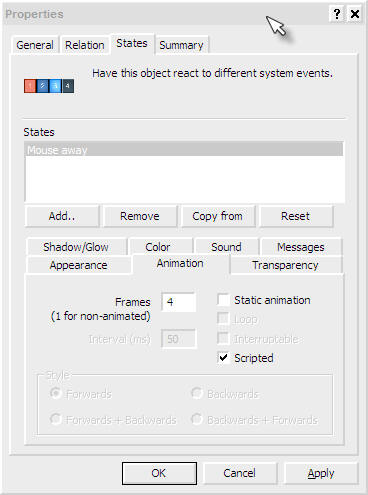
You can (save-as) the above image, and use it for testing. The Catch here
is make sure you change the ANIMATION TAB in the STATES tab of the properties to
show:
(4) Frames, and SCRIPTED is checked.
STEP 2 - Moving Ahead - Add a Script
Create a SCRIPT on the object we just created.
| ANIMATION Code | |
Function Object_OnLButtonUp(x, y, Dragged) |
|
Lets look at the above script.
First we use the same function we use all the time to handle click:
| ANIMATION Code | |
Function Object_OnLButtonUp(x, y, Dragged) |
|
Here is the main part of the
script. The script looks at the object to see what its Current Frame is.
CurFrame = object.CurrentFrame + 1
This is based on 0-3 not 1-4, even though there are 4 frames in the
animation. We START at 0 not 1!!!!
Then we check to see if CurFrame
its less than < the max number of frames (4 frames of animation).
If so, then we make the current frame the new CurFrame.
Or else the object's CurrentFrame is set to 0 (the first frame of the animation).
| ANIMATION Code | |
CurFrame = object.CurrentFrame + 1 |
|
CONCLUSION
So, that's about it. you
click on the object, and it changes the current frame up 1 each time till it
gets to the last frame, then it goes back to 0.
I used this in something I'm working on right now.
I hope you took the time to enter the code (not just copy/pasted the entire thing) so you could work thru the tutorial step-by-step and see how things work.
This one was very simple, but I know I didn't know how to use this till I had to, so I hope it helps everyone out.
This REALLY will be my last tutorial for a while. I hope you have enjoyed this step into DX.
|
Enjoy, RomanDA AKA: David A. Roman http://romanda.wincustomize.com |
This Week in Skinning - June 1st
Skin Roundup for 6-1-07
Friday, June 1, 2007 by Island Dog | Discussion: Community
A new month is here, but now it's time to take a look at back at the week and see some of the skins that you might have missed. Being that it's a new month that also means the new edition of "This Month in Dreams" is out. You can find that feature here.
May was a great month for submissions, so let's make sure June is just as great. Now on to the picks!
Pirates for CursorXP
By Artur Berk

Artur has created another awesome cursor, this time with a pirates touch. Great work.
Vienna in DesktopX Themes
By gef

This DX theme is based off the WindowBlinds skin by vStyler. It comes with a variety of objects. Be sure to download this one.
Spout for Dreams
By TheMasterBaron

I really like this dreams as the "water" appears to stick to your screen for a moment. Very nice work.
Q's Varient X2 in Wallpapers
By Qx9

This is a very cool looking abstract wallpaper. This is one you definitely want to download and check out.
Athena in WindowBlinds
By vStyler

Another port from vStyler of a very clean and usable skin. Be sure to download this one, you won't be disappointed.
Well May seemed to be a great month for skins, and this week was a great end to the month. Remember to keep the community updated with the things you are working on by posting teasers in the "what are you working on" thread in the forums. See you next week!
Animated Wallpapers: This Month in Dreams - May '07
Dream.WinCustomize.Com
Thursday, May 31, 2007 by Island Dog | Discussion: Animated Wallpapers
The end of this month snuck up real fast, but I did not forget about "This Month in Dreams". This was another month of some fantastic submissions, and some of the creators are pumping out dream after dream. Just as it gets hard to pick weekly skins, it's just about as difficult to select Dreams every month.
This Month in Dreams - May '07
The dreams in this months edition are:
- ATI Ruby
- High-Tech
- Orange Tube
- Star Destroyer Convoy
- Falling Rain
- Living Blue Wallpaper
- Shark Pit
- Spout
- Desktop Collage
Another dream I wanted to feature this month was Necromancy: Inferno. Due to a strange codec problem I was unable to include it in this months video, but be sure to check it out.
To use these animated wallpapers you need Windows Vista Ultimate, and Stardock DeskScapes. For the free DeskScapes download and more dreams, visit: