






































Thunderbird listview header fix for Tronnix
Provides a fix for the black headers in Thunderbird
Thursday, June 9, 2005 by Thomas Thomassen | Discussion: Skinning
I really liked MikeB314's WB skin Tronnix. However, as I am sure many of you noticed, the listview headers in Thunderbird became hard to read because they do not automaticly use the correct colour.
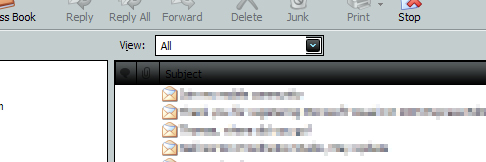
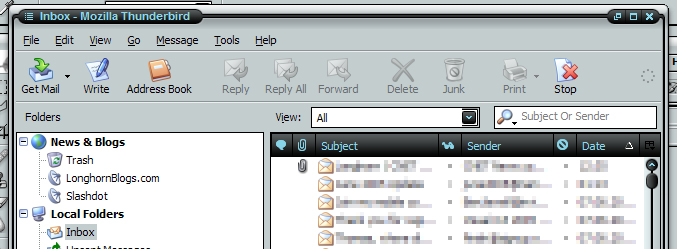
I knew that Firefox and Thunderbird uses a XUL sheme for their GUI and allows you to override most of it (perhaps all?) by setting up some css rules. So I began to look into the problem and after some FAQ's and forum posts I have come up with a fix. Adding some few lines to a userChrome.css in your profile's chrome folder the text colour now match the rest of the system. I also dug out the icons used and recoloured them since they where equally black as the text. The result:
I zipped it all up and put it on my website for anyone to download.
Extract the files to the chrome folder in your proile folder. NOTE! Be sure not to extract over any possible exising userChrome.css file. If you allready have tweaked your Thunderbird using userChrome.css then extract it to a temporary place and copy the text from this fix into your exising one.
To locate your chome and profile folder, see Thundebird's help: http://www.mozilla.org/support/thunderbird/edit
THIS FIX IS PROVIDED AS IS. I TAKE NO RESPONSIBILITY IF ANYTHING SHOULD GO WRONG.
P.S. This fix does not make Thunderbird use the system colours, it only turns them into a light blue colour. You have to tweak it again when you apply another skin.
I knew that Firefox and Thunderbird uses a XUL sheme for their GUI and allows you to override most of it (perhaps all?) by setting up some css rules. So I began to look into the problem and after some FAQ's and forum posts I have come up with a fix. Adding some few lines to a userChrome.css in your profile's chrome folder the text colour now match the rest of the system. I also dug out the icons used and recoloured them since they where equally black as the text. The result:
I zipped it all up and put it on my website for anyone to download.
Extract the files to the chrome folder in your proile folder. NOTE! Be sure not to extract over any possible exising userChrome.css file. If you allready have tweaked your Thunderbird using userChrome.css then extract it to a temporary place and copy the text from this fix into your exising one.
To locate your chome and profile folder, see Thundebird's help: http://www.mozilla.org/support/thunderbird/edit
THIS FIX IS PROVIDED AS IS. I TAKE NO RESPONSIBILITY IF ANYTHING SHOULD GO WRONG.
P.S. This fix does not make Thunderbird use the system colours, it only turns them into a light blue colour. You have to tweak it again when you apply another skin.


Please login to comment and/or vote for this skin.
Welcome Guest! Please take the time to register with us.
There are many great features available to you once you register, including:
- Richer content, access to many features that are disabled for guests like commenting on the forums and downloading skins.
- Access to a great community, with a massive database of many, many areas of interest.
- Access to contests & subscription offers like exclusive emails.
- It's simple, and FREE!
Reply #1 Thursday, June 9, 2005 8:48 PM