






































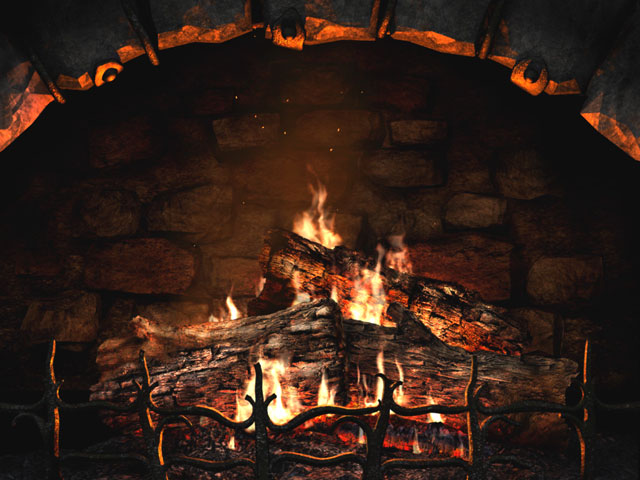
3Planesoft Fireplace
Amazing new screen saver!
Thursday, May 26, 2005 by Tarkus | Discussion: Customization Software
These guys have made a lot of great screen savers, but this latest one is certainly among their best! 

 |
|
Page 2 of 3 | |
|
|---|
Tarkus
Reply #22 Wednesday, June 1, 2005 1:27 AM
I tried out several new screen savers tonight, and this package was the only thing that really stood out.
Skyrocket is really, really cool! I've been wanting a good fireworks screen saver for awhile, and this fits the bill.
Lattice is also very good, especially the Doughnuts setting.
Bugs was kind of cool, too, but I need to find a good image for it to eat into. Eating into a plain color doesn't cut it.


Reply #22 Wednesday, June 1, 2005 1:27 AM
| The "reallyslick" screensavers are pretty cool as well. Make sure you download the latest release where you get all of them in one zip file. |
I tried out several new screen savers tonight, and this package was the only thing that really stood out.
Skyrocket is really, really cool! I've been wanting a good fireworks screen saver for awhile, and this fits the bill.
Lattice is also very good, especially the Doughnuts setting.

Bugs was kind of cool, too, but I need to find a good image for it to eat into. Eating into a plain color doesn't cut it.

WebGizmos
Reply #23 Wednesday, June 1, 2005 4:23 AM

Reply #23 Wednesday, June 1, 2005 4:23 AM
Yeah...Skyrocket is really cool! Flocks is good to, but you have to tweak the settings a bit to get a smooth looking image.
Hyperspace is kinda cool too. And lattice is cool...but if you really stare at it you get kinda dizzy....lol
And I agree about the bugs...just having a color doesn't look as good as an image, I'm using a brick background for it and it looks much better.
Hyperspace is kinda cool too. And lattice is cool...but if you really stare at it you get kinda dizzy....lol
And I agree about the bugs...just having a color doesn't look as good as an image, I'm using a brick background for it and it looks much better.
Gregory2001
Reply #24 Wednesday, June 1, 2005 7:36 AM
Reply #24 Wednesday, June 1, 2005 7:36 AM
Anybody use G-Force (SoundSpectrum.com)? Their beta has now been released and it comes with the best screensaver I've ever seen!
Gregory2001
Reply #25 Wednesday, June 1, 2005 7:37 AM
Reply #25 Wednesday, June 1, 2005 7:37 AM
Anybody use G-Force (SoundSpectrum.com)? Their beta has now been released and it comes with the best screensaver I've ever seen!
Tarkus
Reply #26 Wednesday, June 1, 2005 10:59 AM
I see plugins for media players, but no screen saver. In fact, I installed it, and there was no option for a screen saver, nor did it install one. Maybe the Gold version has a screen saver, but I don't see that mentioned on their site either.
Reply #26 Wednesday, June 1, 2005 10:59 AM
| Anybody use G-Force (SoundSpectrum.com)? Their beta has now been released and it comes with the best screensaver I've ever seen! |
I see plugins for media players, but no screen saver. In fact, I installed it, and there was no option for a screen saver, nor did it install one. Maybe the Gold version has a screen saver, but I don't see that mentioned on their site either.


Tarkus
Reply #28 Wednesday, June 1, 2005 3:55 PM
Reply #28 Wednesday, June 1, 2005 3:55 PM
Well, you an use visualizations in full screen mode, but that's not exactly a screen saver.
Tarkus
Reply #29 Wednesday, June 1, 2005 4:27 PM
Thanks for the link, Bichur!
I love 3D Astroids. It has good graphics, a lot of nice little touches, and it's very light on the CPU, which can come in handy. (Check this one out, WebGizmos!)
3D Holly Berry Holiday is kind of nice too, and I'm sure I'll be using it around Christmas time.
Reply #29 Wednesday, June 1, 2005 4:27 PM
| There a couple of cool free one here Link |
Thanks for the link, Bichur!

I love 3D Astroids. It has good graphics, a lot of nice little touches, and it's very light on the CPU, which can come in handy. (Check this one out, WebGizmos!)
3D Holly Berry Holiday is kind of nice too, and I'm sure I'll be using it around Christmas time.
WebGizmos
Reply #30 Wednesday, June 1, 2005 5:55 PM
Reply #30 Wednesday, June 1, 2005 5:55 PM
Oh yeah...theat 3D Asteroids is pretty cool! It's a keeper!
Funny though...it gives you a mute option, but also tells you this is a non sound screensaver. Am I missing something?
And I use that G-Force visualization for Media Player. And you can make the screen that comes up in the beginning disappear somewhat by resizing the 2 graphics for it down to 1 pixel. A nice little tool for doing that can be found in the Microsoft powertools and it gets added to your rightclick. Really handy for resizing images and backgrounds! Still have figured out how to get rid of the other small one that appears at the bottom though.
Funny though...it gives you a mute option, but also tells you this is a non sound screensaver. Am I missing something?

And I use that G-Force visualization for Media Player. And you can make the screen that comes up in the beginning disappear somewhat by resizing the 2 graphics for it down to 1 pixel. A nice little tool for doing that can be found in the Microsoft powertools and it gets added to your rightclick. Really handy for resizing images and backgrounds!
 Still have figured out how to get rid of the other small one that appears at the bottom though.
Bichur
Reply #31 Wednesday, June 1, 2005 6:03 PM
Reply #31 Wednesday, June 1, 2005 6:03 PM
They all say that for some reason.
Believe it or not, the 3D Gerber Daisey is pretty cool (when it become available again - they cycle around) the big one sits and the others float and bounce against each other, but what i like is they have kind of a transparency to them.
Believe it or not, the 3D Gerber Daisey is pretty cool (when it become available again - they cycle around) the big one sits and the others float and bounce against each other, but what i like is they have kind of a transparency to them.
Bichur
Reply #33 Wednesday, June 1, 2005 6:05 PM
Reply #33 Wednesday, June 1, 2005 6:05 PM
How did you like the way 3d makes it own folder to put the unistalls right there for you?
I thought that was real considerate of them.
I thought that was real considerate of them.
WebGizmos
Reply #34 Wednesday, June 1, 2005 6:09 PM
Reply #34 Wednesday, June 1, 2005 6:09 PM
Thats always nice when they do that. But I have a good uninstaller just in case.
Bichur
Reply #35 Wednesday, June 1, 2005 6:09 PM
Cool. Bookmarked for later. Thanks WebGizmos
Reply #35 Wednesday, June 1, 2005 6:09 PM
| powertoys |
Cool. Bookmarked for later. Thanks WebGizmos
WebGizmos
Reply #36 Wednesday, June 1, 2005 6:12 PM
Reply #36 Wednesday, June 1, 2005 6:12 PM
No problem Bichur! And now that you mention it....I haven't found the folder for Asteroids yet. 
Ahhh...found it.
And the image resizer works pretty good. You can do preset sizes or custom.

Ahhh...found it.
And the image resizer works pretty good. You can do preset sizes or custom.
Bichur
Reply #37 Wednesday, June 1, 2005 6:18 PM
Reply #37 Wednesday, June 1, 2005 6:18 PM
Here's another I like - Distant Suns Link
Click downloads on the left.
Distant Suns Grand Tour 3D is the SS - What I like (found out in the help menu) is if you want, you can replace the mask of the moon or mars or whichever with your favorite - my little girl's head is the moon on mine.
Distant Suns 4 (for Windows) is a free... I don't know what to call it, but when it comes up and you see the sky/stars shot, you can click each star and get info on it - it also has a lot of stuff like when the meteor showers are due, satellites, etc etc.
Pretty awesome for free.
Click downloads on the left.
Distant Suns Grand Tour 3D is the SS - What I like (found out in the help menu) is if you want, you can replace the mask of the moon or mars or whichever with your favorite - my little girl's head is the moon on mine.
Distant Suns 4 (for Windows) is a free... I don't know what to call it, but when it comes up and you see the sky/stars shot, you can click each star and get info on it - it also has a lot of stuff like when the meteor showers are due, satellites, etc etc.
Pretty awesome for free.
WebGizmos
Reply #38 Wednesday, June 1, 2005 6:23 PM
Reply #38 Wednesday, June 1, 2005 6:23 PM
Hi...my name is WebGizmos...and I'm a screensaverholic!
I'm gonna need another hardrive just for all these screensavers.
I'm gonna need another hardrive just for all these screensavers.
Tarkus
Reply #39 Wednesday, June 1, 2005 6:34 PM
I used to use that until I discovered IE Zoomer from PC Mag. Not necessarily better for that specific purpose, but better for resizing images in general, because it maintains the aspect ratio and resamples the image to get rid of the jaggies. Does a lot more than that, too.
Unfortunately, it's no longer freeware, but I'd probably buy it if I hadn't already grabbed it while it was still freeware. Link
Reply #39 Wednesday, June 1, 2005 6:34 PM
| And you can make the screen that comes up in the beginning disappear somewhat by resizing the 2 graphics for it down to 1 pixel. A nice little tool for doing that can be found in the Microsoft powertools and it gets added to your rightclick. Really handy for resizing images and backgrounds! |
I used to use that until I discovered IE Zoomer from PC Mag. Not necessarily better for that specific purpose, but better for resizing images in general, because it maintains the aspect ratio and resamples the image to get rid of the jaggies. Does a lot more than that, too.
Unfortunately, it's no longer freeware, but I'd probably buy it if I hadn't already grabbed it while it was still freeware.
Link
PurrBall
Reply #40 Wednesday, June 1, 2005 6:48 PM

Reply #40 Wednesday, June 1, 2005 6:48 PM
Mmmmmm doghnuts......
That's my screensaver for a while.
Now let's see if I catch anyone drooling in my room!
That's my screensaver for a while.

Now let's see if I catch anyone drooling in my room!

Please login to comment and/or vote for this skin.
Welcome Guest! Please take the time to register with us.
There are many great features available to you once you register, including:
- Richer content, access to many features that are disabled for guests like commenting on the forums and downloading skins.
- Access to a great community, with a massive database of many, many areas of interest.
- Access to contests & subscription offers like exclusive emails.
- It's simple, and FREE!
|
|
Page 2 of 3 | |
|
|---|
Reply #21 Tuesday, May 31, 2005 9:30 PM
The Pyramid Kaleidoscope is pretty cool. Midnight Flight in the holiday section is great for halloween.
Everything with a floating check mark is free for download. haven't found any ad/spy stuff in any of theirs yet. even the cursors come with an uninstaller.