









































Please Help. Are these Bugs, or is it just me.
Monday, November 1, 2004 by nataq | Discussion: WinCustomize Talk
Hi,
Sorry if this is a double posting, but I couldn´t find my post after I submit it, so here is another try.
I´m new to the skinning thing, but have some experience in designing with several programs. Now I wanted to start skinning, but I found several problems. I hope somebody can help me.
At the moment I am evaluating SkinStudio Free to be sure if this is working for me.
Here are my observations:
First:
I draw a bmp or a tar file in Photoshop and import it into skin studio.
If I use "Selection" - "Select all" the values for the selection are at least 1px larger than the original file. If I use "Cut Image" I get an adittional white line on at least one side.
If I try to enter the proper values, it does some sort of auto-correction and again I get the wrong values. Only if I use the arrow-tool I can achieve the right selection. But as you can imagine, that takes a lot of time.
Is this a bug, or am I doing something wrong?
Second:
After I achieved to cut the image the right way, I again don´t get the desired results. Somehow The margins don´t work as I want them to. Please see the example.
I try to add a picture here, if you can´t see it, please use the link beyond:
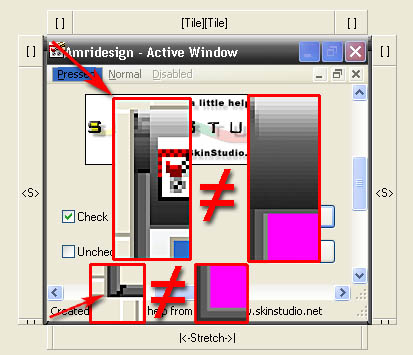
http://www.amridesign.com/bilder/Bugs.jpg
The Image that SkinStudio calls "WindowFrameTop" is exactly 27 px high. If I enter this as the top margin of the image "WindowFrameLeft", I get the results seen in the picture (upper left red square), which is not what I expected. The same thing in the left bottm corner (margin bottom: 4px). I don´t know why, but it adds several pixels, that haven´t been in any of the bmp(the black "s" in the picture).
Please Help. Has anyone else experienced these problems?
Thanks
Sorry if this is a double posting, but I couldn´t find my post after I submit it, so here is another try.
I´m new to the skinning thing, but have some experience in designing with several programs. Now I wanted to start skinning, but I found several problems. I hope somebody can help me.
At the moment I am evaluating SkinStudio Free to be sure if this is working for me.
Here are my observations:
First:
I draw a bmp or a tar file in Photoshop and import it into skin studio.
If I use "Selection" - "Select all" the values for the selection are at least 1px larger than the original file. If I use "Cut Image" I get an adittional white line on at least one side.
If I try to enter the proper values, it does some sort of auto-correction and again I get the wrong values. Only if I use the arrow-tool I can achieve the right selection. But as you can imagine, that takes a lot of time.
Is this a bug, or am I doing something wrong?
Second:
After I achieved to cut the image the right way, I again don´t get the desired results. Somehow The margins don´t work as I want them to. Please see the example.
I try to add a picture here, if you can´t see it, please use the link beyond:
http://www.amridesign.com/bilder/Bugs.jpg
The Image that SkinStudio calls "WindowFrameTop" is exactly 27 px high. If I enter this as the top margin of the image "WindowFrameLeft", I get the results seen in the picture (upper left red square), which is not what I expected. The same thing in the left bottm corner (margin bottom: 4px). I don´t know why, but it adds several pixels, that haven´t been in any of the bmp(the black "s" in the picture).
Please Help. Has anyone else experienced these problems?
Thanks
SelfExiled
Reply #2 Monday, November 1, 2004 2:26 PM
Reply #2 Monday, November 1, 2004 2:26 PM
I don't know if this information will help, but I'll give it a shot.
Your left and right frames extend to the top of the top window frame by the width that they are. The same for the bottom. For a visual example, look at the tutorial here (Part 2-The Frame)http://www.aleksyandr.com/tutorial.htm
Your left and right frames extend to the top of the top window frame by the width that they are. The same for the bottom. For a visual example, look at the tutorial here (Part 2-The Frame)http://www.aleksyandr.com/tutorial.htm


Please login to comment and/or vote for this skin.
Welcome Guest! Please take the time to register with us.
There are many great features available to you once you register, including:
- Richer content, access to many features that are disabled for guests like commenting on the forums and downloading skins.
- Access to a great community, with a massive database of many, many areas of interest.
- Access to contests & subscription offers like exclusive emails.
- It's simple, and FREE!
Reply #1 Monday, November 1, 2004 6:36 AM
When you cut your images, do you have the toll set on antialize? It sounds like you are getting some transparent pixels, saving as a .bmp then sks is darkening out the transparent pixels. Just a guess. Its kinda early for me.