


















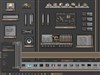

















why does WB 4.4 look like crap
Saturday, September 18, 2004 by Rapid Host | Discussion: WinCustomize Talk
every skin i had with WB 3 then installed 4.4 looks like crap
do all skins need to be updated for 4.4?
if so i am going back to 4.3
do all skins need to be updated for 4.4?
if so i am going back to 4.3
 |
|
Page 2 of 2 | |
|
|---|
Ande
Reply #22 Saturday, September 18, 2004 5:06 PM

Reply #22 Saturday, September 18, 2004 5:06 PM
If your "DPI Settings" are not set to "Normal" in the the WB 4.4 update it can mess with some of your Blinds.
IPlural
Reply #23 Monday, September 20, 2004 12:12 AM

Reply #23 Monday, September 20, 2004 12:12 AM
You are using an imported msstyle and the magic pink is not function because the graphics has either a shadow or something is making the actual color value not meet the exact RGB setting for the Magic pink so it is transparent...
open the skin in SKS and then from inside there after picking that graphic, edit it so the area of pink is the pure Magic pink color and it will not show up. Edit each graphic as needed and save the skin.
It is not 4.4 which is the issue, but the Skin / Port...
If it is showing up ok in 4.3 and not in 4.4, you might try setting the taskbar to small and over ride the skins default thin bar which does not seem to be thin enough.
I run this same port and it works perfectly in 4.4.....
open the skin in SKS and then from inside there after picking that graphic, edit it so the area of pink is the pure Magic pink color and it will not show up. Edit each graphic as needed and save the skin.
It is not 4.4 which is the issue, but the Skin / Port...
If it is showing up ok in 4.3 and not in 4.4, you might try setting the taskbar to small and over ride the skins default thin bar which does not seem to be thin enough.
I run this same port and it works perfectly in 4.4.....
Please login to comment and/or vote for this skin.
Welcome Guest! Please take the time to register with us.
There are many great features available to you once you register, including:
- Richer content, access to many features that are disabled for guests like commenting on the forums and downloading skins.
- Access to a great community, with a massive database of many, many areas of interest.
- Access to contests & subscription offers like exclusive emails.
- It's simple, and FREE!
|
|
Page 2 of 2 | |
|
|---|
Reply #21 Saturday, September 18, 2004 2:23 PM
I'm 2 for 2 with updating so far! SP2, and WindowBlinds. No problems on my system.
But I can't hold out for much longer though... I'll give myself another month before I update.