





































New Forums Problems
Thursday, April 16, 2026 by LightStar | Discussion: Forum Issues
OK, so these new forums are OK, but why is the ability to "Mark all Posts as Read" and the ability to look up my posts gone? Please put abilities like that back so that the forums are more useful.
Moved to Forum Issues, pinned post
 |
|
Page 1 of 2 | |
|
|---|

Reply #2 Thursday, April 16, 2026 10:31 AM
Jafo said:
The Forum rework is a work-in-progress. I wouldn't be worrying about what's not implimented as yet. As with the famous old saying.... "patience, Grasshopper" ...
Understood!



Reply #3 Thursday, April 16, 2026 10:31 AM
I'm not experiencing these issues. I am able to "Mark all Posts as Red" and am able to look up my posts.


Reply #4 Thursday, April 16, 2026 10:34 AM
pelaird said:
I'm not experiencing these issues. I am able to "Mark all Posts as Red" and am able to look up my posts.
Not seeing that here at all Pelaird.

Reply #6 Thursday, April 16, 2026 10:41 AM
I'm not experiencing these issues. I am able to "Mark all Posts as Red" and am able to look up my posts.
Reply #7 Thursday, April 16, 2026 10:45 AM
JanOscar said:
Quoting pelaird, reply 3 I'm not experiencing these issues. I am able to "Mark all Posts as Red" and am able to look up my posts. My guess is that you are seeing this in the Stardock forum, pelaird, not Wincustomize. The Wincustomize forum is currently getting a full overhaul/rework, so I wouldn't worry too much.
I just figured that out. Noticing quite a few updates to this forum. Very nice!

Reply #8 Thursday, April 16, 2026 10:52 AM
It's been dragged kicking and screaming into this century from ancient Egypt's King Tutankhamon's dynasty with its hieroglyphic coding...
Reply #9 Thursday, April 16, 2026 11:06 AM
LightStar said:
OK, so these new forums are OK, but why is the ability to "Mark all Posts as Red" and the ability to look up my posts gone? Please put abilities like that back so that the forums are more useful.
If you go to your profile, you can access your posts, as well as, many other options.
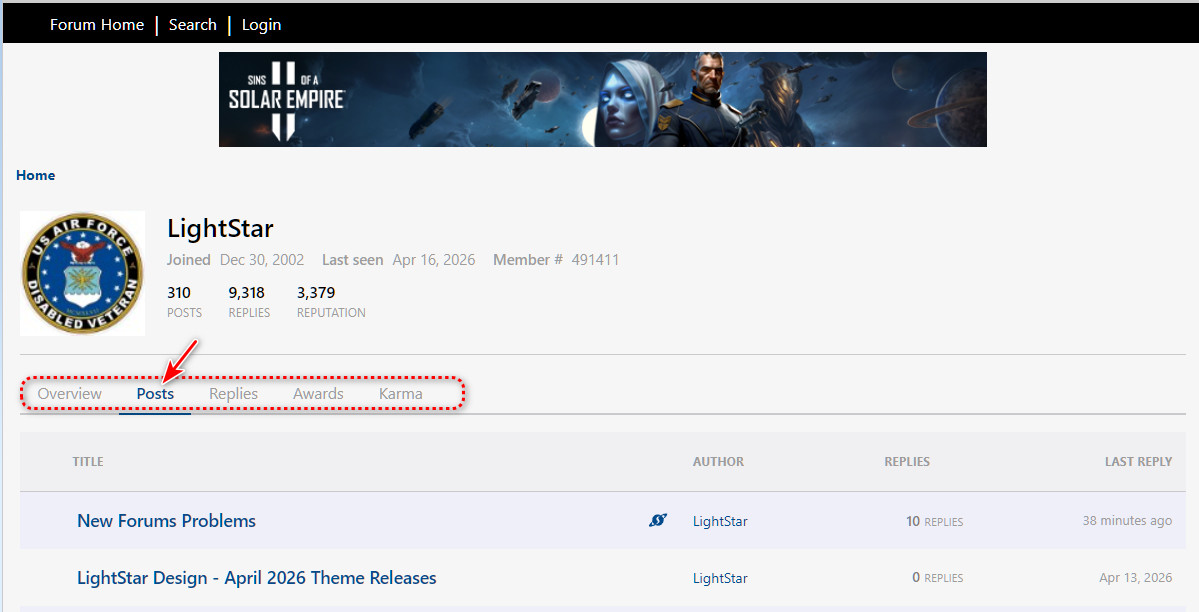
Reply #10 Thursday, April 16, 2026 11:24 AM
I'll just wait until they say the Forum changes are all done.

Reply #13 Saturday, April 18, 2026 3:06 AM
I moved this thread to "Forum Issues" subforum and pinned it.

Reply #14 Monday, April 20, 2026 10:44 AM
It's about time the forums got a major overhaul. And I like the addition of emojis! 🥴
Reply #15 Monday, April 20, 2026 1:18 PM
The italics problem I saw before has been solved. Emoji working well but we lost the old yellow ones.  ">
">
Reply #17 Monday, April 20, 2026 1:45 PM
lost the old yellow ones
 ">
">  ">
">  ">
">
I wonder if they'll survive when it comes time to update SD forum's code. That won't be for some time, though. It really was time to update WC's code. Job well done magedotexe.  ">
">
Reply #19 Monday, April 20, 2026 2:23 PM
MY NEWEST 1 hour ago --- isn't even here (showing)
This thread is about forum problems Sed. Is your newest a comment here in forums?
Or is it regarding this: https://forums.wincustomize.com/541362/cant-upload/page/1#3991709
If it is, I just sent you a pm.
I've contacted the right person and left a message.
edit: Tried to upload your file and got Code 0. Left message at SD.
Reply #20 Tuesday, April 21, 2026 10:20 AM
Something I've noticed about the emoji on WinCustomize forums and how they display on Stardock Software forums.
Emoji created on WC forum  ">
">
How this emoji appears in the same thread on the Stardock Software forum ">">
Very strange.
Please login to comment and/or vote for this skin.
Welcome Guest! Please take the time to register with us.
There are many great features available to you once you register, including:
- Richer content, access to many features that are disabled for guests like commenting on the forums and downloading skins.
- Access to a great community, with a massive database of many, many areas of interest.
- Access to contests & subscription offers like exclusive emails.
- It's simple, and FREE!
|
|
Page 1 of 2 | |
|
|---|
Reply #1 Thursday, April 16, 2026 10:24 AM
The Forum rework is a work-in-progress.
I wouldn't be worrying about what's not implimented as yet.
As with the famous old saying.... "patience, Grasshopper" ...