





































Myths & Facts about WindowBlinds
Thursday, March 25, 2004 by Frogboy | Discussion: WinCustomize Talk
Myths & Facts about WindowBlinds
Because WindowBlinds has been out now for half a decade and it has changed so dramatically over the years, there are a lot of misconceptions about how WindowBlinds works.
MYTH: WindowBlinds is a memory hog.
FACT: No. WindowBlinds not only uses very little memory but it actually uses LESS memory than the bundled themes do. That's because WindowBlinds visual styles are designed to use less memory since its skin format was designed during the days when users had fewer resources.

The Wbload.exe process in the Windows task list.
MYTH: WindowBlinds will slow down your computer.
FACT: To a certain extent, anything you load onto your machine will slow it down by some amount. The question is, will a given program slow down your computer noticeably. In WindowBlinds' case, it shouldn't slow down your computer. Thanks to hardware acceleration and using extra video RAM on most new cards, WindowBlinds should be noticeably faster than using the bundled themes in Windows XP.
MYTH: WindowBlinds isn't as compatible or will crash my programs
FACT: WindowBlinds, because it's a commercial product, has to provide additional value over the included themes in Windows XP. One of the ways it does this is by defaulting to skinning non-theme aware programs. Of course, some programs just don't like being skinned. Those apps can be added to the exclusion list. Most existing software is excluded by Microsoft's theme engine. But you can do the same thing with WindowBlinds if you are concerned about compatibility over consistency:
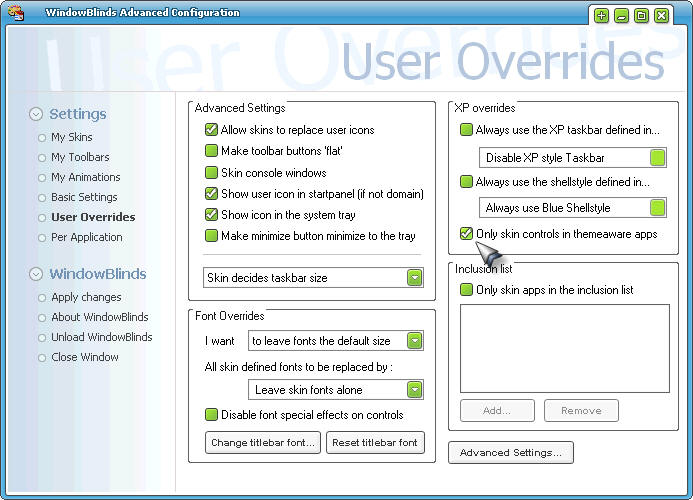
You can tell WindowBlinds to only skin theme aware programs and have identical compatibility to Windows XP's bundled themes.
MYTH: All the WindowBlinds visual styles are big and ugly.
FACT: There are thousands of WindowBlinds visual styles on the net. And it can also import in .msstyles files if you have SkinStudio installed. Because WindowBlinds is very flexible, skinners tend to make skins that they want to make with little limitation. So that creates more variety. But sites such as WinCustomize.com do have ways of filtering visual styles so you can find the ones you want.
For example, if you want to see the Admin picks of WindowBlinds visual styles, you can go here. That doesn't mean you'll like what they picked but they are skins that other people have liked.
 |
|
Page 3 of 4 | |
|
|---|

Reply #42 Wednesday, June 23, 2004 9:02 PM
| at least 60% are all much more minimal and look great. |
First, that's purely a personal opinion, if you look at the work of WB Skinner, some his skins are "over-the-top" and very popular. Secondly, the minimalism is mainly due to the fact that there isn't much flexability in .msstyles, you CAN'T do the kind of skins you see here, they're just not possible to make with the .msstyle format limitations.

[Message Edited]



Reply #45 Thursday, June 24, 2004 12:10 AM
Minimalism in styleXP is a 'necessity', not a 'feature'.
With Windowblinds the skinner has the option to be minimalistic or not, as he so chooses, hence its popularity...
Reply #46 Thursday, June 24, 2004 12:29 AM
Reply #47 Friday, June 25, 2004 12:40 AM

Reply #48 Saturday, July 17, 2004 6:53 AM

Reply #49 Wednesday, July 21, 2004 6:02 PM
The simple fact is, the vast majority of home PC users simply do not know how to maintain their system for top performance. They don't understand the importance of maintaining a clean registry, sweeping their system for spyware/virii, or running cleanups on their temp files and defrag of the HDD. They see something that they think is a neat program, for "free", and blindly install it. (What? Free cursors? All I have to do is "click here"??... while CursorXP gives you any and all cursors you could want, or make, without the spyware...)
Also, many home PC users think that an install of Windows should last forever, without ever having to reinstall it. I've seen people bring in systems with Win98 first edition (we refuse to work on 95 machines these days), that have been installed since the day that they purchased it. As a general rule, a format and reinstall of Windows once a year is a good practice. No matter how good of a job you do cleaning up your registry, it's bound to get "wiggy" sooner or later. If Windows was an OS designed to be installed, and forgotten about... we'd never need to buy a new version of it.
Finally, the issue about memory, and it's availability these days. Most mass PC manufacturers are putting at least 512MB in a system these days... and that's DDR. We're talking a minimum of what USED to be the maximum, and at speeds at least double what it used to run at. Add to that the fact that the average user has 1GB or more (hardcore users, those that would be interested in running something like WB), and this is no longer even a valid topic. (Even with WB and Objectdock, NAV, and a few other programs running, I still have over 75% of my memory available... with 1GB installed.)
Granted, I just recently got into WB/Object Desktop, as I'm sick and tired of Windows being so boring... and I'm getting interested in creating my own skins... but, I can't see where this program could ever have been the "memory hog" that it's claimed to have been.

Reply #50 Sunday, July 25, 2004 8:15 AM
Maxness what kind of image where you trying to make with 90 layers.I am just in the stages of getting to grips with Photoshop CS and I dont think I have used more than 10 layers... Dont think I would like to manage more than that yet lol
Reply #51 Monday, July 26, 2004 3:17 PM
| Maxness what kind of image where you trying to make with 90 layers.I am just in the stages of getting to grips with Photoshop CS and I dont think I have used more than 10 layers... Dont think I would like to manage more than that yet lol |
My latest desktop theme in its development stage currently consists of a single photoshop document with 293 layers organised into 14 nested layer sets
Reply #52 Monday, July 26, 2004 5:31 PM

Reply #53 Saturday, September 4, 2004 12:13 PM
When you install WindowBlinds it typically goes into your c:\program files\stardock\object desktop\windowblinds directory.
It is set to run on start-up but you can turn it off when you choose. When wbload.exe is loaded, it simply tells Windows to let wblind.dll take care of your GUI element painting instead of uxtheme.dll. There's no dark magic involved. No messing around with your registry. And if you decide you don't want to use it, you can uninstall it just like any other program.

Reply #54 Saturday, September 18, 2004 2:19 AM
Here's one for you. This is WB running my Cirrus skin. Go drool...

Reply #55 Monday, September 20, 2004 1:11 AM
SP2 seems to make XP run smoother and more stable as well, at least for me. Besides if the people would actually think that with todays common 128mb and 256mbb graphics cards paired /w 1GIG or more of ram in most machines in use, I would accept a 5% decrease in performance just to have a good looking Windows (which obviously you don't have to sacrafice /w these products). Norton 2003 has a system slowdown of 10%. So to the people that think these WindowBlinds, DesktopX, etc. apps are resource hogs.... do you use Norton? cause your already behind the game by 10% not to mention all the people that don't scan for spyware (switch to Pc-Cillin 2004 I am a tweaker and I think Stardock's programs are stable, cool, and resource friendly. AWESOME PRODUCT STARDOCK & VERY FRUITFUL WEBSITE WINCUSTOMIZE! Kudos
Reply #56 Monday, September 20, 2004 8:30 PM
As a previous post said - occasional clean re-installs help too. Kinda sad though.


Reply #57 Monday, September 20, 2004 9:34 PM
| As a previous post said - occasional clean re-installs help too. Kinda sad though. |
That's a fact with or without Stardock products.
Reply #58 Monday, September 20, 2004 11:53 PM
When I format peoples' computers that have had it for a few weeks or months, they are flabbergasted @ the difference. And people that have had a computer for 3 or 4 years and have never formatted... whoa I feel for them.
Reply #59 Friday, October 1, 2004 11:11 PM
use wb msot of the time because i like to piff up the dekstop some.
with wb i feel in most cases/skins sluggish compared when not using it very few skins out there feels smoth when using them
regarding to response time.
That has always been the case with wb since the beginning of time regardless what computer you own:)
I suppose if you use xp only for games wb wont hurt you but when you use xp heavly imo it does feel worse with wb on then with it off not tiny diffrence but again imo big.
And having more then 1gb of ram right now feels overkill just to make wb work 100 24/7
haven tried out wb 4.4 yet but i dont hope to much
Reply #60 Saturday, October 16, 2004 9:33 AM
specialy when i use win2kpro and now have winbinds so my pc look like xp but bot the bar down were you have the start button thats the only thing that looks bad. do i d/l desktopx no more deskbar that liik bad..but the window looks asum..
Please login to comment and/or vote for this skin.
Welcome Guest! Please take the time to register with us.
There are many great features available to you once you register, including:
- Richer content, access to many features that are disabled for guests like commenting on the forums and downloading skins.
- Access to a great community, with a massive database of many, many areas of interest.
- Access to contests & subscription offers like exclusive emails.
- It's simple, and FREE!
|
|
Page 3 of 4 | |
|
|---|
Reply #41 Wednesday, June 23, 2004 6:40 AM