





































Myths & Facts about WindowBlinds
Thursday, March 25, 2004 by Frogboy | Discussion: WinCustomize Talk
Myths & Facts about WindowBlinds
Because WindowBlinds has been out now for half a decade and it has changed so dramatically over the years, there are a lot of misconceptions about how WindowBlinds works.
MYTH: WindowBlinds is a memory hog.
FACT: No. WindowBlinds not only uses very little memory but it actually uses LESS memory than the bundled themes do. That's because WindowBlinds visual styles are designed to use less memory since its skin format was designed during the days when users had fewer resources.

The Wbload.exe process in the Windows task list.
MYTH: WindowBlinds will slow down your computer.
FACT: To a certain extent, anything you load onto your machine will slow it down by some amount. The question is, will a given program slow down your computer noticeably. In WindowBlinds' case, it shouldn't slow down your computer. Thanks to hardware acceleration and using extra video RAM on most new cards, WindowBlinds should be noticeably faster than using the bundled themes in Windows XP.
MYTH: WindowBlinds isn't as compatible or will crash my programs
FACT: WindowBlinds, because it's a commercial product, has to provide additional value over the included themes in Windows XP. One of the ways it does this is by defaulting to skinning non-theme aware programs. Of course, some programs just don't like being skinned. Those apps can be added to the exclusion list. Most existing software is excluded by Microsoft's theme engine. But you can do the same thing with WindowBlinds if you are concerned about compatibility over consistency:
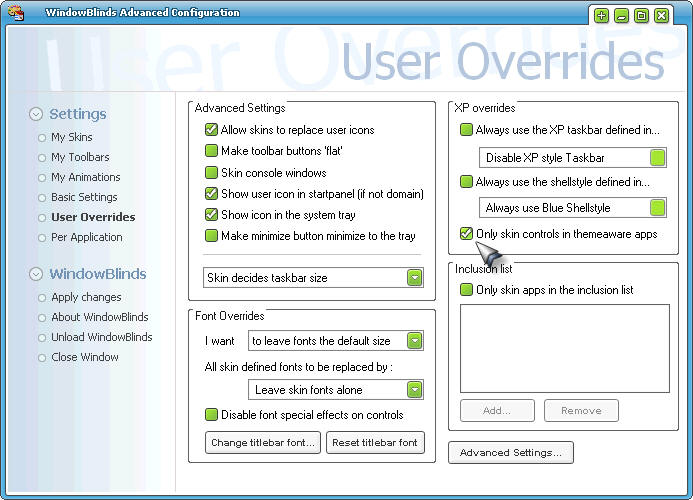
You can tell WindowBlinds to only skin theme aware programs and have identical compatibility to Windows XP's bundled themes.
MYTH: All the WindowBlinds visual styles are big and ugly.
FACT: There are thousands of WindowBlinds visual styles on the net. And it can also import in .msstyles files if you have SkinStudio installed. Because WindowBlinds is very flexible, skinners tend to make skins that they want to make with little limitation. So that creates more variety. But sites such as WinCustomize.com do have ways of filtering visual styles so you can find the ones you want.
For example, if you want to see the Admin picks of WindowBlinds visual styles, you can go here. That doesn't mean you'll like what they picked but they are skins that other people have liked.
 |
|
Page 2 of 4 | |
|
|---|
Reply #22 Monday, April 5, 2004 6:00 PM
| Thanks to hardware acceleration and using extra video RAM on most new cards, WindowBlinds should be noticeably faster than using the bundled themes in Windows XP. |
Has Nvidia ever enabled this in their drivers or does this still only apply to ATI and Matrox cards?

Reply #23 Wednesday, April 7, 2004 3:42 PM
| "One myth I would really like to know the source of is where people came to believe that WindowBlinds uses more memory or is a memory hog?" |
When Windowblinds debuted the average computer had, what, 32 megs of ram, tops? Maybe 64? The computer I bought in 1998 had 96 megs and I thought that was plenty.
That said, WB using 10-20 megs in 1999 is very different than WB using 10-20 megs in 2004. I mean, 20megs out of 64 hurts, but 20 megs out of the 1000megs presently have isn't even noticeable. Winamp 5 gets the same flack, I think it is silly. People with 256+ megs of ram complaining about 20.
Make yourself a 24x36 image in Photoshop with about 90 layers, then come back and talk about RAM.
Reply #24 Thursday, April 8, 2004 10:17 AM
"Make yourself a 24x36 image in Photoshop with about 90 layers, then come back and talk about RAM."
I did that, kinda gave me the BSOD...
 But it was fun...
  I love trying to lag the hell out of my computer.
Reply #25 Thursday, April 8, 2004 10:19 AM
I forgot to do that quote thingy majigy... My bad..

Reply #26 Thursday, April 8, 2004 8:36 PM

Reply #27 Saturday, April 10, 2004 1:38 AM
| NO - Windows ME replaced 98SE. Then XP replaced ME. |
I know that Kona. I was referring to the fact that Win98SE was the more stable and most used operating system for the home user until WinXP came along. WinXP replaced Win98SE in that regard.
Reply #28 Saturday, April 10, 2004 1:47 AM
| Make yourself a 24x36 image in Photoshop with about 90 layers, then come back and talk about RAM. |
Working on the toolbar icons in my last skin, I actually had 103 layers at 1200x1000, before the program said no more layers. No lag really, the program (PSP) just said that it needed more memory.

Reply #29 Saturday, April 10, 2004 6:03 AM
| Working on the toolbar icons in my last skin, I actually had 103 layers at 1200x1000, before the program said no more layers. No lag really, the program (PSP) just said that it needed more memory. |
at 150ppi, 1200x1100 is like 8x7 inches. waaaaaay different than 24x36. poster size at commercial print resolutions will eat a gig of ram as an appetizer.

Reply #30 Saturday, April 10, 2004 3:15 PM
Reply #31 Friday, April 23, 2004 1:05 AM
BTW, out of curiousity how much memory do typical visual styles and themes service take? Since the themes serices hasn''''t been optimized lately if at all I would imagine it has to be more than WB.
BTW, I think no matter what there will alway be people who claim that it takes more memory\resources than the themes service (which they call uxtheme.dll which is like if one would call windowblinds wblind.dll). And that the themes service takes no resources, =p
[Message Edited]
[Message Edited]

Reply #32 Sunday, May 2, 2004 10:27 PM
by the time that 1.3 arrived I was running a tech site (OWT). I downloaded WB just to review and it haven't had a computer without it since.
I am probably an odd case in the ram department my win98 machine had 256mb and each system since has doubled that amount up to the current sys with about a gig of it. so the only problems I have ever had are the mem leaks in the win 9x series wich was an OS problem not a WB problem.
In the begining WB probably should have been closed until it was proven stable, version 1.3 in my opinion, maybe that would have prevented some of the " it's a mem hog remarks".
Also Stardock should support for the 9x OS's, this would also eliminate some of the bad press about WB slowing systems and crashing.
??Are there any system hardware requirements listed for WB??
Reply #33 Sunday, May 2, 2004 10:43 PM
Reply #34 Saturday, May 15, 2004 12:20 AM
on my system Wbload.exe runs at 620k - 1000k if you add sdmcp.exe's resources of 2,200k - 3,900k you get a maximum combined resource useage of 2,800k - 5,000k

Reply #35 Saturday, May 15, 2004 3:10 PM
From what I can remember sdmcp is supposed to help by reducing the number of hooks to the system by running multiple programs that use hooks so I think WB should be updated to support it.

Reply #36 Wednesday, June 9, 2004 5:59 AM
"Once installed, the program (WB)can NOT be removed from your system. Uninstall will remove Windows' original skin system with the program files."
I have no intention of uninstalling my WindowBlinds, but...if we were attacked by terrorists and I needed to protect my files I'd like to know I could without messing anything up.

Reply #37 Wednesday, June 9, 2004 8:37 AM
webgizmos....Windowblinds modifies the matrix of your hard drive platters and re-arranges the crystaline make-up of your ram chips.....apparently it also demagnetizes the PC speaker cone to eliminate the 'post' beeps on startup.
I've also heard said that it is the cyber equivalent of daylight saving....it'll fade your curtains.
Reply #38 Wednesday, June 9, 2004 9:41 AM

Reply #39 Saturday, June 19, 2004 7:29 PM
Fact#1 I love Windowblinds , have no complaints,and use it all the time.
Fact#2 On my computer when I go from standard XP style that came on my computer,and load Windowblinds using a simple skin with no animation,My PF usage increases 29 Mega bites.
Question : Is this to be expected?
Reply #40 Wednesday, June 23, 2004 6:33 AM
| "Once installed, the program (WB)can NOT be removed from your system. Uninstall will remove Windows' original skin system with the program files." |
There is usually at least one person that says somthing like that for every piece of software on download.com

[Message Edited]
Please login to comment and/or vote for this skin.
Welcome Guest! Please take the time to register with us.
There are many great features available to you once you register, including:
- Richer content, access to many features that are disabled for guests like commenting on the forums and downloading skins.
- Access to a great community, with a massive database of many, many areas of interest.
- Access to contests & subscription offers like exclusive emails.
- It's simple, and FREE!
|
|
Page 2 of 4 | |
|
|---|
Reply #21 Sunday, April 4, 2004 8:21 PM