






































February 2024 Desktop Screenshots
Tuesday, January 30, 2024 by DrJBHL | Discussion: WinCustomize Talk
Chilly here...and it influenced my desktop. Rainy, as well...snowing like crazy in the far(ther) north.
Anyway, Aero11 (clear) by SimplexDesigns, Start11 Modern Style, Fences 5 and Windows 7 Xtreme from Winstep Technologies. Wall...one from the web (which I dubbed the Ice Star), modified with on1 Effects 2024.
Hope it's warmer where you are...

 |
|
Page 4 of 7 | |
|
|---|


Reply #63 Saturday, February 17, 2024 2:08 PM
Really great screenshots as always Chuck! Keep'em coming! 

Reply #64 Sunday, February 18, 2024 8:36 AM

You know I like this.

Reply #65 Sunday, February 18, 2024 8:41 AM
You know I like this.
Clear evidence the two of you are in cahoots!
Good work, Reap and Chuck!






Reply #72 Monday, February 19, 2024 10:04 AM
Great shots, everyone!
Mine is Acrylic7 by Dani with the Winstep port by Giz. The wall is from adni18's website (adni18_0100_48).

Been trying to find that wallpaper on adni18's website with no luck. Any chance there somewhere else to find it?

Reply #73 Monday, February 19, 2024 10:56 AM
Todays Desktop Is Mass Effect Theme V2 with matching Rainmeters.
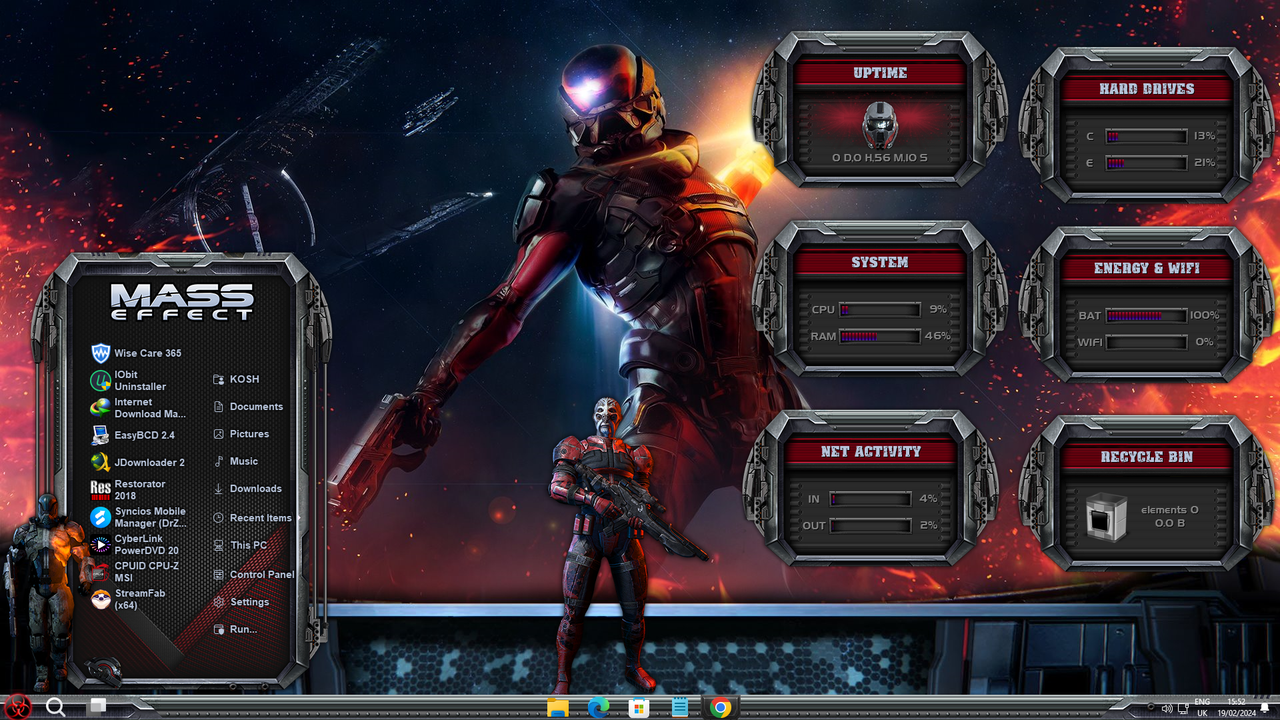
Reply #74 Monday, February 19, 2024 11:24 AM
Been trying to find that wallpaper on adni18's website with no luck. Any chance there somewhere else to find it?
You can try to do a Google Image search or tineye image search for the wallpaper. I searched his AI walls just now and couldn't find it.
Reply #75 Monday, February 19, 2024 11:32 AM
Todays Desktop Is Mass Effect Theme V2 with matching Rainmeters.
Reply #77 Tuesday, February 20, 2024 8:54 AM
Todays Desktop Is Mass Effect Theme V2 with matching Rainmeters.
Who did Mass Effect? Dats cooooool!
They Are Skinpacks Red, you get a Theme, Rainmeters, RocketDock, Cursors and Walls all in a Exe File. We take them apart and break them down into its parts, then we change them to our liking, mostly colour changes and image fixes, Dark Mode fixes etc.. I for one just need a Great Start Menu to pull me in, everything else can be adapted or changed to give us very different looking Themes. I have become used to seeing a theme and thinking ok, i will add Borders from this one and Taskbar from another, sometimes we do little.

Reply #79 Tuesday, February 20, 2024 2:21 PM
Who did Mass Effect? Dats cooooool!
They Are Skinpacks Red, you get a Theme, Rainmeters, RocketDock, Cursors and Walls all in a Exe File. We take them apart and break them down into its parts, then we change them to our liking, mostly colour changes and image fixes, Dark Mode fixes etc.. I for one just need a Great Start Menu to pull me in, everything else can be adapted or changed to give us very different looking Themes. I have become used to seeing a theme and thinking ok, i will add Borders from this one and Taskbar from another, sometimes we do little.
I kinda like using WindowBlinds.
Please login to comment and/or vote for this skin.
Welcome Guest! Please take the time to register with us.
There are many great features available to you once you register, including:
- Richer content, access to many features that are disabled for guests like commenting on the forums and downloading skins.
- Access to a great community, with a massive database of many, many areas of interest.
- Access to contests & subscription offers like exclusive emails.
- It's simple, and FREE!
|
|
Page 4 of 7 | |
|
|---|
Reply #61 Saturday, February 17, 2024 1:32 PM