





































Slide the power button
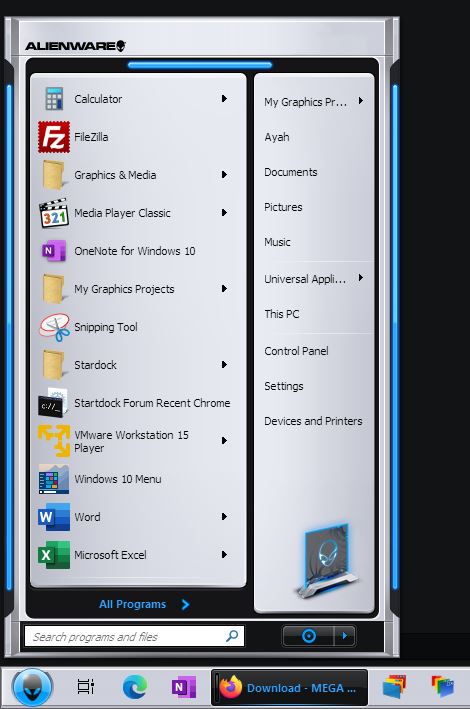
How do I adjust the position of the button?
Thursday, May 13, 2021 by SporeAltair | Discussion: WindowBlinds
I cannot move the button to the left. I can shrink the window, change the taskbar, but the button doesn't move. I did as they write in the tutorial.



Reply #2 Thursday, May 13, 2021 9:49 AM
You would need to open the the WB in SkinStudio and adjust the text margins as needed:

Reply #3 Thursday, May 13, 2021 10:41 AM
Does not work. Here's the theme.
You cannot distribute an Alienware theme. - Admin

Reply #4 Thursday, May 13, 2021 10:50 AM
Hello,
Don't need to shout. But the button look great on my system.
Thank you,
Basj,
Stardock Community Assistant
Reply #5 Thursday, May 13, 2021 10:58 AM
Just checked it here too, works fine also. You are using Windows 10 right Lord Altair386 right?
Only thing I can recommend is to apply another skin, delete the Alienware Invader skin you have installed and then reinstall the original Alienware Invader skin and apply it. However if you made modifications to the skin for some reason and don't want to do that, there is nothing else I can recommend. What is it that you are trying to change in the start menu area of the skin?

Reply #7 Thursday, May 13, 2021 11:37 AM
We cannot support themes or issues from things that have been downloaded from warez sites.

Reply #8 Thursday, May 13, 2021 11:37 AM
Lord Altair386 The skin you are having issues with is a commercial skin which is required to be purchased. The link you posted as your source does not appear to be a legitimate location so there's no certainty the skin itself is correct or legitimate/unaltered.
Any issues with that skin downloaded would not be able to be resolved.
Reply #9 Thursday, May 13, 2021 12:30 PM
This skin was available as a free download from the Alienware website in 2009. But Invader was running on Windows Vista. Or was it on Windows 7? Where can I download this theme without bugs?
Reply #10 Thursday, May 13, 2021 1:12 PM
This is an old skin, so there most likely will be issues regardless of where you download it from.
Please login to comment and/or vote for this skin.
Welcome Guest! Please take the time to register with us.
There are many great features available to you once you register, including:
- Richer content, access to many features that are disabled for guests like commenting on the forums and downloading skins.
- Access to a great community, with a massive database of many, many areas of interest.
- Access to contests & subscription offers like exclusive emails.
- It's simple, and FREE!
Reply #1 Thursday, May 13, 2021 9:45 AM
Hello,
Sorry to hear you are having issues. Please try adjust "Shutdown button horizontal shift".
Basj,
Stardock Community Assistant.