




































WindowBlinds 11 planning
Friday, December 25, 2020 by Frogboy | Discussion: WindowBlinds
We are putting together the schedule to make WindowBlinds 11.
Customization is a lot harder now than it used to be. Microsoft, for reasons unknown, has actively encouraged developers to take care of their own client and even non client (border, frame) painting rather than using standard Windows controls.
Microsoft's baffling decision to throw away trying to provide a standard set of in-app controls for developers and instead provide vague, often conflicting standards (cough, Fluent) has resulted in having less and less of the OS we can even touch.
Which is unfortunate because WindowBlinds, in theory, could actually give Windows users a consistent, OS-wide Fluent if apps weren't handling the drawing of their own UIs these days.
Still, with that in mind, there are things we can do such as skin the standard OS controls and then handle apps on a case-by-case basis. Keep in mind though, the more non-standard apps we have to handle, the harder it is for us to keep compatibility.
Earlier this year we released Curtains which doesn't even hook into the OS. This means it is 100% compatible. Skins, even the weirdest ones, won't break a given app. Of course, the price is that it doesn't skin nearly as much (no client area GUI controls like scrollbars, push buttons, radio buttons, etc.). It's done quite well. However, we know there are still plenty of people out there who would like to have more full control over how their Windows desktop looks.
That's where this thread comes in: What would you like to see in WindowBlinds 11?
 |
|
Page 28 of 34 | |
|
|---|

Reply #542 Saturday, June 18, 2022 7:10 PM
IDK. Groupy and Start11 for me are required.
WB11 is a fun toy to play around with. I think the UI in 11 has been improved enough to not need WB11.
I find windows 11 UI acceptable but what I really want is Windows 7 UI that's why I will be using Windowblinds when it finally makes its appearance. Stardock has indicated that the reason for Windowblinds 11 delay was because they chose to put the resources into start 11 first. If and when windows 12 makes it debut I think Stardock should put their emphasis on windowblinds 12 first then work on Start 12.

Reply #543 Sunday, June 19, 2022 6:22 AM
I would agree with the W7 UI. Aero > *. However I still think the Start* line is a bit more important. Unless MSFT actually makes a useful start menu. The start menu lends far more to productivity which at the end of the day IS the name of the game. At some point I actually need to USE my machine and get some work done. I am aware that the UI does play a big role as well. If like me you spend 10+ hours a day staring at it a dull drab UI can detract from productivity.
In short W11's UI has improved to the point that WB11 isn't really required to use the machine but does enhance it. I will of course try it out but at this point there are far too many concerns I have. First off we have no idea what type of skin support it will have. Judging by just the way MSFT has changed various elements at the very least many older skins will require some overhauling. Based on various comments here it doesn't appear many skinners are willing to do so. You could very well find yourself with a shiny brand new WB11 with little or no skins or many skins (that you may have paid for) that are at best broken.
Secondly It may not even be possible to "skin" W11 the same way as before. It is for example possible that some elements can't be skinned at all. This could lead to a very broken look/feel. I have noticed it with WB10 in many cases. While technically you can say "it works" that doesn't mean the overall look/feel is a pleasant one.
Again however as we have nothing to test atm I could be totally wrong on all points (god I hope I am). Only time (and a beta release) will tell. I will say that I have faith in SD. If it is indeed possible to make WB11 with a complete coherent look I'm sure they will do it.

Reply #544 Sunday, June 19, 2022 11:03 AM
I would like to see some streamlining in skin studio myself. It would be nice if amateurs could dip their feet into the skinning waters a bit and do things such as making slight alterations to skins that need updated from windows 10 to windows 11.
Brilliant idea mate, if the skinners are willing to produce a short tutorial, not even sure that is possible as they too do not know what skins will or will not work, not yet anyway mate.
Reply #545 Monday, June 20, 2022 7:17 PM
I want also W7 Windows classic look. Using a modified Precision 7 with the Winretro (also slightly modified) taskbar is perfect. Winretro alone looks too hash for my taste but its taskbar is the best.
In particular, I spent a lot of time to find how get back the contrast in the file explorer between the fields "name", "size", etc... which were grey on W7 while they are the same white as the data below with a separation line barely one pixel wide took me a lot of time. I'd like to be able just use these themes and get the same results:
[url=https://postimages.org/] [/url]
As for the menu, sorry for speaking of another product, but there is another one, which I won't name here to respect the forum owners, that is vastly superior to the Stardock one. It's made so you NEVER need to scroll. Just never if your screen is big enough. Every other menu I saw is clumsy in comparison, and there is a free version for the non power users.
Reply #546 Monday, June 20, 2022 7:22 PM
Here is a global look. I don't show the menu on purpose:
[url=https://postimg.cc/Q9rXJ4pm]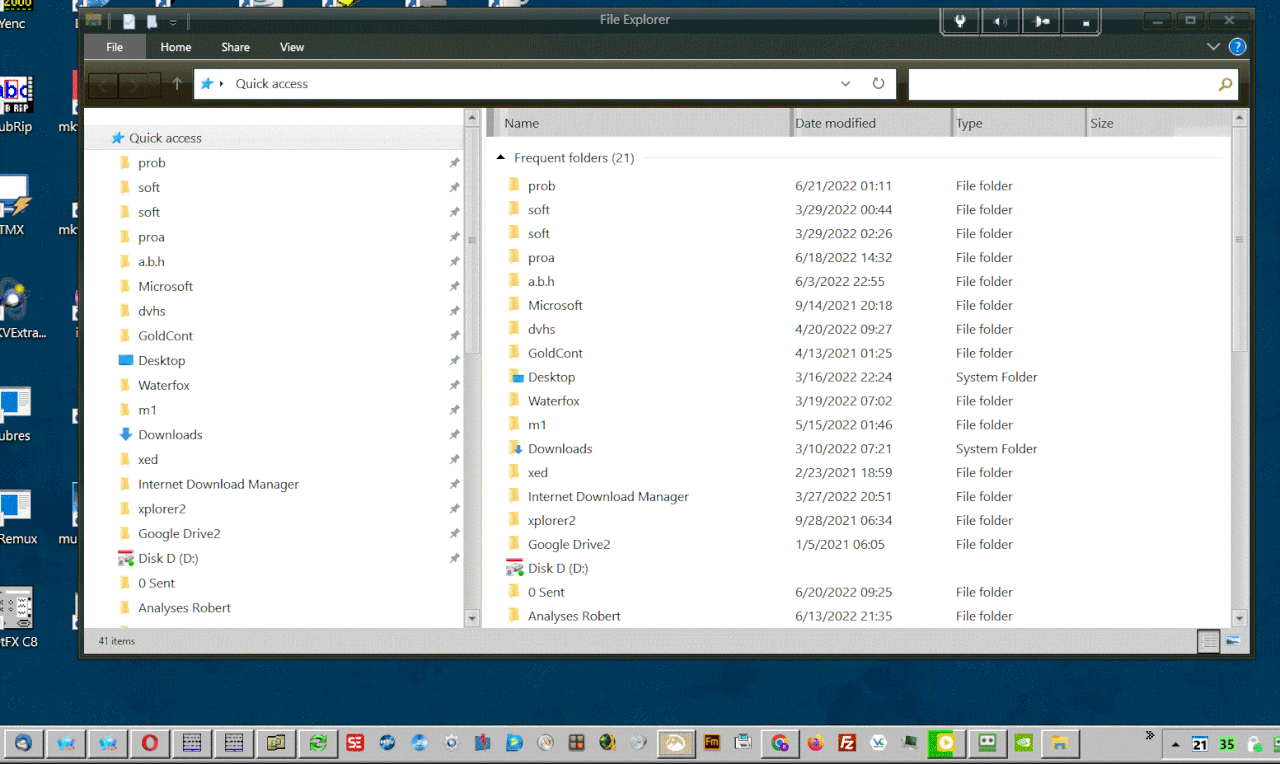 [/url]

Reply #547 Tuesday, July 5, 2022 7:56 PM
Just to provide an update, we are making progress on WB11 - we don't have a public release date yet but are pushing toward internal deadlines so that we can release the application that is compatible with the many flavors of Windows 11.
Any news in progress ?

Reply #548 Tuesday, July 5, 2022 8:14 PM
Just to provide an update, we are making progress on WB11 - we don't have a public release date yet but are pushing toward internal deadlines so that we can release the application that is compatible with the many flavors of Windows 11.
Any news in progress ?
Take a look at the changelog for the latest Start11 beta 😉
Reply #549 Wednesday, July 6, 2022 4:02 AM
Just to provide an update, we are making progress on WB11 - we don't have a public release date yet but are pushing toward internal deadlines so that we can release the application that is compatible with the many flavors of Windows 11.
Any news in progress ?
Google "When will then be now?" from the movie, "Space Balls." 😜

Reply #551 Wednesday, July 6, 2022 9:16 AM
Can this be updated then? It's at the bottom of the object desktop page.
Please refer to this thread on Stardock Software compatibility list : https://forums.stardock.com/505717/stardock-app-compatibility
Thank you,
Basj,
Stardock Community Assistant
That never gets updated either.

Reply #553 Wednesday, July 6, 2022 1:00 PM
Take a look at the changelog for the latest Start11 beta 😉
- Added support for the forthcoming WindowBlinds 11
Doesn't say more than that so that's hardly anything new.
We can't ship WB11 until Start11 is compatible, this is another item that is now off the "to do" list.

Reply #554 Thursday, July 7, 2022 12:35 AM
I think this means that the taskbar part is done. This would then leave the command bar and other various Windows 11 system changes to be completed.
As far as Start 11 compatibility goes; Can we expect the Windows 10 and 11 themes to also be skinnable?

Reply #555 Saturday, July 16, 2022 4:12 PM
Got a reminder that my Object Dock subscription is about to run out. Not a lot on offer to entice me to renew it at the moment as I am using Windows 11.


Reply #557 Sunday, July 17, 2022 8:57 AM
[/quote],
Got a reminder that my Object Dock subscription is about to run out. Not a lot on offer to entice me to renew it at the moment as I am using Windows 11.
Same for me I bought object desktop instead of just Start11 because I had assumed that Windowblinds 11 would be out with in a month or two of Start11. With my subscription now ending late August, I'm not sure if I will renew. My personal opinion and I know I'm going to get scolded for this it has taken way too long.

Reply #558 Sunday, July 17, 2022 10:09 AM
There are a lot of smart people and loyal long-term supporters here and more.
I read as much as I could that was different and not a repeat of someone else's.
I additionally read what the dev's said about how windows 11 has affected the development and content of windowBlinds and Curtains.
I could be wrong and it's just my take on it, that it seems Stardock has decided not to release a crappy product. I say this because it certainly seems that a large proportion of the functionality and features that WindowBlinds had that people loved has been placed in a position where they just do not work with the O/S changes.
So it seems to me that they are trying to get all of the features working with an O/S that just is not cooperating. Maybe they're in discussion with Microsoft? I have no idea but I am sure they do not want to release something just because it is overdue if it will end up alienating more people than making them happy, or at least content. That's only my take on it.
Reply #559 Monday, July 18, 2022 5:44 PM
I am starting to believe that 2023 “Typo” release date may be closer to the truth. I hope something is coming soon.
Reply #560 Monday, July 18, 2022 8:00 PM
I am starting to believe that 2023 “Typo” release date may be closer to the truth. I hope something is coming soon.
Microsoft, Stardock, anyone that wants to sell something always eyes the holiday season.
I would guess that Windowblinds 11 will come out around the same time that Windows 11 22H2 hits release. This will also when pc sales start to increase.
The best bet would be around October. These summer months are kind of boring for new tech unfortunately.
Please login to comment and/or vote for this skin.
Welcome Guest! Please take the time to register with us.
There are many great features available to you once you register, including:
- Richer content, access to many features that are disabled for guests like commenting on the forums and downloading skins.
- Access to a great community, with a massive database of many, many areas of interest.
- Access to contests & subscription offers like exclusive emails.
- It's simple, and FREE!
|
|
Page 28 of 34 | |
|
|---|
Reply #541 Saturday, June 18, 2022 5:26 PM
I would like to see some streamlining in skin studio myself. It would be nice if amateurs could dip their feet into the skinning waters a bit and do things such as making slight alterations to skins that need updated from windows 10 to windows 11.