







































Desktop folders
Transparent at the top of the folder
Tuesday, May 19, 2020 by gateman6X742 | Discussion: WindowBlinds
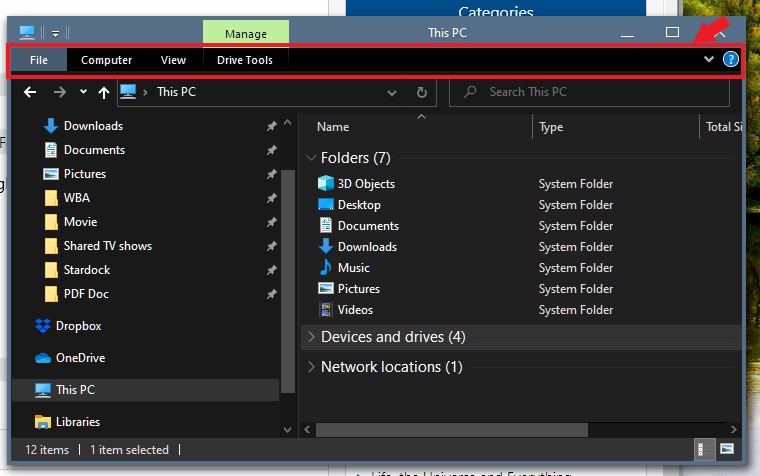
Does anyone know how I remove the transparency at the very top of my desktop folders? That's the only place it does this.
Reply #2 Tuesday, May 19, 2020 12:51 PM
Sorry, I don't know how to do that.But it runs right through file, home, share and view at the top of the folder. And that's the only place that has it.

Reply #3 Tuesday, May 19, 2020 1:06 PM
Is this you're referring?
If it is, please let us know which Windowblinds style you applied to have it turn transparent.
Thank you,
Basj
Stardock Community Assistant.
Reply #4 Wednesday, May 20, 2020 1:43 PM
Problem solved! I just had to reset the transparent setting in the very first Windowblind I loaded. I think I was fooling around with the settings and never changed back. How did it do it to all the ones I've loaded so far? Thanks for your help.
Please login to comment and/or vote for this skin.
Welcome Guest! Please take the time to register with us.
There are many great features available to you once you register, including:
- Richer content, access to many features that are disabled for guests like commenting on the forums and downloading skins.
- Access to a great community, with a massive database of many, many areas of interest.
- Access to contests & subscription offers like exclusive emails.
- It's simple, and FREE!
Reply #1 Tuesday, May 19, 2020 11:43 AM
Hello,
Sorry to hear you are having issues. But, really not sure which area your are referring too. Please post a screenshot.
Thanks
Basj,
Stardock Community Assistant.