






































why is this happening and how do I fix it?
Transparency problem I think
Friday, February 8, 2019 by PapaBravo | Discussion: WindowBlinds


Reply #2 Saturday, February 9, 2019 4:58 PM
I have no shadow option enabled in the skin and other skins don't do it so other software isn't the issue
Reply #3 Saturday, February 9, 2019 5:02 PM
Hello,
I have forwarded your report to the Stardock support team for their review and recommendations.
Please keep an eye on this thread for any updates.
We really do appreciate your feedback, thanks.
AzDude
Stardock Community Assistant
Reply #4 Saturday, February 9, 2019 8:13 PM
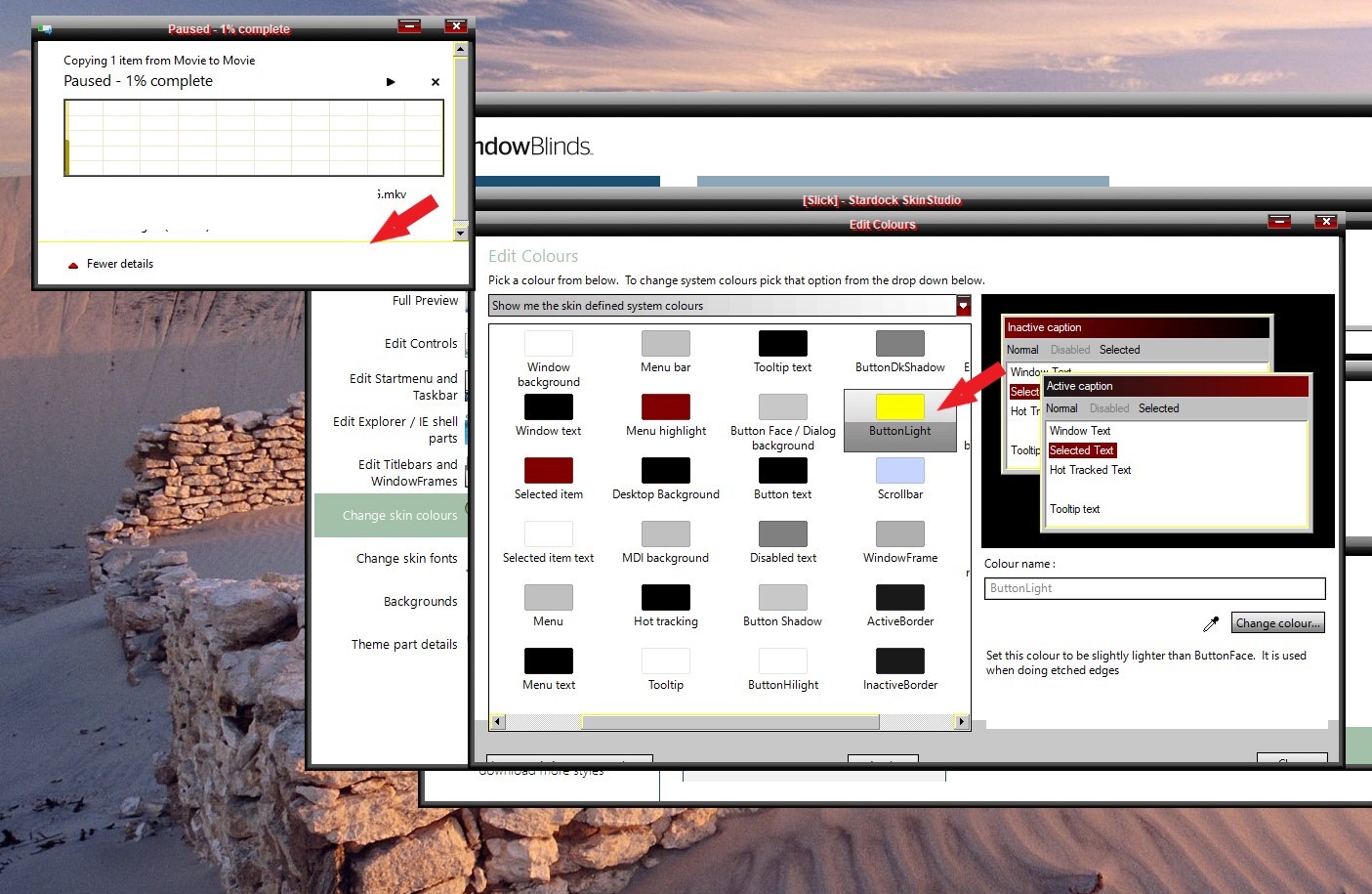
OK, but I don't think it's a window blinds issue as when I load other skins it doesn't happen, another issue is when I'm copying files the progress bar always show a scrollbar and other skins don't do this even if I reze the window the scrollbar reappears. The skin is called slick maybe you could load it so you can see what I mean.

Reply #5 Saturday, February 9, 2019 10:06 PM
Hello,
Sorry to hear you are having issues.
What app is this?
Thank you,
Basj,
Stardock Community Assistant
Reply #6 Saturday, February 9, 2019 10:26 PM
As for the scrollbars issues. I saw a lot of issue with it. But maybe it just me. My suggestion is to rebuild that entire sections.
Thank you,
Basj,
Stardock Community Assistant
Reply #7 Saturday, February 9, 2019 10:37 PM
it does it on any app that has a menu that one is bulk rename utility
Reply #9 Saturday, February 9, 2019 10:55 PM
Scrollbars Sections :

Thank you,
Basj,
Stardock Community Assistant
Reply #10 Saturday, February 9, 2019 10:59 PM
No problem on mine

Thank you,
Basj,
Stardock Community Assistant
Reply #11 Sunday, February 10, 2019 2:04 PM
I checked every option in the scrollbar section to no avail. I noticed at the bottom of the progress window there is a faint line at the bottom where it says fewer details going horizontal. Where is that section controlled?
Reply #12 Sunday, February 10, 2019 7:48 PM
I checked every option in the scrollbar section to no avail. I noticed at the bottom of the progress window there is a faint line at the bottom where it says fewer details going horizontal. Where is that section controlled?
Not sure on which part you are looking at.. A screenshot might help.
Thank you,
Basj,
Stardock Community Assistant
Reply #13 Sunday, February 10, 2019 8:08 PM

It runs even with the bottom of the scrollbar the arrow tip is pointing to it.
Reply #14 Sunday, February 10, 2019 8:31 PM
Try change this.
Thank you,
Basj,
Stardock Community Assistant
Reply #15 Sunday, February 10, 2019 9:11 PM
Yes that changes the line color but didn't help with the scrollbar showing on the progress window.
Reply #16 Sunday, February 10, 2019 9:28 PM
Just to let everyone know I solved all my issues with winareo tweaker by decreasing the scrollbar size that fixed all my issues.
Reply #17 Sunday, February 10, 2019 9:51 PM
I believe there are something wrong with your theme. But I can't go through every single element of it and pin point where is the problem. I did also saw a few other odd behavior in your theme.
For me, usually this happen when building a theme from a problematic/not compatible old windows theme. And the problem will be carried forward/inharit when you build a new theme on-top of old one. My suggestion is to build this theme again, using a known good windows 10 good theme. Replacing all the graphics and setting with your own.
Just my opinion. Others might come along and give their expert input
Thank you,
Basj,
Stardock Community Assistant
Reply #19 Sunday, February 10, 2019 10:14 PM
Thank you for everyone's help as your suggestions pointed me in the right direction One has to be careful using tweakers
Reply #20 Friday, February 22, 2019 9:59 PM
So it wasn't winareo after all I rebuilt the entire theme based on a win10 working theme and all is well.
Please login to comment and/or vote for this skin.
Welcome Guest! Please take the time to register with us.
There are many great features available to you once you register, including:
- Richer content, access to many features that are disabled for guests like commenting on the forums and downloading skins.
- Access to a great community, with a massive database of many, many areas of interest.
- Access to contests & subscription offers like exclusive emails.
- It's simple, and FREE!
Reply #1 Saturday, February 9, 2019 4:12 PM
Not sure but is it a shadow problem? What other software are you running?