





































Start menu will not skin
Tuesday, May 29, 2018 by Totalize | Discussion: WindowBlinds
I am running windows 10 and have object desktop. When using windows blinds 10 it does a good job of skinning but it cannot change the start menu. Is this a shortcoming of the software? I noticed a few skins on the site have a changed start menu but mine will not change no matter what skin I install?
Suggestions?
Dave.
 |
|
Page 1 of 2 | |
|
|---|
Reply #2 Tuesday, May 29, 2018 5:38 PM
I have start 10 running with 7 style menu. sometimes the colour changes on the start menu but thats it. Nothing.


Reply #3 Tuesday, May 29, 2018 6:09 PM
If you have Start10 configured like this it should work:

Also I see that you just joined today, so on the off chance that you haven't rebooted after installing both WindowBlinds and Start10, try rebooting.
Post back on whether or not that takes care of it. If it doesn't someone more adept than I will be along to help you out.
Reply #4 Tuesday, May 29, 2018 6:29 PM
Yep, have start10 configured as per above and rebooted a few times. Still the same problem though the color of the start menu changed to orange per the colour of the them but still the regular start menu.
I wonder if there is a conflict with the LAUNCH app. When I hit the start button the launch app comes up too.

Reply #5 Tuesday, May 29, 2018 7:32 PM
To me that looks like the window 10 start menu. I could be wrong. However if it is it will never look like anything but the win10 menu.
If that is what shows when you press on the taskbar start button then you do have a situation. But clicking on the start button should show a SM like win7. If not Just keep trying what DaveRI is suggesting.

Reply #6 Tuesday, May 29, 2018 10:10 PM
Yep, have start10 configured as per above and rebooted a few times. Still the same problem though the color of the start menu changed to orange per the colour of the them but still the regular start menu.
I wonder if there is a conflict with the LAUNCH app. When I hit the start button the launch app comes up too.
Hello,
Sorry to hear you are having issues. Could you check if you setting are set as below
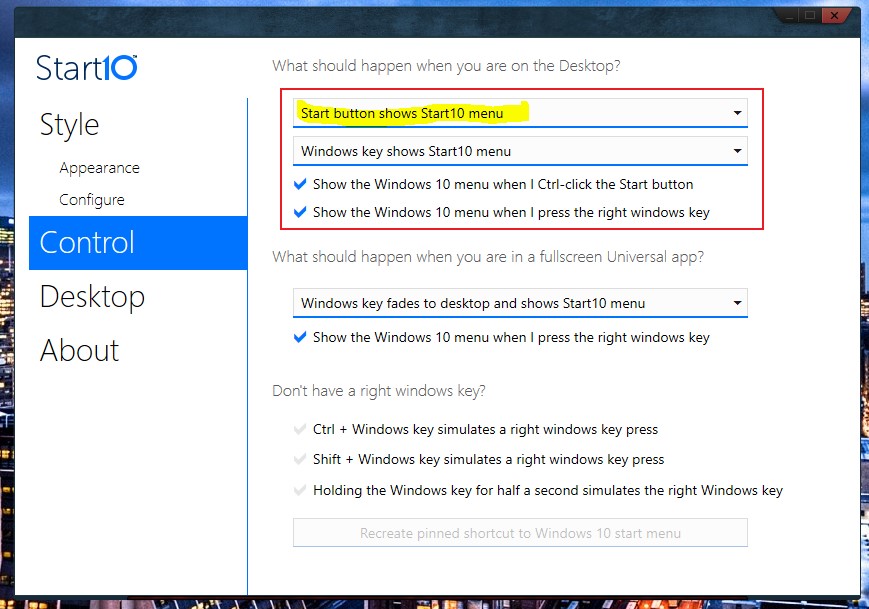
Please check that and let us know.
Basj,
Stardock Community Assistant.
Reply #7 Wednesday, May 30, 2018 12:57 PM
Thanks very much basj. It works now.
Cheers,.Dave.
Reply #8 Wednesday, May 30, 2018 5:23 PM
Great, thanks for reporting back.
Basj,
Stardock Community Assistant.

Reply #9 Saturday, June 9, 2018 11:06 AM
Well, here's a similar issue. I had Start 10 v1.56 installed on my spare PC and it worked fine. I upgraded it to Start 10 v1.60 and no matter what I do the WB skins start menu will not apply, it is always the Windows 10 menu.
So I gave up finally and went back to v1.56 and all is fine now. I have tried everything, even set the settings exactly to my main PC's settings for v1.60 that works fine with that version.
Looks like Start 10 v1.60 has some issues for sure. 
Reply #10 Saturday, June 9, 2018 11:20 AM
Well, here's a similar issue. I had Start 10 v1.56 installed on my spare PC and it worked fine. I upgraded it to Start 10 v1.60 and no matter what I do the WB skins start menu will not apply, it is always the Windows 10 menu.
So I gave up finally and went back to v1.56 and all is fine now. I have tried everything, even set the settings exactly to my main PC's settings for v1.60 that works fine with that version.
Looks like Start 10 v1.60 has some issues for sure.
Hi Tom,
Could you try the purge and reinstall steps: https://forums.stardock.com/486022/start10-support-faq#reinstalling
Please reinstall the V1.6 again and see if the problem still there.
Please reboot, retest and report back.
Thank you,
Basj,
Stardock Community Assistant


Reply #13 Saturday, August 4, 2018 9:34 PM
That tip about configuring Start10 did the trick for me. Thanks.
Reply #15 Sunday, September 19, 2021 11:28 PM
The Windows 10 start button can be changed with Windows Blinds I had it done. But I guess I had the start button file on my C drive so everything else ok loading my theme from the folder on my Files drive but my custom start button won't load as before and the Skin Studio won't load with this current version of Windows Blinds to help me locate and swap it. Can someone please tell me the exact file name and location? See screen shot of the button that is loading which seems to be the vista start button file:
Reply #16 Sunday, September 19, 2021 11:50 PM
The Windows 10 start button can be changed with Windows Blinds I had it done. But I guess I had the start button file on my C drive so everything else ok loading my theme from the folder on my Files drive but my custom start button won't load as before and the Skin Studio won't load with this current version of Windows Blinds to help me locate and swap it. Can someone please tell me the exact file name and location? See screen shot of the button that is loading which seems to be the vista start button file:
Hello,
Sorry to hear you are having issues. Not sure what you're trying to do. But if you wish just to change the start10 Start button but not the whole WB theme. You will need to release WB control on Start button and change the start button from Start10.
To release WB from changing Start10 Start button.

Than in Start10 you can change your Start button to anything you like. But, if you wish to use your own pictures, just click the "Pick Image" button and browse for it.

Basj,
Stardock Community Assistant.
Reply #17 Monday, September 20, 2021 12:20 AM
Hi thanks for your reply. I can't buy Start 10 right now. I just need to know the exact file name and file directory for the Start button of the screen shot above so I can replace the file that keeps loading since your new version of Windows Blinds won't load Skin Studio to be able to locate it.
Reply #18 Monday, September 20, 2021 12:42 AM
Hi thanks for your reply. I can't buy Start 10 right now. I just need to know the exact file name and file directory for the Start button of the screen shot above so I can replace the file that keeps loading since your new version of Windows Blinds won't load Skin Studio to be able to locate it.
Actually you can import in your own graphics into Skinstudio and change the start button. Please refer to the screenshot below.

Thank you,
Basj,
Stardock Community Assistant
Reply #19 Monday, September 20, 2021 12:44 AM
Do you have a working version download link of skin studio you can send? Because the current version of Windows Blinds it won't open.
Reply #20 Monday, September 20, 2021 12:46 AM
Do you have a working version download link of skin studio you can send? Because the current version of Windows Blinds it won't open.
What version of Windows and Skinstudio you have that won't open?
I have SkinStudio V10.1. And it should be available in your account. https://store.stardock.com/myaccount/products
Thank you,
Basj,
Stardock Community Assistant
Please login to comment and/or vote for this skin.
Welcome Guest! Please take the time to register with us.
There are many great features available to you once you register, including:
- Richer content, access to many features that are disabled for guests like commenting on the forums and downloading skins.
- Access to a great community, with a massive database of many, many areas of interest.
- Access to contests & subscription offers like exclusive emails.
- It's simple, and FREE!
|
|
Page 1 of 2 | |
|
|---|
Reply #1 Tuesday, May 29, 2018 5:18 PM
On Win10, to skin the Start Menu you need to have Start10 installed and have it set to use the Win7 style. Start10 is included with Object Desktop so you should already have access to it if you don't already have it installed. There are some screenshots of Start10 here if it might help:
https://www.stardock.com/products/start10/