





































In Start Menu - Highlight for an item showing Jump List - Win 8 - WB8
Friday, April 10, 2015 by thedoctor953 | Discussion: WindowBlinds
Hi,
In a regular Windows 7 installation, when an item on the left side in the Start Menu is highlighted, it has a highlight around the item plus a highlight box around the arrow if that item has a jump list on the right side. There is a line that separates the two. Here is a picture of what I mean:
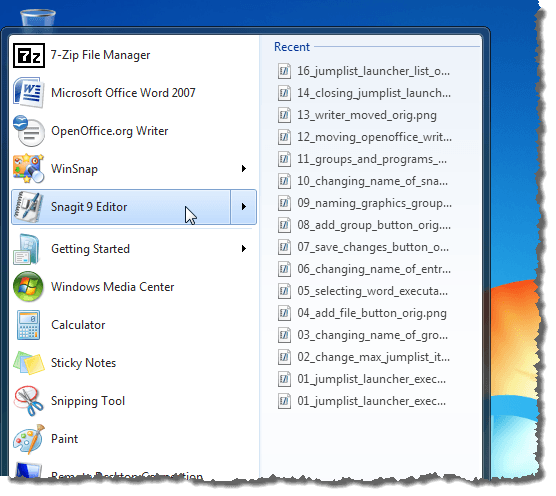
Is it possible to replicate this effect in Windows 8/8.1 using Skin Studio 8 and WB 8? If there is, I can't seem to find out how. In Windows 8, it seems the line between the item and the arrow can't be replicated.
Thank you,
Jeff

Reply #2 Friday, April 10, 2015 8:52 AM
It cannot be changed in anything unfortunately. It is being forced that way by the operating system itself.
Reply #3 Friday, April 10, 2015 10:57 AM
That's what I was thinking too LightStar. Thanks for the confirmation. Oh well. I am trying to adapt the Diamond theme to make Windows 8 look as close to Windows 7 as possible. I guess that modification will have to be left out. Thank you.
Please login to comment and/or vote for this skin.
Welcome Guest! Please take the time to register with us.
There are many great features available to you once you register, including:
- Richer content, access to many features that are disabled for guests like commenting on the forums and downloading skins.
- Access to a great community, with a massive database of many, many areas of interest.
- Access to contests & subscription offers like exclusive emails.
- It's simple, and FREE!
Reply #1 Friday, April 10, 2015 8:33 AM
I guess you could do it by making sure the line is on the actual mouseover graphic, and then make sure the margins are inside the line (in Skinstudio). Don't know if this helps as I don't know if Windows only adds that line when it needs it.