































Problem with MalwareBytes
Stops working when trying to update
Tuesday, May 20, 2014 by Uvah | Discussion: Personal Computing
Went to MalwareBytes website and read some of the forum posts. No help there. Uninstalled Mbam and downloaded a new one for a clean install. After the uninstall using ASC's uninstaller which takes out left over files did a reboot and installed Mbam. Ran it and the same thing happened. Back to the website where another post says to delete rules.ref. So I did that and tried again to run Mbam. No help there either. Did three online scans with TrendMicro, Kaspersky and Bit Defender and all came up clean. The problem started after using ADWcleaner dl'd from Major Geeks. I think it took out some files it wasn't supposed to. Any ideas?
 |
|
Page 3 of 4 | |
|
|---|
Reply #42 Friday, May 23, 2014 8:50 AM
Quoting Uvah, reply 39When I do a scan with ASC it has a junk removal tool.
I think he means this one, Ross. http://thisisudax.org/?p=1 Download and run it.
Best to run it in safe mode...and for that matter, it wouldn't hurt to try to install MWB while in safe mode also.

Reply #43 Friday, May 23, 2014 8:50 AM
Thank you Wiz. I'll do that. Never occurred to me to install in safe mode.
@bodadog...appreciate your help. Hopefully very soon.
Reply #44 Friday, May 23, 2014 3:20 PM
I got this thing in safe mode. I clicked on JRT and it opens a command prompt.
What should I put there? 


Reply #47 Friday, May 23, 2014 4:07 PM
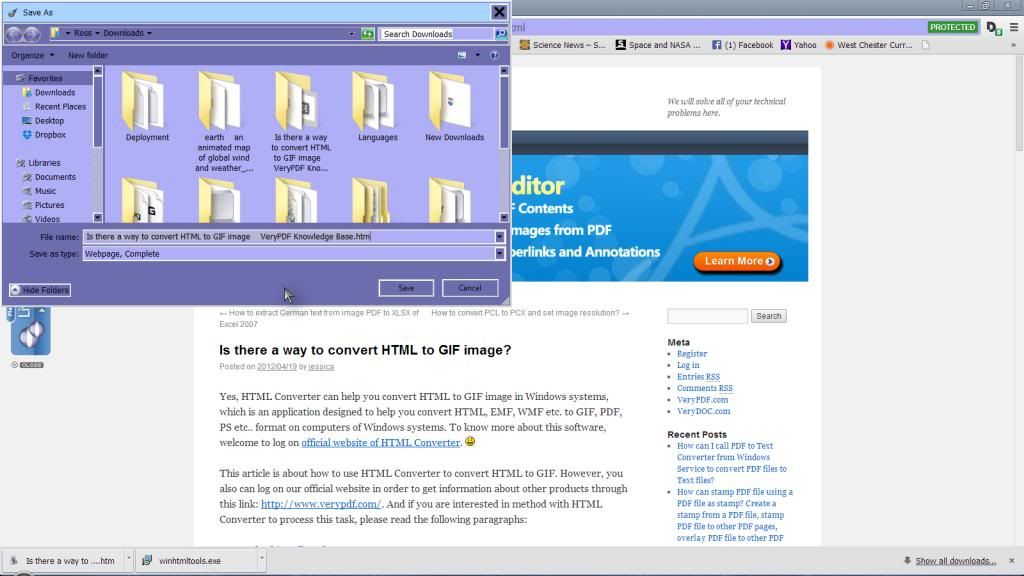
I know I did that. Its still checking the registry, has been for the last twenty minutes. I started it a 10 minutes to 4 and it finished at 5:30, one hour and forty minutes. The dialogue box seen here is what prompted this whole thing. Its the same window frame as in safe mode.
Reply #48 Saturday, May 24, 2014 8:13 PM
What does that ss have to do with MWB's? That is some installer/wrapper for a converter program. get rid of it.,
Install MWB and run it.

Reply #49 Saturday, May 24, 2014 9:26 PM
You get that dialog box if you rightclick on the background of any page and hit save as in firefox
Reply #50 Sunday, May 25, 2014 9:00 AM
What does that ss have to do with MWB's? That is some installer/wrapper for a converter program. get rid of it.,
Quoting Uvah, reply 47The dialogue box seen here is what prompted this whole thing. It could even be malware.
Install MWB and run it.
It was an example, I didn't actually dl the program. I wanted to show what the dialogue box looked like. It should not look that way. It should be skinned like the rest.
I've installed MWB numerous times and it still doesn't work.
And yes it could be malware but why hasn't anything worked so far. JRT only took out what was left of that software informer, which I thought I had gotten rid of all of it. As for the installation disc, that'll bring back the recovery partition plus afford me the opportunity to take this thing back down to factory specs if all else fails. Unfortunately its beginning to look that way.
Reply #51 Sunday, May 25, 2014 9:32 AM
When installing Malwarebytes do you run the install as admin?
Reply #53 Sunday, May 25, 2014 8:38 PM
Does to save as dialog look like that all the time or just when trying to save something from the internet?

Reply #54 Sunday, May 25, 2014 9:41 PM
Had the same issue yesterday............MWB would not fire up until I rebooted..........weird..........running windows 8.

Reply #55 Sunday, May 25, 2014 10:25 PM
Guys: Are you running the free or Pro editions?
Also, please state which other security software you're using...so people can tell what's up, and if there's a correlation, OK?
Reply #57 Monday, May 26, 2014 7:25 AM
Using the free version. Running Advanced System Care, IObit's Malware Fighter, ThreatFire and MSE. Been using them since my first laptop and never had a problem until now.
Reply #59 Monday, May 26, 2014 6:04 PM
Do you get this messed up dialog in other browsers or just firefox?
Reply #60 Monday, May 26, 2014 6:24 PM
Also, why the hell do you need so many security apps. Whether they say they do or don't, they interfere with each other, Uvah.
Please login to comment and/or vote for this skin.
Welcome Guest! Please take the time to register with us.
There are many great features available to you once you register, including:
- Richer content, access to many features that are disabled for guests like commenting on the forums and downloading skins.
- Access to a great community, with a massive database of many, many areas of interest.
- Access to contests & subscription offers like exclusive emails.
- It's simple, and FREE!
|
|
Page 3 of 4 | |
|
|---|
Reply #41 Friday, May 23, 2014 8:41 AM
Hey Uvah I see you are still at it. Well anyways on the brighter side of things got your email and will be sending that out today. Sure hope you get this resolved here soon!