




































SkinStudio 8 (7.9X beta) Issues and Recommendations Thread
Friday, May 24, 2013 by LightStar | Discussion: OS Customization
OK, the 7/8 fonts section does not work at all in Windows 7 or 8 in a LOT of skins, cannot even reset the area to default fonts.
What the heck is this "Old close button" addition in the Tree/Tooltips area? It says it's for IE7? IE7 is ancient.
How about including images in the help section of new (and even some old) items and a better explanation of what the image does?
Sure would have been nice if you would have made the new SkinStudio pinnable to the taskbar too.
 |
|
Page 1 of 4 | |
|
|---|

Reply #2 Tuesday, May 28, 2013 8:01 AM
Update: As far as the 7/8 fonts not being accessible, if I leave SKS 7.3 installed and also have SKS 8 installed, the font issue does not occur. But if I uninstall 7.3, the font problem comes back.
Also, it sure would be nice to be able to delete unused color and font entries that end up not being used in a skin when all is said and done.

Reply #4 Wednesday, May 29, 2013 6:10 AM
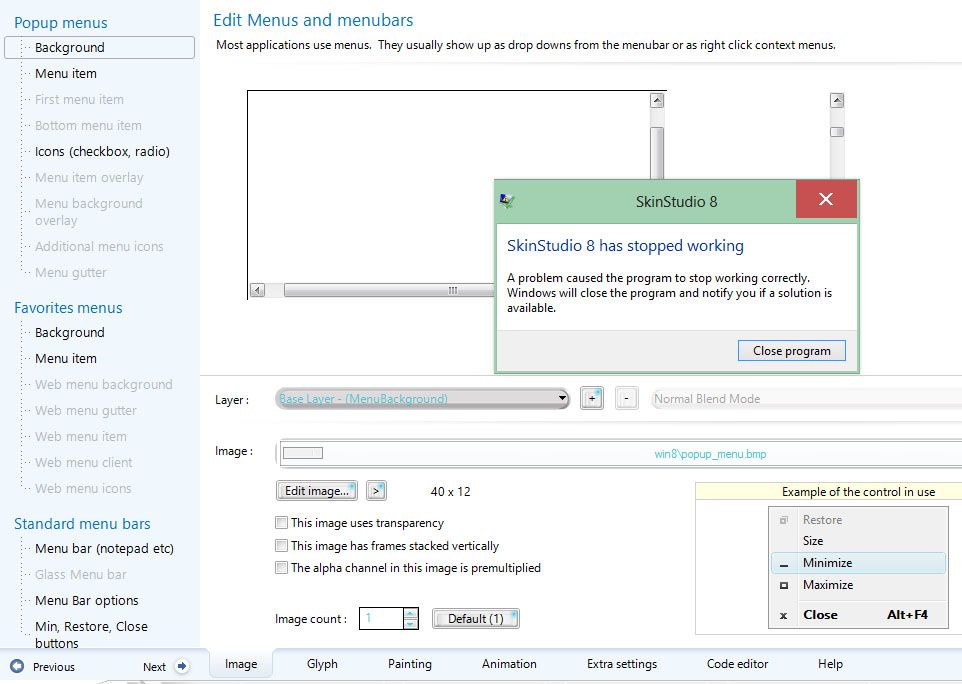
OK so I am making my skin.
I go to "Theme part details" in SKINSTUDIO
If I click on Normal style MenuBars or click on Favorites menu or Popup Menus
the window comes open and than SkinStudio force closes as soon as I move my mouse
I have iconpackager, fences, and windowblinds 7.90 installed
64 bit os
Windows 8

And I can't change images in Explorer Backgrounds bitmaps. I change the image and than it goes to a transparent image I can't get a bmp or a tga or a png to work at all in any of them in that section
I have a problem that if I change the show desktop button
under the task bar section it doesn't change it fully.
it is pulling the image from the Edit Controls section- Button image
Here is an image to show you what I am talking about

Reply #5 Wednesday, May 29, 2013 8:55 AM
On the show desktop button issue bhast23, are you sure the correct image is selected in SkinStudio? I know sometimes when I am in SkinStudio I may accidentally bump the scroll wheel on my mouse and it changes the image without my realizing it, and when I go look at what image is selected I see the problem then and have to select the correct image from the drop down list.
Reply #6 Wednesday, May 29, 2013 6:11 PM
Yeah I am sure it is the correct image
here is a picture of my image in skinstudio

Here is a picture of the image that is shown for pressed

Reply #7 Wednesday, May 29, 2013 6:49 PM
Ooook, why so many images? I can't make heads or tails out of these other than a nasty image of a cartoon woman's breasts. Please just do a single cropped image of the affected area could you? Thanks.
What the heck? All the images just went away when I posted this. 
I am PM'ing you with my email address, I may see the problem but if it's OK with you I need to look at the skin in SKS8 if you could send me the .wba file.
Reply #8 Wednesday, May 29, 2013 6:53 PM
Yeah something going on with the forum it posted my image sooo many damn time lol
should be fixed now
Maybe I could send you my skin and you could look at it for me
Reply #10 Wednesday, May 29, 2013 7:13 PM
Well, I checked your skin in Windows 8 and I cannot find anything wrong with it, assuming you wanted your task bar buttons, start button and show desktop button to be above the top of the task bar that is. By chance do you have other than normal DPI settings applied in Windows 8 on your end? That could cause problems.
Other than that I don't know what to tell you, has to be something on your end is all I can figure out. 
Reply #11 Wednesday, May 29, 2013 7:16 PM
the problem is that when I press the show desktop button it show a different image than what it should
Reply #12 Wednesday, May 29, 2013 7:47 PM
Well, I did not look that close, are you sure your image spacing and number of images is correct?

Reply #13 Saturday, June 1, 2013 2:18 PM
Hmmm... 
Happens like all the time.
-Windows 8 Pro x64.
Your computer has a Windows Experience Index base score of 5.2 Your Windows Graphics Experience score is 5.2
WindowBlinds version : WindowBlinds 7.91 (009 - Windows 8 Edition) - 64 bit OS
WindowBlinds is installed correctly on this PC
(Generic PnP Monitor) 1 is attached to Intel(R) HD Graphics 4000
Wblind.dll 2013/05/30 20:49:ll Wblind64.dll 2013/05/30 20:49:48 Wbsrv.dll 2013/05/29 15:56:07 WB8Config.exe 2013/05/30 15:32:50 Wbload.exe 2013/05/07 19:30:24 Wbhelp.dll 2013/04/18 20:51:37 Tray.dll 2013/04/18 20:51:19 Wbload.dll 2013/05/29 15:56:39 Screen.exe 2013/05/09 20:07:23

Reply #16 Saturday, June 1, 2013 4:36 PM
i sent something to stardock support and than gave them my info on my system

Reply #18 Saturday, June 1, 2013 5:04 PM
Reply #19 Saturday, June 1, 2013 6:15 PM
no it still doesn't work right.
I did a fresh install of Win8 and still the same issue
I have stardock support looking in to it
I hope they figure something out

Please login to comment and/or vote for this skin.
Welcome Guest! Please take the time to register with us.
There are many great features available to you once you register, including:
- Richer content, access to many features that are disabled for guests like commenting on the forums and downloading skins.
- Access to a great community, with a massive database of many, many areas of interest.
- Access to contests & subscription offers like exclusive emails.
- It's simple, and FREE!
|
|
Page 1 of 4 | |
|
|---|
Reply #1 Friday, May 24, 2013 8:44 PM
Might come in handy