





































Is the time right for a Community Skinning Project?
Friday, November 2, 2012 by Philly0381 | Discussion: Community
Hi ya folks
It has been awhile since the last Community Project, so being the glutton for punishment that I so love being, I volunteer to start one.
Since I am not a skinner this part is really easy. The hard part is coming up with an idea, some graphics or a theme like a WindowBlinds that the rest of the community skinners can use to make additional themed skins.
So if you have some thoughts for a theme lets see them. Now this is not a contest to see who can come up with the best theme. If we get several theme ideas then that can work it's way into several projects. Hmmm, I like that thought, lets not lose that idea.
Just like any other skins that are submitted to WinCustomize to be uploaded into the Libraries the skins for the Community Project must pass moderation. I believe everyone knows what that means, but if you must, ask questions before hand. If you are going to share some ideas for a theme just remember that what you come up with graphically should be able to work for folks wanting to make Docks, DX skins or Winstep.
What themed skins can be done? Well I always like to say if there is a WinCustomize Library for it you can do one.
Basically there is no clock on the project, when it's done it's done. The only thing that will change that is if the consensus is to do a Holiday Theme. That should at least be available for the community to use before the holiday passes. 
Okay community, the ball is in your end of the court, lets see what you an come up with. 
UPDATE:
1. Just so everyone knows what we are doing, we have two Holiday Themes to make skins for, reply #22 and #31. Please contact Karen and Dave to get what you need, when it is ready, so you can start skinning.
2. Hey, we need names for the themes. Don't really want them to be Community Skinning Project Holiday Theme 1 and 2 do we? 
Theme name suggestions: Karen's - Yule Rock and Dave's - Christmas 2012
3. I'm thinking that the WBs and themed skins should go up at the same time about a couple of weeks before the Holidays, in other words lets not upload the WBs before folks have a chance to finish their themed skins. Need to know what the consensus is.
Yule Rock Christmas 2012
1. WindowBlinds by k10w3 1. WindowBlinds by DaveBax
2. DesktopX Skins by RedneckDude 2. DesktopX Skins by RedneckDude
3. ObjectDock Backgrounds by WebGizmos 3. SysMetrix Skin by k10w3
4. Winstep by WebGizmos 4. ObjectDock Backgrounds by DaveBax
5. Start 8 by Vampothika 5. Start 8 by Vampothika
6. Xion by neone6 6. Xion by neone6
7. DesktopX Clock by k10w3 7. Rainlendar by RedneckDude
8. SysMetrix by Uvah 8. Tiles by RedneckDude
9. Wallpaper by k10w3 9. Wallpaper by k10w3
10. 10. Wallpaper by DaveBax
 |
|
Page 10 of 13 | |
|
|---|

Reply #182 Sunday, December 2, 2012 7:42 PM
Only because you and RedneckDude are part of it.

Reply #183 Sunday, December 2, 2012 7:55 PM
Quoting WebGizmos,
reply 181
This is gonna be one sexy Xmas theme!
Only because you and RedneckDude are part of it.
Wait a minute John starting to worry about you. It will be a great theme with their additions no doubt about it. However I don't see where they fall in the sexy category. Have you looked at them lately.


Reply #185 Sunday, December 2, 2012 8:18 PM
Quoting WebGizmos,
reply 181
This is gonna be one sexy Xmas theme!
Only because you and RedneckDude are part of it.
Wait a minute John starting to worry about you. It will be a great theme with their additions no doubt about it. However I don't see where they fall in the sexy category. Have you looked at them lately.
Hell, I can't get past looking at me in a mirror without getting sick Dave......
Reply #186 Sunday, December 2, 2012 8:22 PM
Now I need to figure out how to get both Dave's and your wallpaper on a dual monitor set up. I guess I could use Paint or a similar program and put the two walls together to make essentially a dual monitor wall. Do you or anyone else know if that will work?
[quote who="RedneckDude" reply="157" id="3288098"]Quoting Philly0381, reply 153Very nice Karen.
Now I need to figure out how to get both Dave's and your wallpaper on a dual monitor set up. I guess I could use Paint or a similar program and put the two walls together to make essentially a dual monitor wall. Do you or anyone else know if that will work?
John, It's called DisplayFusion.
http://www.displayfusion.com/[/quote]
Well there is another answer which Wizard just showed me.......Deskscapes, and it works great.
Now there are not some of the bells and whistles and options that you get with DisplayFusion but then you don't have to download another program.
Reply #187 Sunday, December 2, 2012 9:46 PM
OMG!!!! What? The dreaded "another program"!


Reply #188 Monday, December 3, 2012 12:31 AM
I got stuff from Karen. It´ll match up. Finishing it today

Reply #189 Monday, December 3, 2012 7:59 AM
I have a question. The three that I'm doing........since the graphics go well together can I use Yule Rock/Christmas 2012 as the 'dress-up' for the hearth. Here's what I'm thinking. There's this big tree.......makes the one in Rockefeller? Center look like a sapling........anyway....Neone 6's Xion is like the star on top. Karen's Yule Rock, with its window to the outside, as a wall next to the tree that opens up to envelope the hearth while DaveBax's candy canes stick out of the stockings, make up a frame for a winter scene hanging on the wall above the hearth.....stuff like that. Kinda reminds me of an Uncle's home way out on Long Island circa 1957 or so. Memories. 



Reply #195 Monday, December 3, 2012 6:36 PM
Andy, your stuff turning out good is no surprise. 
Reply #196 Monday, December 3, 2012 7:25 PM
Second that. You may have to give Andy an Apprenticeship as a Wizard. Who know3s...maybe........................ 


Reply #199 Tuesday, December 4, 2012 12:30 PM
Uvah - I don't think I'm going to get to the fire for the mantle. My job is offering me overtime for the next week and a half and I'm not in a place in my life where I can turn that down. I'm sorry. You can find the fire tutorial that I was going to use here (in case you want to try it yourself): http://graffiti.hbfx.com/?p=219&lang=ro Instead of saving it as a .GIF, in Photoshop, choose Export-->render to video, and that will save the animation in individual separate .png files and you can either manually assemble them into a strip for the animation, or use AniUtil. Once again, I apologize for not being able to get to this. 
Reply #200 Tuesday, December 4, 2012 12:33 PM
These words get a redneck's attention....dunno why. 
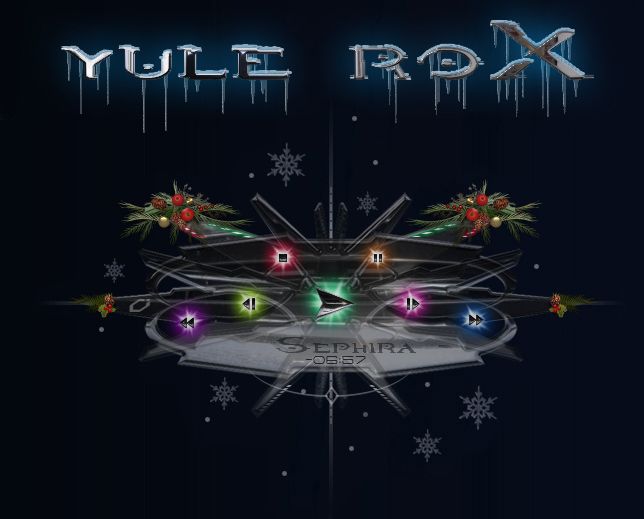
I will be posting a screenshot for Yule Rock DX in a few hours. 
Please login to comment and/or vote for this skin.
Welcome Guest! Please take the time to register with us.
There are many great features available to you once you register, including:
- Richer content, access to many features that are disabled for guests like commenting on the forums and downloading skins.
- Access to a great community, with a massive database of many, many areas of interest.
- Access to contests & subscription offers like exclusive emails.
- It's simple, and FREE!
|
|
Page 10 of 13 | |
|
|---|
Reply #181 Sunday, December 2, 2012 7:38 PM
Oh man! You mean all I needed was some garland! Hmmmm...now...I can do some great stuff with just garland.
  Oh course I'll probably get banned.
  This is gonna be one sexy Xmas theme!