






































DesktopX scripting error message
Saturday, September 8, 2012 by ddraney | Discussion: OS Customization
I'm using Redneckdude's Raptor DX theme, however, every time it opens I continuously keep getting a scripting error message. I have no idea what it's wanting from me, plus it's particularly annoying. Any ideas how to eliminate this? 

 |
|
Page 1 of 2 | |
|
|---|

Reply #3 Saturday, September 8, 2012 5:09 PM
Firstly, tell us what the error is. I may be able to help then.
Also, what version of DX you're running, your OS, etc.
Reply #4 Saturday, September 8, 2012 5:20 PM

Reply #5 Saturday, September 8, 2012 6:44 PM
I'm using desktopx 4 on windows 7 home premium 32bit sp1. The only other tid-bit i'm using is the raptor weather gadget simultaneously. The script error message simply prompts me to either disable the script or disable and edit the script. Like i said, i have no idea what to do because i'm not familiar with how desktopx is coded. Thanks guys. Hope that helps.
Reply #6 Saturday, September 8, 2012 6:50 PM
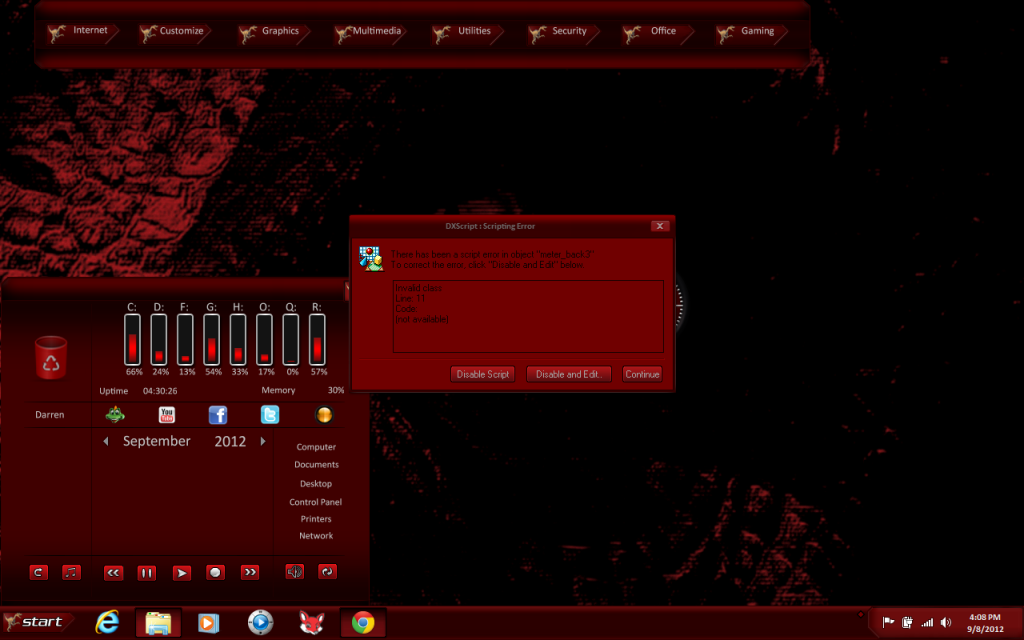
ddraney, please take a screenshot of the error and post it here.
There has to be an error code.

Reply #9 Saturday, September 8, 2012 7:28 PM
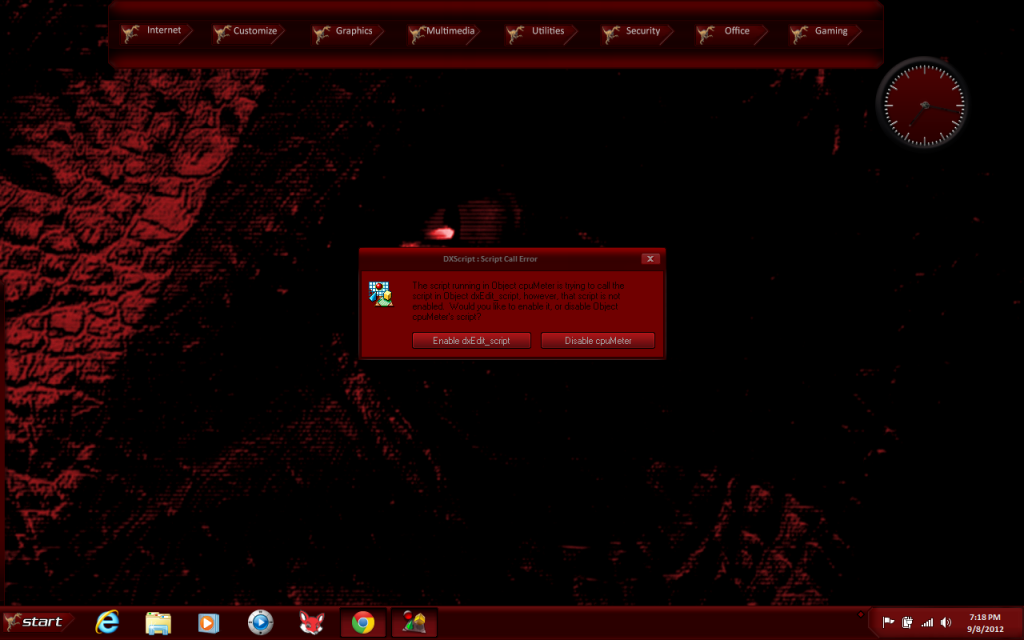
OK, I also see that the calendar and cpu meters aren't loading, either. Do you give it time to load before trying to use it?
Do you have any script blocking app running?
This is line 11, in case there is a scripter reading this, I am not a scripter.
Set objRefreshItem = objRefresher.AddEnum(objWMIService, "Win32_PerfRawData_PerfOS_Memory").ObjectSet
The CPU meter and calendar are scripted too, which is why Iasked about the script blocker, but the drive meters seem to work, and they too, are scripted.
I'll look into it.
Meantime, redownload and reload.
 g
g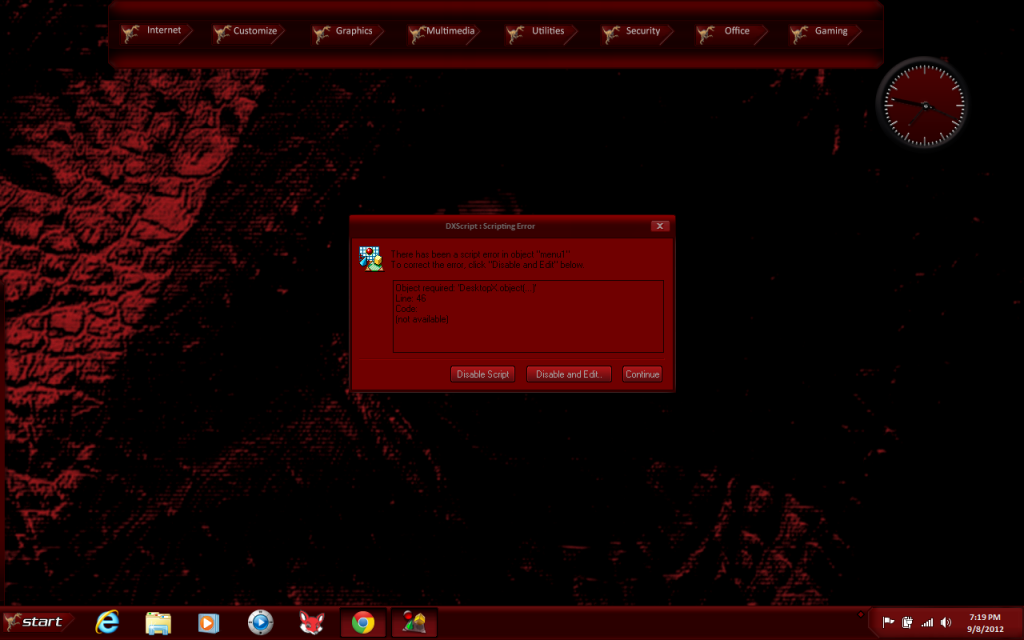
Reply #11 Saturday, September 8, 2012 10:37 PM
Getting those too...Yeah i have it set to start with windows. I just let it do it's thing, but something keeps causing these errors. I do use admuncher, but never had any conflicts before. I also have windowfx enabled. I can certainly disable these to determine if it'll make a difference.
Reply #12 Saturday, September 8, 2012 11:14 PM
Dunno about admuncher. WinFX isn't a problem.
Try a different DX theme of mine. Any recent one will do. If you don't get errors with a different one, then it'll mean you got a bad download on this one. Else, I'd say you may have a bad DX install.
I have had several people test this and no one else is having this problem.
Reply #13 Saturday, September 8, 2012 11:33 PM
ok i'm not doubting your work. I'll try those suggestions and see what i get. I do have most of your themes and haven't run into any troubles. This one though completely caught me off guard. Will tinker and let you know what i come up with.
Reply #14 Saturday, September 8, 2012 11:37 PM
Well, I use all the same scripts in all my work, just rearranged and with different gfx. So I'm guessing you got a bad download and may need to redownload. I will download a fresh copy and try it. Maybe I got a bad upload. You never know.
Reply #15 Saturday, September 8, 2012 11:49 PM
I just uninstalled and reinstalled desktopx 4. Downloaded a new copy of your theme, and sadly am getting the same script errors. I even tried another theme and am getting the same results. 
Reply #16 Sunday, September 9, 2012 12:05 AM
This tells me it's on your rig. I have no idea what it could be.
So you didn't have this problem before, when you downloaded those other themes?
This too would point to some change on your rig that has brought about these problems.
I really wish we could resolve this, but the info points to something specific to your setup.
Reply #17 Sunday, September 9, 2012 12:35 AM
I think i fixed it redneckdude, i reverted back to desktopx 3 and i have no issues. Something wrong with desktopx4 and my configuration i suppose. Hard to say.

Reply #19 Sunday, September 9, 2012 8:57 AM
Just curious here, ddraney. As RnD's tester, it's my job to see that his stuff is error free. Were you using the v3.96 beta from the store which is labeled as DX4? It is the current working version. In About in config it still shows as DX4. On my store page it shows as the only one available but this may not be the same for everyone.
I ask because if for some reason you had the 4.01 release installed, it was/is broken.
Reply #20 Sunday, September 9, 2012 2:13 PM
Yeah wizard it says 4 in the config window, however in the about page it states it's version 3.96. By the way, i went back to it from the older version mainly because it auto-starts w/ windows. The old version wouldn't do that for me. Ugh! I can't win. LOL. Anyways i'm continuing to get these errors when running v3.96. Guess i'll just endure it. I appreciate you guys wanting to help correct this nonetheless. Maybe desktopx will get an update soon.
Just to clarify, i'm using the DX4_beta3.96 version from the store. I do have the 3.5 version still available to me through the store as well. I've never even seen a v4.01 so i have no experience with that one. 
Please login to comment and/or vote for this skin.
Welcome Guest! Please take the time to register with us.
There are many great features available to you once you register, including:
- Richer content, access to many features that are disabled for guests like commenting on the forums and downloading skins.
- Access to a great community, with a massive database of many, many areas of interest.
- Access to contests & subscription offers like exclusive emails.
- It's simple, and FREE!
|
|
Page 1 of 2 | |
|
|---|
Reply #1 Saturday, September 8, 2012 4:43 PM
I just downloaded to test it and I dont get a scripting error, can you elaborate? what does the popup say word for word?