































Changing background of text boxes on Internet sites
Wednesday, August 29, 2012 by ed_b | Discussion: Skinning
Been using WB for many years, and have installed a skin I love except for how dark the text boxes on some sites are. I've purchased SKS Pro to deal with this...except I can't seem to find where this particular element is. The boxes are medium gray on some sites, which makes the cursor barely visible and any background text indicating what info is needed in box almost invisible. Running Win 7. I've tried changing background colors of presets for this skin, but I see no changes when applying. Although it say IE in SKS, does the browser actually matter -- I use Opera and Chrome. I thought this would be easy, but I'm not finding the appropriate setting to change.

Reply #2 Friday, August 31, 2012 12:56 AM
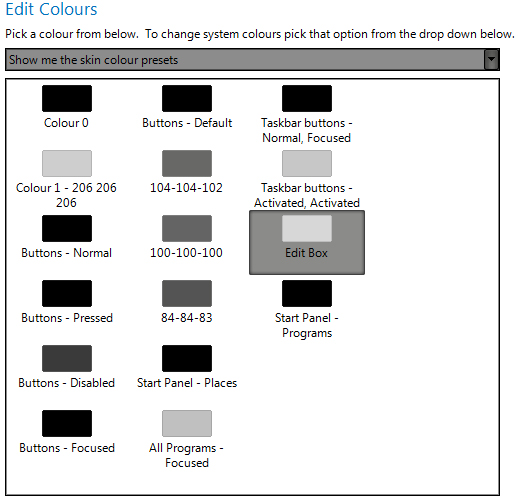
Here's the skin I'm trying to fix. Can I assume edit box is the background for those text input fields that are too dark? Oddly, there's no consistency. Some boxes on a site have white backgrounds, which is fine, but others have grey that is closer to Edit Box or even somewhat darker. Because the presets are not all labeled as they are in your example, I don't really know what to change.

Reply #3 Friday, August 31, 2012 1:48 AM
You are almost in the right place. Towards the top of the screen you have pictured, click on the arrow to the right of "Show me the skin colour presets". A dropdown menu will pop up with "Show me the skin defined system colours" as in GMC's picture, click on that, the group will change to the group he's showing you.
Reply #4 Friday, August 31, 2012 9:09 AM
Ah ha. Thanks much for pointing the way.
Would the text input box background color be the window background color? If so, I'm assuming that when the box color isn't specified on the web page, the default background color appears instead. Lots to learn.
Please login to comment and/or vote for this skin.
Welcome Guest! Please take the time to register with us.
There are many great features available to you once you register, including:
- Richer content, access to many features that are disabled for guests like commenting on the forums and downloading skins.
- Access to a great community, with a massive database of many, many areas of interest.
- Access to contests & subscription offers like exclusive emails.
- It's simple, and FREE!
Reply #1 Thursday, August 30, 2012 12:55 PM
open the "change skin color" section, click on the combo box to "show me the skin defined colors" and change the "window background" color.
of course this will change all of your window colors to this one.