






































April 2012 Desktop Screenshots
This ain't gonna disappear. :)
Sunday, April 1, 2012 by DrJBHL | Discussion: WinCustomize Talk
O.K. The month changed (at midnight), and it's once again time to load your beauties for all to see!
Mine is "ZubaZ ZeveN" by Master 2of3. Tim has provided us with many, many great skins... all beauties, but there's just "soemthing" which "keeps pulling me back in" and reloading it.

So please join me in showing all that's "special" in April with truly creative desktops which celebrate the great Stardock software we all love so much!
 |
|
Page 7 of 8 | |
|
|---|





Reply #124 Monday, April 23, 2012 11:00 PM

OK...the bit that was 'skun' is the plane.
"discussions" with a disgruntled member the other day saw him criticize my WC uploads [screenshots] as something his 7 year old could do. Yes.....pressing "PrintScreen" whether in a game [screencap] or a desktop [screenshot] is somewhat 'simple'. The difficulty is editing multi-layer PSD files in Photoshop and PSP, per-pixel alignment of graphic sections .... ensuring transparencies and specular shine are right....hunting down just the right font/s for the text.... researching existing photos for details..... and a few days later you get DDS-DXT5 2048x2048-size detail 'skins' of John Travolta's 707 138B "Jett Clipper Ella" in the colours of the original Qantas V-Jet of the 60's..... the very model of plane I flew on in '73 on the Architecture course tour with RMIT....26 hours to London.
So there's me flying out of YMML [Melbourne Airport] in FSX.....
Skinning encompasses more than 'just' the Windows GUI and its associated proggies, but also Gaming Mods [as the SD Gaming fraternity will attest].
The skills are much the same.....knowing your way around some graphic tools.....having some degree of understanding about what you're doing....or trying to do.
BTW ...the plane/model is the Payware CaptainSim 707 [my most recent purchase].... one of the best add-ons around. [now I need to up it to their site, I guess]...
PS.... just as you think it's done you remember the 'Pratt & Whitney' logos on the engines.....drat....
Reply #125 Monday, April 23, 2012 11:35 PM
Dang Jafo....you have a talent other than nabbing spammers!!




Reply #129 Tuesday, April 24, 2012 9:15 AM
*syd waves back... 
thanks doc...
'tis a lovely little beach, just around the headland from South Head...the entrance to Sydney Harbour...
great place to dine while the kids play on the beach.... link..
and look out to the view of the city in the distance.... link.. a favourite spot.... 

Reply #130 Tuesday, April 24, 2012 10:39 AM
First screenshot after switching to Win7, and loosing RightClick.... but found another lill thingy that works just as good.
An still "working on it" though....
WB: Sublime by Mike Bryant
Tiles: Sublime by me
Walls: The eye 1/2 by ??
WinAmp classic: TSR by Garetjax and The Only Lynx
"Menu": G.H.O.S.T by me (still wip)



Reply #132 Tuesday, April 24, 2012 5:11 PM
An still "working on it" though....
WB: Sublime by Mike Bryant
Tiles: Sublime by me
Walls: The eye 1/2 by ??
WinAmp classic: TSR by Garetjax and The Only Lynx
"Menu": G.H.O.S.T by me (still wip)
Reduced 17%
Original 3360 x 1050

Now you got my attention
Edit: PS. Glad you´re skinning




Reply #135 Wednesday, April 25, 2012 9:23 PM
RedneckDude's Wood 'N Chrome, another very nice DX centered theme.

Reply #136 Thursday, April 26, 2012 12:59 AM
Nice shot Philly! I have several people wanting a blind for that suite of skins. If anyone is interested in making a WB skin, let me know, i will provide gfx.

Reply #137 Thursday, April 26, 2012 4:52 AM
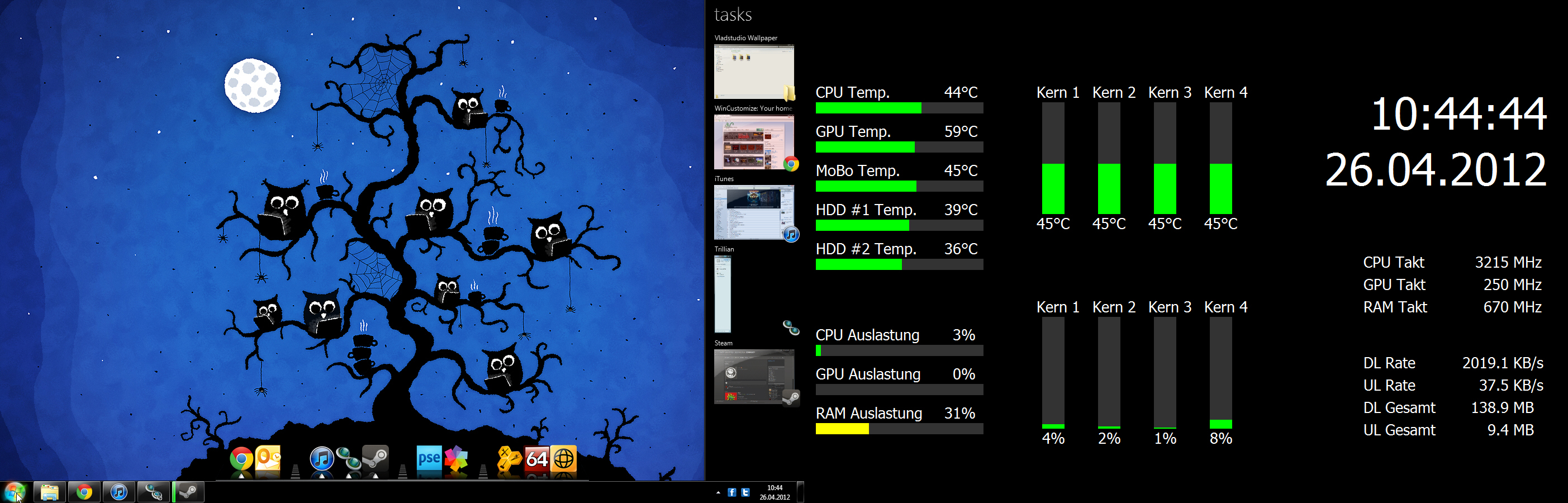
Secondary Monitor: Full Screen Sensor Panel made with AIDA64. I think it looks pretty cool.
Reply #138 Thursday, April 26, 2012 5:33 AM
Needs an smx too. Nothing like a well rounded Suite. Hey Jim....you know I like working with wood.

Reply #139 Thursday, April 26, 2012 2:02 PM
Hi
Okay maybe its just my comp, but will ask. this morning all the post images in this forum are coming in full size, not reduced in size like they normally showup.
Normally they say, reduced in size by say 50% +/-. Then you click on the image to see it full screen.
Anyone else having htis issue?
Windows 7 Pro x64, Radeon HD5770, IE9.
GigaByte69
Reply #140 Thursday, April 26, 2012 2:15 PM
Try holding down the CTRL key and adjusting the size with the plus or minus key.
Please login to comment and/or vote for this skin.
Welcome Guest! Please take the time to register with us.
There are many great features available to you once you register, including:
- Richer content, access to many features that are disabled for guests like commenting on the forums and downloading skins.
- Access to a great community, with a massive database of many, many areas of interest.
- Access to contests & subscription offers like exclusive emails.
- It's simple, and FREE!
|
|
Page 7 of 8 | |
|
|---|
Reply #121 Saturday, April 21, 2012 5:54 PM
Okay?