






































Post-apocalyptic (Fallout style) WindowBlinds
Tuesday, February 28, 2012 by Denis55 | Discussion: WindowBlinds
I've just discovered WindowBlinds and I LOVE IT! My PC looks awesome now, and has a whole new feel to it. And this site is full of awesome people an their awesome work. However, I've been search for an post-apocalyptic styled WindowBlind (something like this, with a retro-futuristic, Fallout feel to it), but unfortunately I couldn't find any. Are there similar themes I'm missing, or is someone interested in making something like that? That would really be my dream theme. 
Thanks in advance for your replies!
Reply #2 Tuesday, February 28, 2012 8:11 AM
Not sure if my Engine Room stuff would fit the bill, but you could take a look......... It's all quite old now though.......... https://www.wincustomize.com/explore/all/search/engine+room


Reply #4 Tuesday, February 28, 2012 8:33 AM
Oh yeah!
Come on Bry ..... this is right up your ally.
EDIT: I downloaded the WB. I know it was made for XP. I want to see if it will run on Win7.




Reply #8 Tuesday, February 28, 2012 11:55 AM
Wow, I knew this was a helpful community, but I didn't expect this many replies in such a short time.
@DrJBHL: I've checked out those guys' work and they really look impressive, but I'll wait for Boxxi's reply to see if he's interested in giving it a shot before I PM them.
@BoXXi: Your Engine Room blind looks great, but it's not quite what I was hoping for. I'm currently using this one and it's awesome (it even has a nice sound scheme) however it looks a bit too "futuristic" and "clean" for what I was looking for. If Engine Room and neOS had a child though, with a few rusts, worn-out buttons and nuclear signs here and there, I think it would be spot on!
Reply #9 Tuesday, February 28, 2012 12:09 PM
Hi Denis55: I don't think I'd be able to do this...... sorry  I hope someone does though........


Reply #13 Tuesday, February 28, 2012 2:22 PM
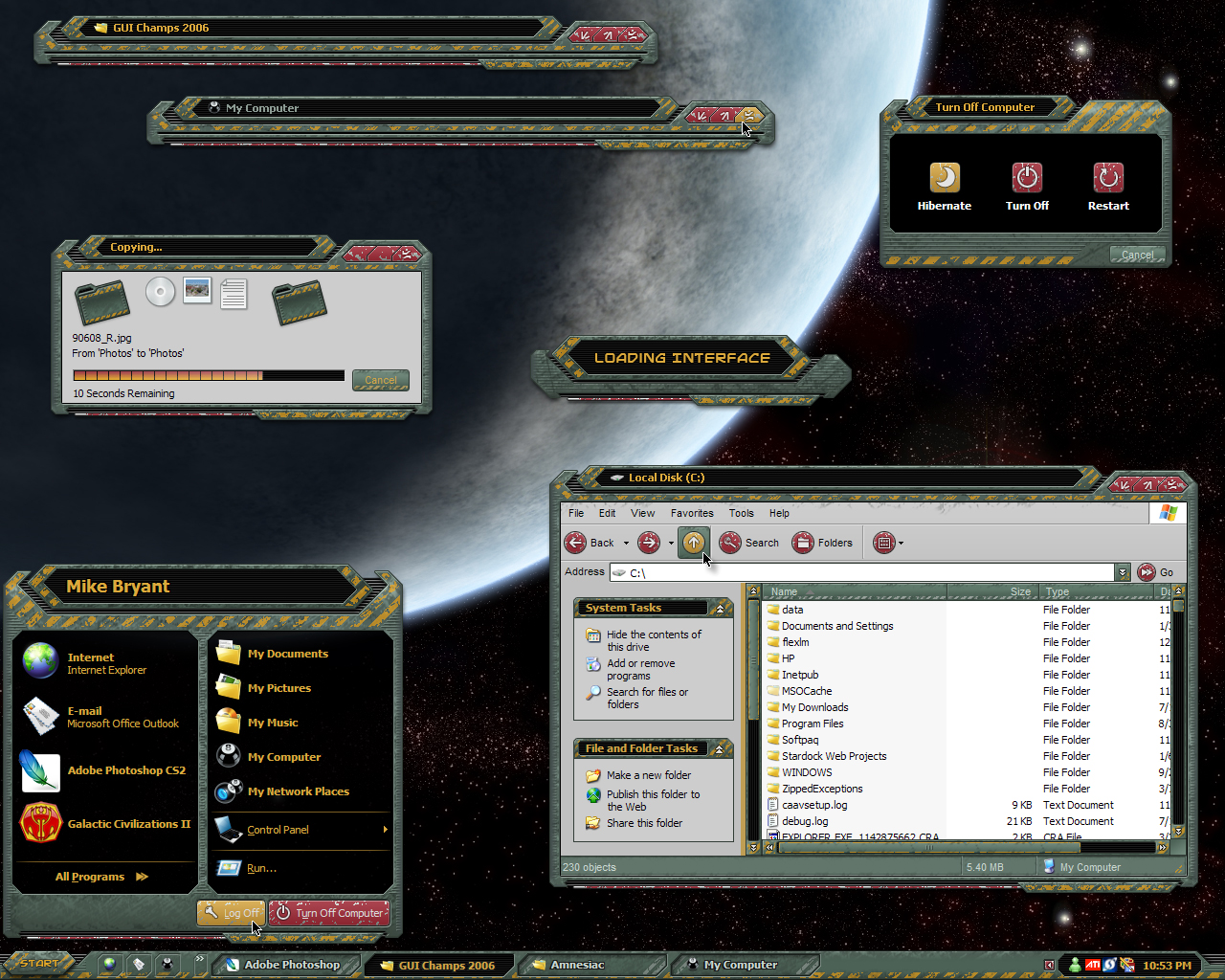
Xiandi's Pressurized is one. https://www.wincustomize.com/explore/windowblinds/6928

Reply #16 Wednesday, February 29, 2012 12:21 PM
The Fett skin looks awesome, and it's closest to what I was looking for yet. Thanks a million guys!
Reply #17 Wednesday, February 29, 2012 12:52 PM
I just tried "Fett" with my "BoBBle" texture applied to it, and it looks really good!! Give it a try.......... https://www.wincustomize.com/explore/windowblinds_textures/24/
Reply #18 Thursday, March 1, 2012 5:43 AM
@Lantec.....the link takes you to a pic of Fett, not to the WB.
Reply #19 Thursday, March 1, 2012 6:17 AM
Here's the link to the Windowblind "Fett": https://www.wincustomize.com/explore/windowblinds/5938/
(sorry... I should have posted that link back in #12).
And that's the truth. Just tried it, Bry, and it looks great! 
Please login to comment and/or vote for this skin.
Welcome Guest! Please take the time to register with us.
There are many great features available to you once you register, including:
- Richer content, access to many features that are disabled for guests like commenting on the forums and downloading skins.
- Access to a great community, with a massive database of many, many areas of interest.
- Access to contests & subscription offers like exclusive emails.
- It's simple, and FREE!
Reply #1 Tuesday, February 28, 2012 7:47 AM
Glad to hear your enthusiasm, Denis55. Also, welcome to the Community. While I have been around for awhile, I don't remember seeing anything like that. I think you could pm Snowman (who has the hugest archive of skins that I know of).
You could also pm Vampothika and neone6 who live in close proximity to each other. Vampothika loves a challenge and is a Master Skinner. neone6 has come on the scene more recently, but shows talent and flare in his skinning. I think they're currently working on a painting project... but hive it a try. Another Master Skinner, 2of3 might take on the challenge.
Since you're new, to pm a member, use the search box on the upper right and search the member. Then, click on the member's nickname just over his/her avatar and from the drop down menu, choose "Private Message" (pm).