






































Two browsers same problem. Doc says I killed IE. Problem solved.
FF and Chrome
Tuesday, February 14, 2012 by Uvah | Discussion: Personal Computing
Just a few minutes ago I opened FF and the top of the page where the shutdown, min and max buttons are was gone. The forward and back buttons were still there though. I closed FF and opened Chrome and got the same thing. Even going online they both experienced the same problem, opening an ew tab every time I press a key, it didn't matter which key either. Had the same problem with opening windows. They didn't open fully with part of the top missing and I also noticed that WindowBlinds reverted back to classic windows.
Then I remembered the update for Batch Tuesday. So I run the update, 10 important 3 optional, and click on install updates. Seven completed successfully and three failed. Tried to do the update again and got this error code - 800-B0100. It has something to do with the windows installer module. Okay... now I'm at Microstuff's download center and in another tab I have KB947821 which is the Windows Update Readiness Tool which scans your system for missing or corrupt files. It weighs a whopping 315 mb!! Is this for real?
Did a reboot and that seemed to cure the browser problem but I'm wondering what the hell's going on?



Reply #4 Wednesday, February 15, 2012 9:23 AM
@Doc ...... you slay me. lol
@yrag ..... Clicked on the link and it took me to the MS support page. Recommended I download and install Fix-it Cleaner. Did that and at first it worked. Fixed some issues but ... to fix remaining issues, the original problem, Pay this amount. Screw that! I uninstalled it and got rid of it. Then I ran my maintenance utilities, Malware Bytes, CCleaner, Glary Utilities. I figured one of them was gonna find it. After all that I went to system restore and took it back to before I installed Fix-it Cleaner .... to yesterday. To make a short story even shorter my stuff worked along with the restore. Updates are back up and running. Downloading updates now. The readiness tool is among them. Thank you yrag for the link. it was still helpful and Doc ...... lol.
Reply #5 Wednesday, February 15, 2012 9:51 AM
Glad it was fixed... can't help but wonder if it was a virus that caused it, and removing it just didn't return things to the way they were before.
There is a utility (tiny) which does that. http://www.thewindowsclub.com/repair-fix-windows-updates-with-fix-wu-utility
There's also: http://www.thewindowsclub.com/repair-fix-windows-7-vista-problems-with-fixwin-utility
Reply #6 Wednesday, February 15, 2012 11:18 AM
Update ..... three updates I think are corrupt. KB2633873, KB2640148 and KB2607675. There were other updates with them that installed without a problem. Also ... there is another thread with some one having the same problem with his browser.
Reply #7 Wednesday, February 15, 2012 11:57 AM
How to fix that kind of thing:
If you tried the utility I posted for you and that didn't work, then look here: http://answers.microsoft.com/en-us/windows/forum/windows_other-windows_update/corrupted-windows-7-update-file/5389510b-8c73-412f-8760-7db61f388b1f
Please do the following and post the error log. http://www.sevenforums.com/tutorials/24367-windows-update-view-update-history-details.html?filter

Reply #8 Wednesday, February 15, 2012 12:13 PM
How do I reset Windows Update components?
To have us reset the Windows Update components for you, go to the "Diagnose using automated troubleshooter" section. To reset the Windows Update settings yourself, go to the "Let me fix it myself" section.
Uvah, this is what you are supposed to download. It is not called "Fix IT Cleaner". I do not know what you downloaded but there is no charge, ever, for Microsoft "Fix-It" solutions. Sounds like you have some sort of malware redirecting your browser.
Reply #9 Wednesday, February 15, 2012 4:46 PM
@Frankief ...... Went that route already, its where I got that Fix-it Cleaner from. I think you're right about being redirected though. I installed and ran that repair tool, in fact I still have it. Also they gave me FixWU and FixWin, both from MS. So far nothing has worked. That's why I think they're corrupt. There were other updates that installed with no problem. Is there a way to delete these three?
Reply #10 Wednesday, February 15, 2012 4:54 PM
No....they're not. I have no idea what the hell you're doing, but whatever it is, it's wrong.
http://support.microsoft.com/kb/947821
Pick one at the bottom and run it.
Reply #11 Wednesday, February 15, 2012 4:54 PM
[quote who="DrJBHL" reply="7" id="3083414"]If you tried the utility I posted for you and that didn't work, then look here: http://answers.microsoft.com/en-us/windows/forum/windows_other-windows_update/corrupted-windows-7-update-file/5389510b-8c73-412f-8760-7db61f388b1f
Please do the following and post the error log. http://www.sevenforums.com/tutorials/24367-windows-update-view-update-history-details.html?filter[/quote]
If what yrag said to do doesn't work.
Reply #12 Wednesday, February 15, 2012 5:44 PM
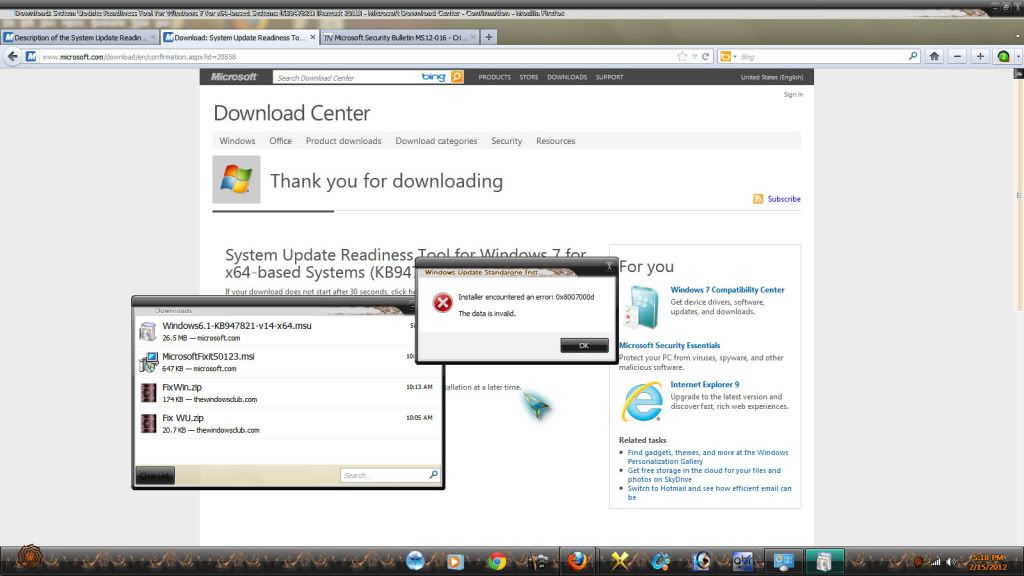
Downloaded the Readiness tool and got this. That same tool was one of the updates and it installed successfully.

Reply #13 Wednesday, February 15, 2012 5:58 PM
I have had that problem before Uvah I just downloaded the individual updates and run them and they installed fine links are below
KB2633873 Standalone installer - http://www.microsoft.com/download/en/details.aspx?id=28881
KB2640148 Standalone installer - http://www.microsoft.com/download/en/details.aspx?id=28456
KB2607675 Standalone installer - http://www.microsoft.com/download/en/details.aspx?id=27788
Reply #14 Wednesday, February 15, 2012 6:07 PM
Update # 2 .....
Went to the MS download site and downloaded KB2633873. This time it installed without a problem. Why it wouldn't install the regular way is beyond me. There is still one more, KB2633870, downloaded and installed successfully. Hope I'm done.
Reply #15 Wednesday, February 15, 2012 6:26 PM
The only one that is for my machine is the first. Reason the others did not install is because they are for x86 systems not x64. My updates are complete. Thanks yrag, Frankief, Disturbed Computer and of course good ole DrJBHL.
BTW ... one of them was UGH! IE9. Did it and done.
Reply #17 Wednesday, February 15, 2012 7:05 PM
I use Firefox, sometimes Chrome. I never use IE but the one on my machine was IE8. Now its IE9. One of the tools was for resetting IE to the default settings. That worked but made no difference. That's the part I don't understand. Both browsers having the same problem. I can understand one but not both. Did you check out the other thread?
https://forums.wincustomize.com/417811
Please login to comment and/or vote for this skin.
Welcome Guest! Please take the time to register with us.
There are many great features available to you once you register, including:
- Richer content, access to many features that are disabled for guests like commenting on the forums and downloading skins.
- Access to a great community, with a massive database of many, many areas of interest.
- Access to contests & subscription offers like exclusive emails.
- It's simple, and FREE!
Reply #1 Tuesday, February 14, 2012 8:23 PM
Bump please. Updates not working.