







































Need drive clone recommendations
Friday, January 20, 2012 by LizMarr | Discussion: Personal Computing
Poor laptop. I'm not sure what I did but with every restart it runs CHKDSK and finds more things to correct. Speedfan tells me that the Current Pending Sector Count and Uncorrectable Sector Count are pegged - something about electrical failure (huh?) I need to move everything to a different drive. When I looked at all the clone program choices my eyes crossed. I already have 50 year old eyes that have trouble seeing. I'll deep format the current drive and put it into the spare, which is where I'm getting the replacement. I think maybe the spare's HD is 400gb against my current HD 500gb. Hum, anyone give me a loan for the TB one on New Egg? (just kidding) I think I have a few days before meltdown, but I have said that before with other drives. I'm just finishing a data backup (in duplicate) but I didn't include my Stardock folders (bad me, but I figure I can download them again)

Reply #3 Friday, January 20, 2012 12:05 PM
Another vote for Acronis here. It's the only disk cloning software I use.
I'd back up your important docs and pics first, before anything else happens. <edit> I see you've already done this. </edit>
You could go ahead and try to clone it, but if you're having sector errors, it might not work.
You can try to take an image of the drive and if that also fails, try Spinrite in recovery mode (2). http://www.grc.com/sr/spinrite.htm
It might be able to recover the the bad sectors and then allow a clone or image.
I'm running it as we speak on my cousin's laptop. Fingers crossed. 
Reply #4 Friday, January 20, 2012 12:52 PM
If it's a Seagate drive, you can use seatools to repair/block bad sectors and in some cases, as in my recent experience, the drive continues to work.
At least it may give you a chance to save data.



Reply #7 Friday, January 20, 2012 11:40 PM
It's Win 7 x64 that has been totally stable for at least 6 years. Any problems I created by messing with it. I've been manually backing up onto two 500gb externals - duplicates. I had one I was using then got a nifty-slick new external so I'm using them both. Most of what they have are photos, downloads (why, I have no idea) and documents. Plus a little email (Pegasus Mail for Windows) I save what I can't replace. If I ever had a fire I could grab one and have all my photos for the last ten years. (the rest are on a server that I haven't fired up in years and really need to) I really like designing all my web sites now using WordPress - nothing I absolutely have to back up on my PC.
I have no idea how an image works, I envision twenty-million DVDs.
Reply #8 Saturday, January 21, 2012 12:17 AM
A disc image can be saved onto your hard drive, preferably a storage drive. It will be a little smaller than actual size of the used portion of your drive. I store mine on an external drive I made from a laptop drive and an external enclosure. Acronis, and other apps, make it easy to make, and restore from, a disc image.


Reply #10 Saturday, January 21, 2012 3:30 PM
The machine has.... it came with Windows Vista Pro (or whatever it was back then) I keep adding memory and giving it a new system. This Windows 7 I got as soon as it was officially released. I didn't get in on the public beta. I've got 8 on the laptop whose drive I think I will steal. I'd like to buy a new one but have to do with what I have. I hate Windows 8 BTW and I will probably never buy it.
As far as back from the future is concerned... Wouldn't you like to know?
Reply #11 Saturday, January 21, 2012 7:34 PM
Well...I had the Beta and it certainly wasn't 6 years ago....looks like my dl dates to May, '09....and the iso calls itself '...090421...' which I expect is 21st April '09. You can't have had 7 for that long...
Reply #12 Saturday, January 21, 2012 10:12 PM
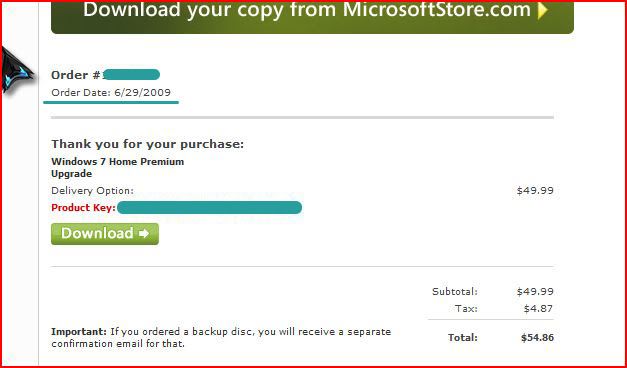
I bought Windows 7, pre-ordered, from Microsoft for $49.00 while it was still in beta.
Note the date.
Reply #13 Saturday, January 21, 2012 11:07 PM
Now my husband's computer has the same symptoms. At least his has an excuse - six years in the middle east where water is just a memory for a guy from the PNW. Anyone know if there is a bug going around? These computers been running AVG and getting scanned regularly.
Monday, July 13, 2009, 20:20:08 That's when I created the directory the FIRST time I installed it. I installed it again 3/31/2010, 17:07:53. I can't remember why, I only remember swearing (a lot)
I can't remember when I bought the laptop. All I know was that I had the only Druid healer in a raid in EQII and my video card died on my other laptop. So I excused myself and went down to staples and grabbed the first half-way suitable laptop they had. I got back and got EQII transferred over (one of those lovely games that don't need to be installed) and was only 15 minutes late for the raid. Unfortunately, they got another Druid from the general population. But they got me in after the third boss....
Other laptop is the one I have Windows 8 on. But I still won't use it for anything important due to a design flaw that caused the video to die in the first place.
Please login to comment and/or vote for this skin.
Welcome Guest! Please take the time to register with us.
There are many great features available to you once you register, including:
- Richer content, access to many features that are disabled for guests like commenting on the forums and downloading skins.
- Access to a great community, with a massive database of many, many areas of interest.
- Access to contests & subscription offers like exclusive emails.
- It's simple, and FREE!
Reply #1 Friday, January 20, 2012 2:21 AM
What OS are you on, LizMarr?
Have you been backing up to an external drive or do you have any restore points?
Sounds like the hdd is dying.
Best cloning software? Acronis is the best, but if you're looking for a free one: EASEUS: http://www.todo-backup.com/business/free-backup.htm
by far the best of them. I've reviewed it's big brother in the past.