






































Andromeda WB - Work in progress.
www.maxstyles.com
Thursday, December 8, 2011 by vStyler | Discussion: WinCustomize Talk
Dreamed this up last night, more to follow....
..lots more... 
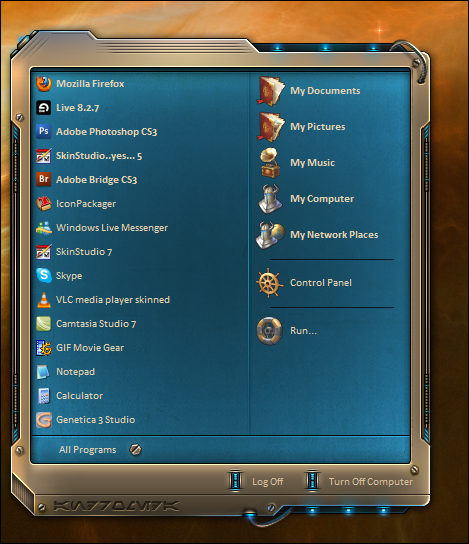
Subject to change*
 |
|
Page 6 of 22 | |
|
|---|
Reply #102 Wednesday, December 14, 2011 10:40 PM
That's what the old folks called their laying hens. The ones that produced eggs.

Reply #103 Wednesday, December 14, 2011 10:44 PM
Heh... once in a while, i may name, or group some layers, I think maybe i did a couple on this project, but, for the most part, I find naming, grouping, takes more time than I spend finding the layers by memory.... I'm not naming 250+ layers  so, to that end, that's my illogical logic (See Fuzzeh)
Here's my method... and.. this may or may not help folks..
1. If i want to access a layer.. I..... click on it !  , yes, I know its profound, but that's my science.
2. If a layer I want, is under another layer.. I just click on the upper layer, then travel down thru the layers palette until I find it.
3. I typically.. just remember, after working on something, where layers are, in the layers palette. sort of memorization thru attrition.
4. Photoshop does not install this at default but ALWAYS ALWAYS make sure that when u have the move tool (black arrow) selected, that in the options bar above you have 'Show bounding box" \ "show transform controls" checked (depending on ur PS version) Secondly make sure you have " Auto select" checked as well.
without these being checked... I'd be lost too.


Just a couple of tips from an old and weary skinner.
Off to bed... thanks folks. 

Reply #104 Wednesday, December 14, 2011 11:51 PM
 Thanks!

Reply #105 Thursday, December 15, 2011 12:47 AM
don't tell me you've been doing all that blind work and not known that..... oh... there should be a li'l book of helpful hints like this... this one's a huge sense of humour saver.... 

Reply #106 Thursday, December 15, 2011 6:44 AM
supersweet i asked you if there will be an antrazite version : why did i even ask just had a look at saturation turned it down a bit and there i was - why did i even doubt that it would work 
NOW i want the final product 

Reply #107 Thursday, December 15, 2011 7:02 AM
This will kill ya, John.
Screeny of the layers in a typical psd for me:

Each group has sub groups so I can easily hide and show different layers separately. Ask Jim or Cyndie.....I'm simply anal about these 
Reply #108 Thursday, December 15, 2011 7:55 AM
Don't get me wrong, If i do a freelance job, or something someone else is paying me, regarding a PSD, my Layer palette is extremely organized.. but if its just me... I work faster without doing all that.


Reply #109 Thursday, December 15, 2011 8:11 AM
I went through the psd and let me tell ya ... I am very impressed. All the subtle variations. Right down to the dig marks. Amazing! That's got to take a shitload of time and patience. With a start menu like this I can just imagine the rest of the WB. Freakin' awesomeness!!!

Reply #110 Thursday, December 15, 2011 2:32 PM
This skin is terrific!...right up my alley,...if my alley were classier,and in a better neighborhood. Couldnt have done it better John. 

 That's why I have been naming all my layers, makes them easier to find, lol.
Reply #113 Thursday, December 15, 2011 8:52 PM
Saved for future reference.


Reply #116 Friday, December 16, 2011 12:37 AM

Reply #117 Sunday, December 18, 2011 12:59 PM
Wow, This went from amazing to perfect. I am seriously looking forward to seeing the final product. This is great work John as expected from a master skinner . I like the tint you added to it too gives it more depth.

Reply #119 Tuesday, December 20, 2011 8:49 PM
i guess you're allowed some time off for the Christmas madness..... 
Reply #120 Tuesday, December 20, 2011 9:08 PM
Indeed, Syndey is right. Enjoy Christmas and then get back to work on it  . Merry Christmas!
Please login to comment and/or vote for this skin.
Welcome Guest! Please take the time to register with us.
There are many great features available to you once you register, including:
- Richer content, access to many features that are disabled for guests like commenting on the forums and downloading skins.
- Access to a great community, with a massive database of many, many areas of interest.
- Access to contests & subscription offers like exclusive emails.
- It's simple, and FREE!
|
|
Page 6 of 22 | |
|
|---|
Reply #101 Wednesday, December 14, 2011 10:39 PM
See next reply...lol.