































DeskScapes 3.5 and 4 New Master Dynamic Dreams Released
Wednesday, November 2, 2011 by Island Dog | Discussion: WinCustomize News
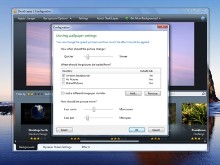
Today we release DeskScapes 3.5 which is an application that lets users have animated wallpapers on their Windows desktop. These animated wallpapers (also called .dreams) can be video-based or dynamically generated for a wide variety of content. DeskScapes can also apply effects to .dreams and static wallpapers as well.
New in DeskScapes 3.5:
- Added four new wallpaper effects (blue colors only, green colors only, red colors only, and desaturate)
- Added option to keep only a range of colors in a static wallpaper (Colors tab)
- Added support for new WinCustomize Master Skin premium dreams
 |
 |
We have also released 4 new Master Dreams from Stardock Design! These in addition to other Master Dreams available on WinCustomize give you a great choice of premium animated wallpapers to choose from.
- Colored Lights
- Colored Desktop
- Drips
- Moving Wallpaper
|
|
|
|
|
|



DeskScapes is available for $19.95 or part of the Object Desktop suite of desktop enhancements. Visit the DeskScapes website for more information and downloads.
https://www.stardock.com/products/deskscapes/
Video demo of new Dynamic Dreams.
Note: It's difficult to record HD video of the dynamic dreams. These small previews might appear slow or jumpy, but they are completely smooth when being used on the desktop. It's just a limitation of video software.
 |
|
Page 1 of 2 | |
|
|---|
Reply #2 Wednesday, November 2, 2011 1:47 PM
Have you released an update to the SDK to support this? Or are about to?
There is no need for a new SDK. It was related to the Stardock premium dreams only not generic dynamic dreams.
Reply #3 Wednesday, November 2, 2011 2:29 PM
I have to say, I think you really need to post a video preview of these dreams, especially since they're paid skins.
I know others that feel the same, I won't even download most free dreams without a video preview.


Reply #5 Wednesday, November 2, 2011 3:09 PM
The moving wallpaper sounds pretty cool. Those are my favorites - the ones that integrate with various wallpapers or images (Like Stars, Snow, Collage). Gives me something to play with. 

Reply #7 Wednesday, November 2, 2011 4:46 PM
Would be nice to have a video preview of these so we know what we are buying, don't you think?
Reply #8 Wednesday, November 2, 2011 5:22 PM
The moving wallpaper one really is quite nice(as are the others), but then I would say that as I wrote all of them!
Each of them has the option to show unique content per monitor for multiple monitor users which is a plus and two of them default to a very slow speed so they do not distract you at all.
Reply #9 Wednesday, November 2, 2011 5:23 PM
Updated with video demo.

Note: It's difficult to record HD video of the dynamic dreams. These small previews might appear slow or jumpy, but they are completely smooth when being used on the desktop. It's just a limitation of video software.
Reply #11 Wednesday, November 2, 2011 6:02 PM
If you had issues with adding .dreams to the cart, please try again as we have resolved the issue. 


Reply #13 Wednesday, November 2, 2011 6:31 PM
I'm a little biased (as I pushed for the development of DeskScapes for years before it came out), but I reorganized my wallpaper folders just for the Moving Wallpaper dream (as I liked it so much).

Reply #14 Wednesday, November 2, 2011 7:05 PM
i can't install this update due to the installation process stating it can't install with an earlier version of Deskscapes already on my rig. OK, that's fine and dandy but I can't uninstall the earlier version because I no longer have Impulse.
Reply #15 Wednesday, November 2, 2011 7:58 PM
Hey ID...I believe you were wrong about it being safe to uninstall Impulse.
Here's what I get when I try to update

Here's what i get when I try to uninstall the existing version.

Damn...now I have to reinstall Impulse to update DeskScapes.
Edit: MadDeez beat me to it...but at least I included pictures.
Update: Well I downloaded and installed Impulse GameStop and before I could sign in a balloon notification popped up in the taskbar saying there was a DeskScapes update. I signed in and updated to 3.5 within Impulse GameStop.
The odd thing is Impulse GameStop installed the update on top of the old version without uninstalling DeskScapes.

Reply #16 Thursday, November 3, 2011 5:57 AM
Great stuff here.. I can't wait to update to 3.5 and get these Dreams  (My schedule has me tied up until Friday
  ).
).
This is the problem I have all the time. Looked at it work...Jumpy... Got home, on the desktop...Smooth. 

Reply #17 Thursday, November 3, 2011 6:53 AM
Damn...now I have to reinstall Impulse to update DeskScapes.
Update: Well I downloaded and installed Impulse GameStop and before I could sign in a balloon notification popped up in the taskbar saying there was a DeskScapes update. I signed in and updated to 3.5 within Impulse GameStop.
The odd thing is Impulse GameStop installed the update on top of the old version without uninstalling DeskScapes.
Same problem this morning through installing the new CursorFX Update. I reinstalled GameStop, let it install the update, then uninstalled first CursorFX and afterwards GameStop. Now I installed CursorFX from my account.
I think so you can get a clean install of DeskScapes too.

Reply #18 Thursday, November 3, 2011 7:40 AM
Who let this guy in? Just cos he's Number 2 ?
Hi, Kris....

Reply #19 Thursday, November 3, 2011 6:12 PM
Pretty cool update, I like a lot the Colored Lights .dream

Reply #20 Thursday, November 3, 2011 7:42 PM
I still have Impulse installed so I tried to use it to update Deskscapes but it says my Object Desktop subscription has expired. Well it did but I renewed it a month ago. Now what do I do to install the Deskscapes update?
**SOLVED**
Impulse allowed me to uninstall the old version and then I was able to install the update.
Please login to comment and/or vote for this skin.
Welcome Guest! Please take the time to register with us.
There are many great features available to you once you register, including:
- Richer content, access to many features that are disabled for guests like commenting on the forums and downloading skins.
- Access to a great community, with a massive database of many, many areas of interest.
- Access to contests & subscription offers like exclusive emails.
- It's simple, and FREE!
|
|
Page 1 of 2 | |
|
|---|
Reply #1 Wednesday, November 2, 2011 1:29 PM
Quote : "Added support for new WinCustomize Master Skin premium dreams"
Have you released an update to the SDK to support this? Or are about to?