






































Lost Format of Window Frame ....stuck.
Monday, July 25, 2011 by Casperrr | Discussion: Skinning
HI
Stuck here...
Have been through every frame section and setting and can not figure out what I have done to loose the Window Frame on the left and the rest of the window that remains at default.
Thanks for directions to correct section.



Reply #3 Tuesday, July 26, 2011 2:33 AM
HI
Thanks for the reply.
It is one I am building-
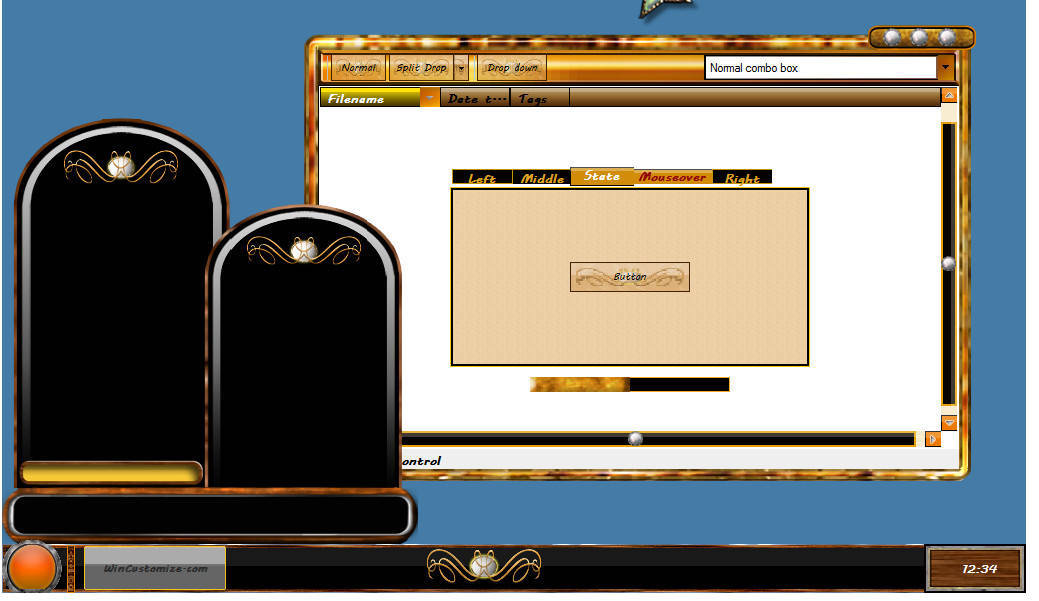
I thought it was the Tools Window settings - but it is not -
As you can see in the background of the screenie -
the window frame has taken (all buttons, tabs, et) but the application frames are whacked - and where that left side is coming from...got me.
Maybe just rebuild the skin -
Thanks for any help.
Casperrr
Reply #4 Tuesday, July 26, 2011 3:51 AM
Found issue -
Was the left frame in the UIS2 section -
Thanks for the replies
Please login to comment and/or vote for this skin.
Welcome Guest! Please take the time to register with us.
There are many great features available to you once you register, including:
- Richer content, access to many features that are disabled for guests like commenting on the forums and downloading skins.
- Access to a great community, with a massive database of many, many areas of interest.
- Access to contests & subscription offers like exclusive emails.
- It's simple, and FREE!
Reply #1 Monday, July 25, 2011 2:27 PM
That truly appears to be a skin issue,Is this a skin you downloaded or are you building it?