








































Sysmetrix 3.45 Released
Weather now working
Monday, March 21, 2011 by JuniorCrooks | Discussion: WinCustomize Talk
Just wanted to let everyone know that there is a new update to Sysmetrix which has fixed the weather problem. Head on over to this link to get your new version. http://www.xymantix.com/sysmetrix/download
 |
|
Page 1 of 2 | |
|
|---|


Reply #3 Tuesday, March 22, 2011 6:39 AM
Thank you so much for this JC. I was hoping someday they'd update it.
Reply #5 Tuesday, March 22, 2011 8:52 AM
You do realize that there will be a lot of updating to do. Now that we finally got this I plan on updating my smx's. Tons of fun.



Reply #7 Wednesday, March 23, 2011 11:41 AM
Been waiting for this. Been a sysmetrix user and fan for a long time. Thanks for the notice. 
[edit] Just installed the new 3.45 version and it works as great as it ever did. At first, it wouldn't show the weather 'til I uninstalled ver. 3.44, then after installing the new version, it just ticks over like a fine watch. Thanks, Mr. Decker, for continuing to keep sysmetrix alive and well.
My favorite skin is still pinchecl's Satiation Vertical. Can be configured just as I wish and is transparent and unobtrusive after just a few tweaks for preference. Thanks, Cliff!
Hard to believe in all the world of necessary upgrades and incompatibilities that sysmetrix is still is as good and better than ever. A fun program. My favorite.
Reply #8 Wednesday, March 23, 2011 12:59 PM
And a whole lot of fun to play with. Now that the weather is working again I plan on exploring all the possibilities.
Reply #9 Wednesday, March 23, 2011 7:08 PM
Hang on there guys. I like sysmetrix too but it is still missing some functionality. Things like MBM no longer work because it is outdated. The solution would be to recode and use the speedfan plugin in place of the MBM plugin. Also support for multi core processors would be a great plus. I have quad cores and some people have more. Most modern computers have more then 1 core so the cpu function in sysmetrix is more for eye candy instead of functionality. There is an option for cpu average but not sure how practical that is.
I enjoy sysmetrix but as good as it is it could be great with some updates.
Reply #10 Wednesday, March 23, 2011 7:23 PM
I know how you feel but since I only have the single core it works for me. Granted it could use some updates but since it took a little over a year for this one I'll take it. Perhaps an email to xymantix will answer your question.
Reply #11 Wednesday, March 23, 2011 7:45 PM
No Uvah I have no question that needs answered. I was just making an observation. I am sure Nick is busy and if he wants and has the time he will make some updates. I am also just happy to have the weather working but if he has used the same source that too might be short lived. Lets hope not.

Reply #13 Wednesday, March 23, 2011 8:11 PM
If you gave the link because you thought I was complaining and you are making the point it is free so I should not be complaining then your wrong. I am not complaining. I have been a big supporter of sysmetrix for a long time and it is my favorite system monitoring tool. I have made about 40 skins and have a few of them available for download. I was only pointing out that it could be even better with some updates and I see nothing wrong with that.
On the other hand if your just providing the link for people to download it then thank you but I already done so in my description.
Reply #14 Wednesday, March 23, 2011 8:19 PM
I would like to see theme setting support for an arbitrary WMI string which would allow access to virtually any system information. Of course you would need to know the WMI string specification, but this information is readily available from Scriptomatic V2 or the System Explorer WMI browsers.
I have sent email to Xymantix before, but I have never received any response. Maybe someone at Wincustomize knows Nick and can pass on my request.

Reply #15 Wednesday, March 23, 2011 8:44 PM
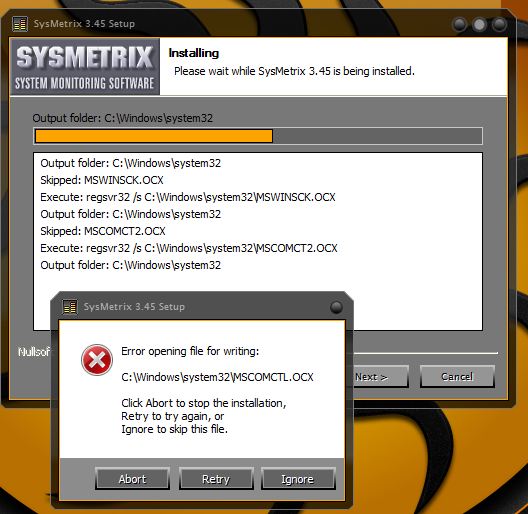
Very odd. I downloaded, tried to install, and received errors. I had to abort the installation. I then uninstalled 3.44 successfully, tried to install 3.45, and received the same errors. I'm running Windows 7 64-bit.
Reply #16 Wednesday, March 23, 2011 8:51 PM
The download may have borked for some reason. Try the download again and see if that cures it. Other than that, no clue.
Reply #17 Wednesday, March 23, 2011 8:57 PM
Can you post a screenshot of the error happyboy? I recently installed 3.45 with no problems and I have the same OS you do.
Reply #18 Wednesday, March 23, 2011 9:07 PM
I know it is kind of off topic but funny things happen when I refresh this page. This always shows up in the comment box. Using FF

Reply #19 Wednesday, March 23, 2011 10:21 PM
Thank you for your help!
Here is a screen shot of the error message:
Reply #20 Wednesday, March 23, 2011 10:34 PM
happyboy I ran into that same error. After uninstall version 3.44 did you run a clean up program like CCleaner? I think I even rebooted and was able to download 3.45 without a problem. I'm also running Windows 7 64 bit. Give it a try.
Please login to comment and/or vote for this skin.
Welcome Guest! Please take the time to register with us.
There are many great features available to you once you register, including:
- Richer content, access to many features that are disabled for guests like commenting on the forums and downloading skins.
- Access to a great community, with a massive database of many, many areas of interest.
- Access to contests & subscription offers like exclusive emails.
- It's simple, and FREE!
|
|
Page 1 of 2 | |
|
|---|
Reply #1 Tuesday, March 22, 2011 12:01 AM
Thanks JC!