





































Rainmeter Gallery Accepting Submissions
Friday, January 14, 2011 by Island Dog | Discussion: WinCustomize News
The new Rainmeter gallery on WinCustomize is open but in private mode right now. We are accepting Rainmeter skin submissions via normal upload, but they will remain in moderation until we get enough to launch.
More information about Rainmeter here - http://rainmeter.net/RainCMS/
If you have some Rainmeter skins, please head over and get them in our galleries!
 |
|
Page 4 of 6 | |
|
|---|

Reply #62 Saturday, January 22, 2011 6:53 PM
"ABP isn't installed yet, when you first install rainmeter."
RND it is installed if you choose it. Let me make this clear. When you download rainmeter at the end of the installtion I believe it is the last window it has 2 checkbox's. I am going from memory here but I believe those 2 boxes say launch rainmeter and the bottom box says download more skins. Make sure they are both checked. Then when you click OK or close, (again going from memory) a rainmeter website page will open with 3 themes for you to choose. They are Gnometer, Enigma, and ABP . Click on ABP and another page will open up showing the skin in detail with a box in the lower right of the screen that says click here to install the release version. Click it and it will download. When it is finished downloading a raininstaller window opens that has ABP skin info and 2 boxes that say Apply ABP theme and launch rainmeter automatically after install. Make sure they are both checked and click install and ABP will be launched. The instructions I gave are for the 1.4 beta but I think it is the same for 1.3.
As far as your zip program is concerned I think your problem is winrar has detected .rmskin format as .zip so the installtion went screwy. Make sure to use 7-zip and I believe you will not have the problem again.

Reply #63 Saturday, January 22, 2011 8:34 PM
The instructions I got say to extract the zip to the rainmeter folder in my documents if it isn't a rlskin format. It don't say anything about sorting the files inside the zip.
Just a question, why did you choose the zip version? I used the installer version and everything worked like a charm right from the start.
Reply #64 Saturday, January 22, 2011 8:42 PM
The skin itself was a zip, Karen. Not the installer for the program.
Reply #65 Saturday, January 22, 2011 9:01 PM
The skin itself was a zip, Karen. Not the installer for the program.
Oh...I chose the "download recommended skins" check box, and it loaded ABP for me. After that, I installed Gnometer, and it automatically installed, also. There was no zip to extract or put somewhere. Are you getting the downloads from the official Rainmeter site, or from DeviantArt?
Reply #66 Saturday, January 22, 2011 9:05 PM
Jim ABP only comes in .rmskin format which confirms my initial statement that winrar is detecting it as a zip file. I repeat again follow the instructions I gave and you will not have any problems. The issue is your using winrar to launch the rmskin file and it detects it as a zip file.
Edit. I should say that if you choose to install it the way I said the file is only in rmskin format. There might be zip formats with ini files out there but why anyone would choose those when you can choose the much easier rmskin format is beyond me.
Reply #67 Saturday, January 22, 2011 10:56 PM
Edit. I should say that if you choose to install it the way I said the file is only in rmskin format. There might be zip formats with ini files out there but why anyone would choose those when you can choose the much easier rmskin format is beyond me.
Well, I don't want to uninstall winrar. I don't see an option to say which is default.
Reply #68 Saturday, January 22, 2011 11:36 PM
I am not saying to uninstall winrar. If there is not an option in 7-zip settings to select it as the default program then just do this simple 4 steps.
1. click on default programs in your start menu.
2. when the default programs window opens click on associate a file type or protocol with a program.
3. scroll down almost to the bottom of the list until you see zip and then click on it.
4. when the window opens and if 7-Zip is not in the first option of programs to select then click on other programs and choose 7-Zip. If 7-Zip is not listed you can use the browse option to find the 7-Zip exe file in your programs.
Now when you launch rainmeter 7-Zip will be the default program to open rmskin files and it should work just fine for you.
Reply #70 Sunday, January 23, 2011 12:01 AM
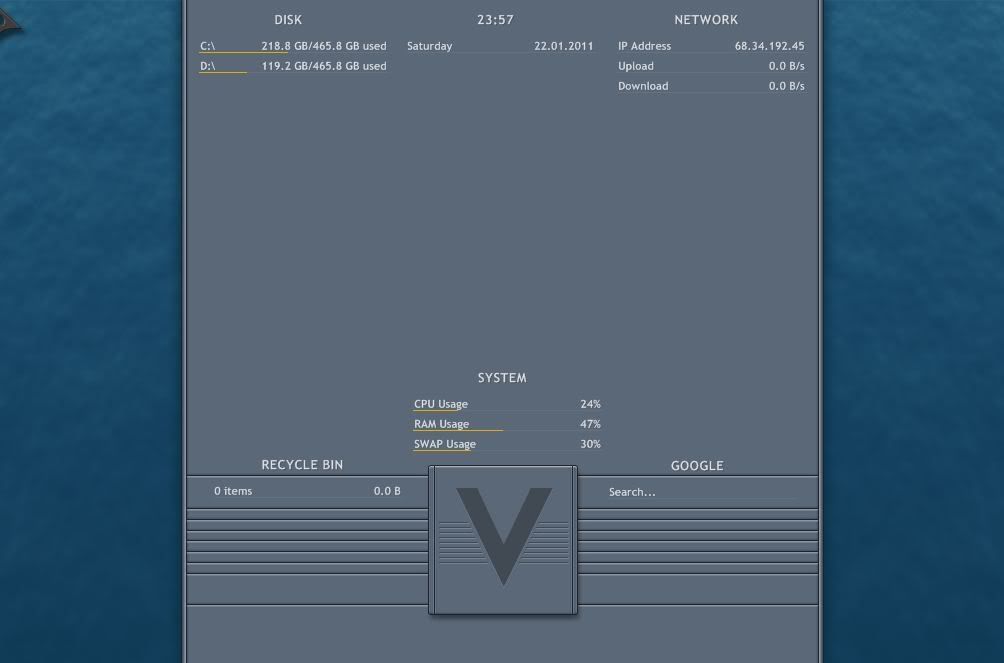
OK, now that helped. But ABP is still not listed in my skins, configs, or themes.
Running Enigma, I get no backgrounds.
Reply #71 Sunday, January 23, 2011 12:08 AM
AAAAAAARRRRRRGGGGGGGGGHHHHHHHHHHHHHHH!!!
OK, Finally. I checked and the downloaded skins that were zips, I changed the extension to rmskin and now it works...shew!

Reply #72 Sunday, January 23, 2011 12:11 AM
I'm not going to try Rainmeter until you get if figured out RedneckDude, then you can walk me through it. 

Reply #74 Sunday, January 23, 2011 12:43 AM
I double the YAY. Now I can keep my trap closed. Glad you got it working. 
Reply #75 Sunday, January 23, 2011 12:47 AM
Still can't figure out how to get music to the player, or pics to the slideshow....but I will!!! 
Reply #76 Sunday, January 23, 2011 12:48 AM
And when I try to set the third drive to my 1TB drive, it borks the skin and I have to reinstall it. 
Reply #77 Sunday, January 23, 2011 1:02 AM
If your using ABP the you need itunes running. After you launch itunes refresh the skin. For the slideshow do this. Right click on any open skin and select ABP + Configure + Configure ini. The configuration window will open. Scroll down and select Slideshow path and enter the correct path to the picture folder you want the slideshow to display. You can also change the text in the next option so it will say something different then slideshow on the skin. As far as the drive is concerned not sure why it is doing that. I can set mine to 2 different external drives with no problem.

Reply #78 Sunday, January 23, 2011 7:03 AM
Nice article about Rainmeter customization/installation for n00bs like me:
Reply #79 Sunday, January 23, 2011 11:57 AM
Well, I don't have, and don't want Itunes, so I won't use that skin.
I appreciate all the help, but I do think I like DX better. For one, you don't need a third party app to play music...lol.

Reply #80 Sunday, January 23, 2011 12:10 PM
RND, it's not a case of replacing dx with rainmeter, it's just a different customizing tool to play around with. And you can use both at the same time. Rainmeter gives those of us without photoshop talent a chance to customize our desktops ourselves using code and sometimes graphics.
Your dx skins will always be appreciated as they look totally different from rainmeter skins. I would love to see some of your dx graphics mixed into a Rainmeter skin or suite- that would be hot!
Please login to comment and/or vote for this skin.
Welcome Guest! Please take the time to register with us.
There are many great features available to you once you register, including:
- Richer content, access to many features that are disabled for guests like commenting on the forums and downloading skins.
- Access to a great community, with a massive database of many, many areas of interest.
- Access to contests & subscription offers like exclusive emails.
- It's simple, and FREE!
|
|
Page 4 of 6 | |
|
|---|
Reply #61 Saturday, January 22, 2011 11:31 AM
ABP isn't installed yet, when you first install rainmeter.
I use winrar, but I also have 7 zip.
I'll try this stuff asap. Been a bit busy repairing a laptop.
Thanks JC!!!