





































Rainmeter Gallery Accepting Submissions
Friday, January 14, 2011 by Island Dog | Discussion: WinCustomize News
The new Rainmeter gallery on WinCustomize is open but in private mode right now. We are accepting Rainmeter skin submissions via normal upload, but they will remain in moderation until we get enough to launch.
More information about Rainmeter here - http://rainmeter.net/RainCMS/
If you have some Rainmeter skins, please head over and get them in our galleries!
 |
|
Page 3 of 6 | |
|
|---|

Reply #42 Monday, January 17, 2011 1:03 PM
Philly, I plan on trying my hand at Rainmeter to match my new Curse of the Full Moon Windowblind that I'm working on.

Reply #43 Monday, January 17, 2011 1:20 PM
Quoting Philly0381,
reply 38
Do you folks think that skinning Rainmeter will be the same as Rainlander and Winstep, meaning will skinners make themed skins for it to go with WindowBlind Themes?
Philly, I plan on trying my hand at Rainmeter to match my new Curse of the Full Moon Windowblind that I'm working on.
I will keep a lookout for it. 
Reply #44 Monday, January 17, 2011 11:01 PM
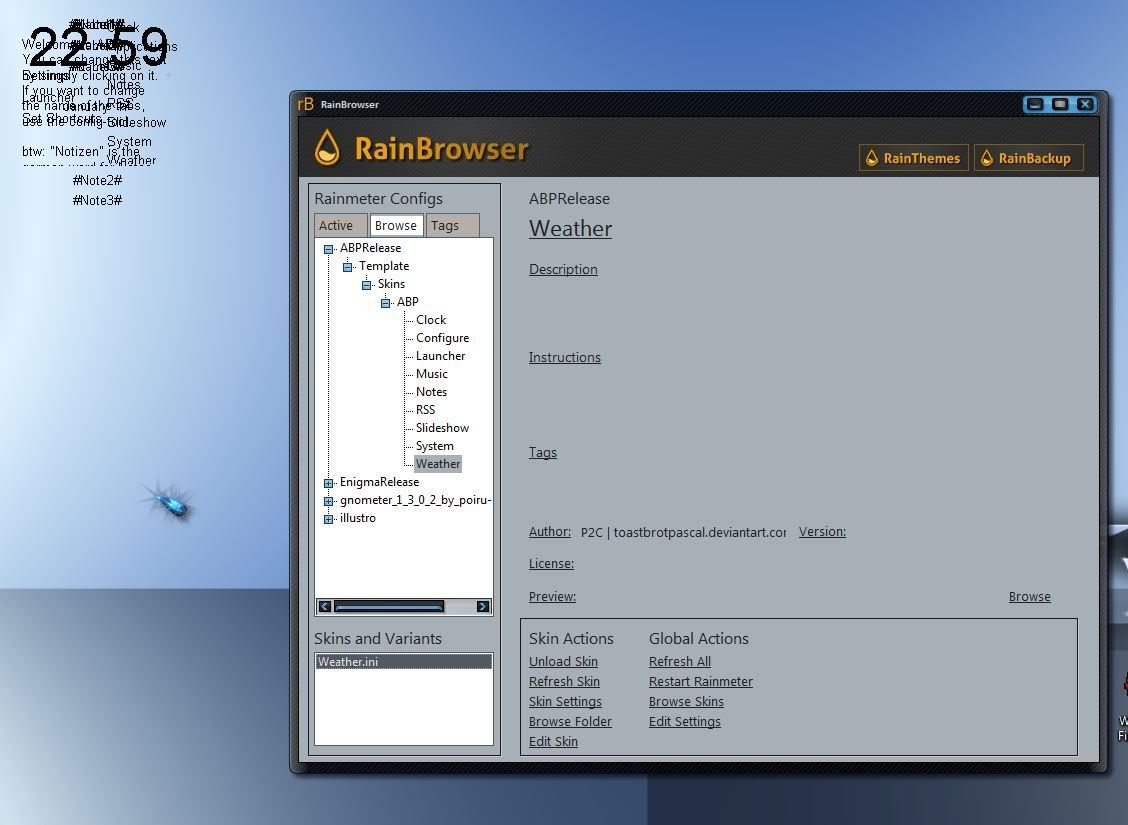
This is where I found the "skins" and chose one and clicke load skin. As I said, the skins load in the top left corner, without any background, all on top of each other, a jumbled mess. ( see screeny)
The only "theme" I see is the default one. I see all my "skins", but only the default "theme". I see all the configs.
Reply #45 Monday, January 17, 2011 11:04 PM
This doesn't work for me, I think I have a bad install.
[quote who="Lantec" reply="36" id="2870187"]I went ahead and made the skins that had been moderated public. One of the Journeyman skinners had submitted and because they don't go thru moderation it ended up available. So I released the others.
Vark would be a good one to try RND. It's set up for beginners to easily get what they need out of it.
I'll try that Mike, thanks!
Reply #48 Thursday, January 20, 2011 1:35 AM
I reinstalled with the non beta....same thing...aaaarrrgggghhhhh.

Reply #49 Thursday, January 20, 2011 6:48 AM
RND - I asked the author of ABP what might be the cause of your problem. After lookng at the screenshot you provided, he told me...
He has RainBrowser opened in which I can clearly see that he hasn't stored ABP in Skins/ABP but in Skins/ABPRelease/Template/Skins/ABP. So simply putting ABP in the right folder should solve his problem.
Here is a screenshot showing my RainBrowser with ABP, and you can see how it differs from yours...

Reply #50 Thursday, January 20, 2011 10:03 AM
Quoting RedneckDude,
reply 48
I reinstalled with the non beta....same thing...aaaarrrgggghhhhh.
RND - I asked the author of ABP what might be the cause of your problem. After lookng at the screenshot you provided, he told me...
He has RainBrowser opened in which I can clearly see that he hasn't stored ABP in Skins/ABP but in Skins/ABPRelease/Template/Skins/ABP. So simply putting ABP in the right folder should solve his problem.
Here is a screenshot showing my RainBrowser with ABP, and you can see how it differs from yours...
Reduced 65%
Original 561 x 673
That is so cool of you to find out for me. I don't understand why they don't package these things so that they go to the right places, or at least provide clear instructions on how to do it.
The instructions I got say to extract the zip to the rainmeter folder in my documents if it isn't a rlskin format. It don't say anything about sorting the files inside the zip.
Reply #51 Thursday, January 20, 2011 1:39 PM
That is so cool of you to find out for me. I don't understand why they don't package these things so that they go to the right places, or at least provide clear instructions on how to do it.
The instructions I got say to extract the zip to the rainmeter folder in my documents if it isn't a rlskin format. It don't say anything about sorting the files inside the zip.
RND - I'm not sure how your download ended up the way it did, because ABP is in .rmskin format. When you clicked on download, it should have come up with choosing to open it using rainstaller or save it. If you chose open, it would have installed it to all the right folders.
Just discovered what the problem is likely to be...
There is a posting http://rainmeter.net/forum/viewtopic.php?f=5&t=5888&start=30 at the Rainmeter Forum for ABP, and someone else was having the same problem. Read it and see if it's the same as yours, if so, the answer is...
Your zip program. It coud be detecting the .rmskin as a .zip file, and unzipping it. Don't let it, or zip it back up and rename it to .rmskin. Then just double-click it.
Hope that helps.

Reply #52 Friday, January 21, 2011 2:04 AM
And to add to what you said RND you do not have to sort any files if the skin is not in .rmskin format. There are still a lot of skins that you just unzip the folder directly to your rainmeter/skins folder found in your documents or place the the extracted folder there. Just make sure your not placing the individual skin files there. They have to be in a folder with the skin name inside the rainmeter skins folder or they will be all over the place in your config option and not work. As time goes on.rmskin format will be the standard but for now most skins are still downloaded in files that are zipped.

Reply #53 Friday, January 21, 2011 5:08 AM
Cool thing about Rainmeter is Vark. A UI right up front you can build the skin with. Way cool. What I found a little confusing (no surprise for me) was all the different ini's. But if you take your time with them I guess they're okay. A far cry from what it used to be.
Reply #54 Friday, January 21, 2011 6:36 AM
Uvah - Vark's creator did an earlier version called Infinity, which is a single ini, you can get it at http://theumad.deviantart.com/gallery/28043747#/d2s9zje But what I like best about Vark is that you can have the icons going vertical, horizontal, slanted, squared, etc.
Reply #55 Friday, January 21, 2011 10:44 AM
Did that, no go.
Reply #56 Friday, January 21, 2011 11:09 AM
Really! Now that is very interesting. Thanks Karmat.
Reply #57 Friday, January 21, 2011 11:18 AM
RnD. Try this. If the folder you download is a .zip right click and rename it .rmskin. I did that and the rainmeter image comes up like Vark. The teardrop. Click on it and it should install. If it does that will automatically place the folder where it belongs. Hope this helps.
Reply #58 Friday, January 21, 2011 7:43 PM
"RnD. Try this. If the folder you download is a .zip right click and rename it .rmskin. I did that and the rainmeter image comes up like Vark. The teardrop. Click on it and it should install. If it does that will automatically place the folder where it belongs. Hope this helps."
That will only work for some skins. It depends on the files and how they are zipped. An example could be taken from sysmetrix. If you right click and highlight all the individual files of a sysmetrix skin you can then zip them and rename the zip extension to smx. But if you zip the folder that the files are in your sysmetrix skin will not work. I know that sounds obvious but you would be surprised how many people get that step wrong.
RND what skin again are you trying to install? At this point I do not know why your having a problem. The only 2 procedures I ever use to install rainmeter skins are to simply click on an .rmskin file which installs itself or to extract non rmskin format folders into the rainmeter skin folder in my documents.
I think you should do what karmat said. I agree that perhaps it has something to do with the way the files are being recognized.
Reply #60 Saturday, January 22, 2011 2:16 AM
If I was in your situation I would do 2 things. First thing I would do is try a different zip program and make sure to set it as the default zip. I am not sure what your using but a nice free one that I have used before is 7-zip. Right now I use winzip pro but that cost and I think 7-zip is probably just as good. http://www.7-zip.org/
Like I have said you would have to make sure that whatever new zip you try it is set as the default program for opening zip files. In this case it might give you that option when you install it or ask you what files you would like to associate it with.
The next thing I would do is uninstall rainmeter completely. I would go further by searching for rainmeter in the registry and deleting everything that came up but you do not have to do that. Just uninstall it and then head over to the site and download either 1.3 or 1.4. As karmat has said the 1.4 beta is stable and that is what I am using.
Once rainmeter is installed it gives you the option to choose what default skin you want. Choose ABP and it should load right up for you.
Please login to comment and/or vote for this skin.
Welcome Guest! Please take the time to register with us.
There are many great features available to you once you register, including:
- Richer content, access to many features that are disabled for guests like commenting on the forums and downloading skins.
- Access to a great community, with a massive database of many, many areas of interest.
- Access to contests & subscription offers like exclusive emails.
- It's simple, and FREE!
|
|
Page 3 of 6 | |
|
|---|
Reply #41 Monday, January 17, 2011 1:00 PM
Yes, it is, Dave. You right click anywhere on the skin, which brings up a menu of all the bits in the skin. Click on the ones that you don't want to uncheck their .ini, and POOF, they're gone. Click in the same way to turn "on" the .ini file, and they appear!