










































Problems with start menu
Tuesday, December 14, 2010 by JordRocks | Discussion: Windows XP
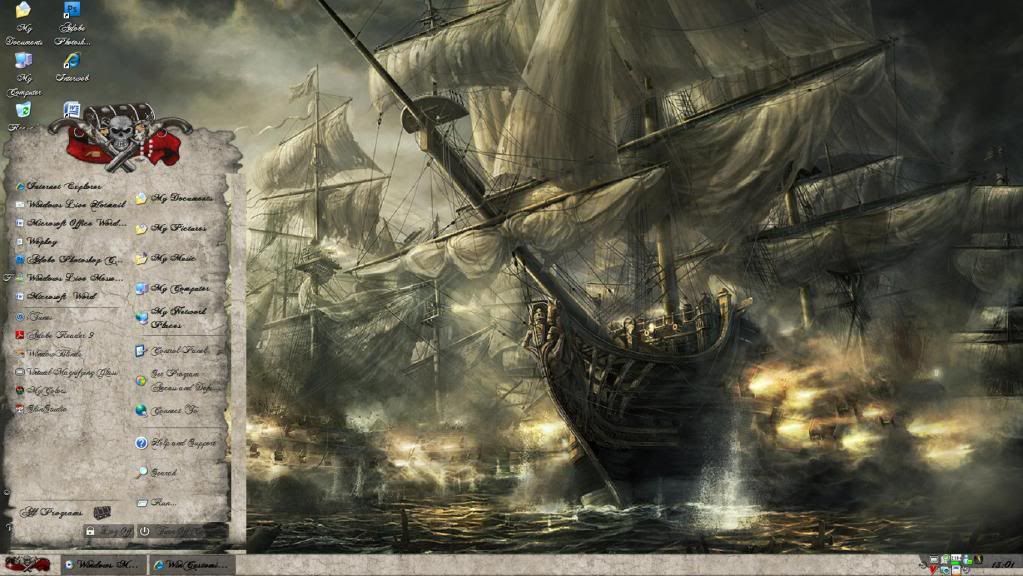
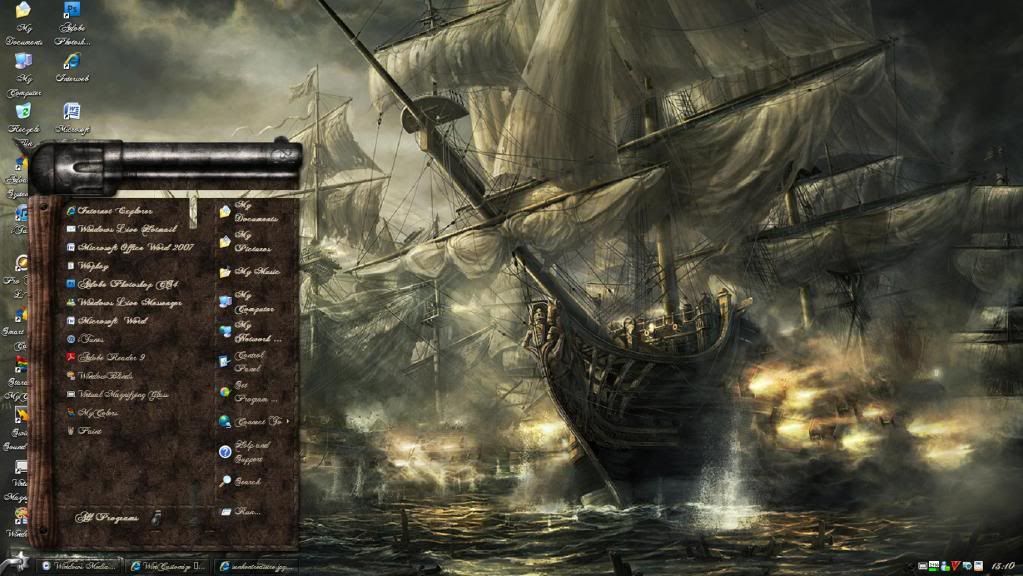
Hey! if anyone can help me out that would be brilliant, i'm running XP 32-bit home, i downloaded WB7 and a few windowblinds skins but i'm having trouble with a couple of them (Sunken Treasure and Gunslinger). Basically all of the WB fetures work fine, like textures and transparency and whatnot, but i'm having trouble with the start menu on the 2 skins previously mentioned. i've included a couple links to screeshots of the start menu. I really don't understand what's happened to them, they were both fine one minute then not the next, i've deleted them both and re-downloaded them but they were the same.
http://i1091.photobucket.com/albums/i394/jordrocks1/sunkentreasure.jpg Sunken Treasure screenshot
http://i1091.photobucket.com/albums/i394/jordrocks1/gunslinger.jpg Gunlsinger screenshot
Cheers Guys!

Reply #2 Tuesday, December 14, 2010 10:47 AM
Make sure you are using the XP version of the blind, and not the Vista or 7 versions. You can check to make sure here:
Reply #3 Tuesday, December 14, 2010 10:48 AM
BTW, where did you get your wallpaper from? That pirate ship scene rocks!
Reply #4 Tuesday, December 14, 2010 2:27 PM
Basically if you look at the screenshots, the sunken treasure start menu has a big thick block running down the right hand side, and the gunslinger start menu underneath the gun there's a weird gap
Reply #5 Tuesday, December 14, 2010 2:30 PM
Yeah i am running the Xp version of the blind, but that doesn't seem to matter, with either of them, any other ideas?
also i got the sunken treasure blind off of here, just go on windowblinds under the explore tab then just type sunken treasure into the search bar 

Reply #6 Tuesday, December 14, 2010 2:31 PM
I can tell from the screenshot of Gunslinger, that you are not using the XP substyle, that is either Vista or 7. Try applying XP again and see if the issue goes away.
I have noticed that sometimes it takes a few tries of applying a blind before it skins right.
Reply #7 Tuesday, December 14, 2010 2:40 PM
Yeah i am running the Xp version of the blind, but that doesn't seem to matter, with either of them, any other ideas?
I can tell from the screenshot of Gunslinger, that you are not using the XP substyle, that is either Vista or 7. Try applying XP again and see if the issue goes away.
I have noticed that sometimes it takes a few tries of applying a blind before it skins right.
Yeah i wasn't using the Xp on gunslinger, my bad  but anyway i've just skinned and re skinned about 10 or so times with the XP blind and there's no difference whatsoever :/ getting on my nerves because i love this blind of yours. Kudos on it by the way



Reply #11 Tuesday, December 14, 2010 4:11 PM
I should have clarified more: I was asking about the wallpaper, not the WindowBlind. I already have the WB.
But that's okay. Doc came to the rescue! 

Reply #12 Tuesday, December 14, 2010 6:55 PM
thanks to Tineye.com
http://fc05.deviantart.com/fs23/f/2008/006/d/a/HMS_Royal_George_by_Radojavor.jpg

Reply #13 Wednesday, December 15, 2010 10:55 AM
Do you have the most recent edition of Windowblinds and if so, did this start after your most recent update?
It might be a good idea to post your WB info, so someone who know how to read it can see if anything is off on it. Click the 'about' tab in Windowblinds, then click the 'copy to clipboard' button and paste it in here.
Please login to comment and/or vote for this skin.
Welcome Guest! Please take the time to register with us.
There are many great features available to you once you register, including:
- Richer content, access to many features that are disabled for guests like commenting on the forums and downloading skins.
- Access to a great community, with a massive database of many, many areas of interest.
- Access to contests & subscription offers like exclusive emails.
- It's simple, and FREE!
Reply #1 Tuesday, December 14, 2010 8:57 AM
Hard to tell from those screenshots exactly what the problem is, can you explain what happened to the start menus?