





































Parchment – New WindowBlinds Skin from Stardock Design
Wednesday, May 19, 2010 by Island Dog | Discussion: WinCustomize News
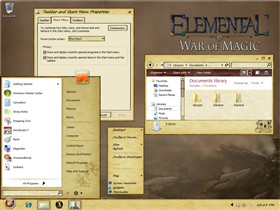
Stardock Design released a new WindowBlinds skin this week called Parchment. This is a beautifully crafted skin that is definitely unique in its style. It’s available to everyone, so head over and download it now!

Reply #2 Monday, November 14, 2011 11:23 AM
I am having the same problem with the startbutton.
Also, sometimes the startbutton shows up in the "log off" mouseover.
Is there a quick fix for this?



Reply #5 Tuesday, November 15, 2011 7:11 AM
Not doing that at all here on XP Vertigo931. Try applying another theme, delete the parchment theme and then install and apply it again, might just be corrupted.
Reply #6 Tuesday, November 15, 2011 7:54 PM
Hi LightStar,
I did that but still get the 'choppy' start button and the start button in the 'Logoff' mouse-over, it doesn't display in the mouse-over all the time, comes and goes.
Reply #7 Tuesday, November 15, 2011 7:55 PM
Do you have the latest graphic card drivers installed for your system Vertigo931?
Reply #9 Thursday, November 17, 2011 7:06 AM
Well then, as no one else seems to be having this issue it is evidently unique to your system for some odd reason. Hopefully someone from Stardock support will read this thread and see if they can help. Or you could try sending an email to [email protected] and see what they respond with. Wish I could help.
Reply #10 Sunday, November 20, 2011 11:28 PM
I completely forgot to mention that no other Windowblinds skins do this on my system

Please login to comment and/or vote for this skin.
Welcome Guest! Please take the time to register with us.
There are many great features available to you once you register, including:
- Richer content, access to many features that are disabled for guests like commenting on the forums and downloading skins.
- Access to a great community, with a massive database of many, many areas of interest.
- Access to contests & subscription offers like exclusive emails.
- It's simple, and FREE!
Reply #1 Wednesday, May 19, 2010 4:29 PM
The startbutton on this for xp needs some work...it looks all cut up.