






































IE8 Skinning!
Saturday, April 17, 2010 by RPGFX | Discussion: WindowBlinds
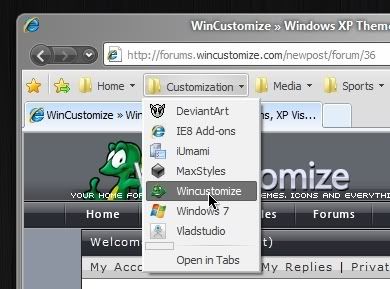
Are my eyes decieving me? Or is Windowblinds skinning more of IE8 than previously? The only thing not skinned for me right now is the actual tab... the buttons and menus and other top shelf real estate is no longer baby blue! When did this wonderful update take place? 

Reply #2 Saturday, April 17, 2010 5:40 PM
....now, if we could just change the color ourselves.....
edit: By the way, the grey is waaaay better than than that baby blue. Thanks for that!
Reply #3 Saturday, April 17, 2010 5:57 PM
Close all copies of IE and reopen it. There is an IE8 limitation that prevents the toolbar changing when it is open.

Reply #5 Saturday, April 17, 2010 6:13 PM
So is the new gray toolbar an IE8 change or a Windowblinds change?

Reply #6 Saturday, April 17, 2010 6:25 PM
My toolbar in IE8 matches my applied WB skin just fine, and changes when a new WB is applied too. It also changes in all copies of IE8 even if I have multiple copies open. So don't know what the issues could possibly be here. This is in Windows XP though. 
Reply #7 Saturday, April 17, 2010 6:49 PM
Edit: I just checked Vista. Those Toolbars are properly skinned.
Edit of the edit: oops, I forgot, I still have IE7 on Vista 
Reply #8 Saturday, April 17, 2010 8:35 PM
IE8 on XP is different and never had the baby blue toolbar.
On Win7/Vista WindowBlinds should now be using a colour based on the skins button face system colour. This is not perfect but works reasonably well with most skins. If it does not appear to be picking a similar colour then I would suggest rebooting as it should be fine then.

Reply #9 Sunday, April 18, 2010 9:51 AM
I like to be able to skin ie8, any chance of this happening???

Reply #10 Friday, April 23, 2010 8:53 AM
This no longer seems to be the case anymore.......it was nice while it lasted
Reply #11 Friday, April 23, 2010 9:04 AM
On Win7/Vista WindowBlinds should now be using a colour based on the skins button face system colour. This is not perfect but works reasonably well with most skins. If it does not appear to be picking a similar colour then I would suggest rebooting as it should be fine then.
This no longer seems to be the case anymore.......it was nice while it lasted
The latest build works in the same way to the previous build.
The baby blue colour will not be in use.
Remember that if you have ANY IE8 copies open in taskmanager then the colour change will not be picked up until those have been closed.
Reply #12 Friday, April 23, 2010 11:09 AM
I don't know, Neil. There must be something I'm not getting. I change the color without any apparent change to the toolbar (yes I have rebooted after the change). Is it just the button face color or a combo of other items.
Reply #13 Friday, April 23, 2010 8:55 PM
When it changed before the update, I was toying with the button face and button light and button shadow...all three seemed to change the color, now it seems that none of them do.
Am I doing something wrong? Is there a setting somewhere that is overriding my color changes? I dunno. Help me Obi Wan!

Reply #15 Saturday, April 24, 2010 2:55 PM
not sure when it happened,butmines always been like that ? and the toolbar changes to.


Reply #17 Saturday, April 24, 2010 9:00 PM
I noticed something that got me thinking about how to get the toolbars skinnable. When you open IE, you can see a quick flash of the skinned toolbar before the one we see all the time appears.
This suggests to me that the toolbars are being skinned but are getting covered. Am I correct?
If this is the case (and I know nothing about the coding of Windowblinds), wouldn't it be great if we could introduce an alpha to the current toolbars and make them transparent, so we can see through them to the skinned ones? Is this possible?

Please login to comment and/or vote for this skin.
Welcome Guest! Please take the time to register with us.
There are many great features available to you once you register, including:
- Richer content, access to many features that are disabled for guests like commenting on the forums and downloading skins.
- Access to a great community, with a massive database of many, many areas of interest.
- Access to contests & subscription offers like exclusive emails.
- It's simple, and FREE!
Reply #1 Saturday, April 17, 2010 5:34 PM
The toolbar is now gray instead of blue. But it is always gray no matter what skin is applied..........it just happens to look good with the skin you have showing there