






































Ultimate Windows Tweaker
http://www.thewindowsclub.com/ultimate-windows-tweaker-v2-a-tweak-ui-for-windows-7-vista

|
|
Most Popular SkinsHighest Rated SkinsTop Skin Authors
Yesterday |
Last 30 Days |
All Time
Latest News
View HomepageReturn to the WinCustomize homepage. |
|

CursorFX is a utility which allows you to have much more flexibility in the cursors you use to interact with Windows. CursorFX users can create and use cursors that look and feel far superior to anything you've ever seen before! Best of all, it's really easy to create your own super-charged cursors!

Customize Windows with additional styles beyond light and dark mode

Stardock DeskScapes extends Windows 10 with the ability to run spectacular animated wallpapers (Dreams) on your desktop. Choose your Dream from our extensive library to personalize your pc.

IconPackager is a program that allows users to change nearly all of their Windows icons at once by applying "packages" of icons. A package of icons contains icons to replace most of the common icons on your Windows PC.
IconsIcons for applications and folders.

Rainmeter allows you to display customizable skins on your desktop, from hardware usage meters to fully functional audio visualizers. You are only limited by your imagination and creativity. Rainmeter is open source software distributed free of charge under the terms of the GNU GPL v2 license. 
Show off your favorite desktop configuration by uploading a screenshot of your desktop!

SoundPackager brings customization of your auditory experience to Object Desktop! Users can now choose from "sound packages" to enhance their Windows desktop experience. Over 30 different system sounds are supported; unique new Stardock Design sound packages are included with the package.

Microsoft Windows® 8 is shipped without the "Start" menu. Stardock heard the cries from Windows 8 users. We put the "Start" menu back in Windows 8. We accurately recreated the most used desktop feature billions of users depend on every day and packed it with additional functionality.

The finest collection of desktop backgrounds on the Internet!

WindowBlinds changes the look and feel of your Windows desktop by applying visual styles to your entire Windows environment. When a visual style is applied, they change nearly every elements of the Windows GUI such as title bars, push buttons, the Start bar, menu and more.

Winstep Extreme is a powerful suite of applications that merge incredible usability and performance with breathtaking eye candy. Add your own Menus, Docks, Tabbed Docks, Taskbar and Widgets with this Windows User Interface Replacement! View Gallery ListView a list of all of the different galleries available in WinCustomize, which you can then browse individually. Explore AllExplore all available galleries on WinCustomize. Customize This MenuThis option is only available for subscribers of WinCustomize. If you are a subscriber it will allow you to select which categories you would like to see in this menu from a list of all galleries available on the site. This information will be stored on your account for all your future visits. |
A followup to my wildly popular  Put some XP back in Vista and Win7 post https://forums.wincustomize.com/378472/page/1/#replies
Here is another cute one regarding cascading all programs menu like in XP.
Some of us miss that in Vista and Win7...tho I've gotten used to a scrolling all programs menu I dont necessarily like it.
So look at the picture,its pretty simple to do...only requires one cascading menu on the right side of the start menu.Administrative tools will do as well as what I picked.
The folder has to be COPIED...not just linked to or shortcutted...or it wont cascade open.(unless I did something wrong...maybe you can get a shortcut/link version to cascade...if you do,let us know)
Thats the only problem...the copied one will not change as you install or uninstall programs...tho I bet there is a way to make that happen. The plus part of that is only the programs you want to see could be in there and ALL of them in the actual more programs.
I renamed mine to 'a Programs' to get it to sort to the top of the menu.
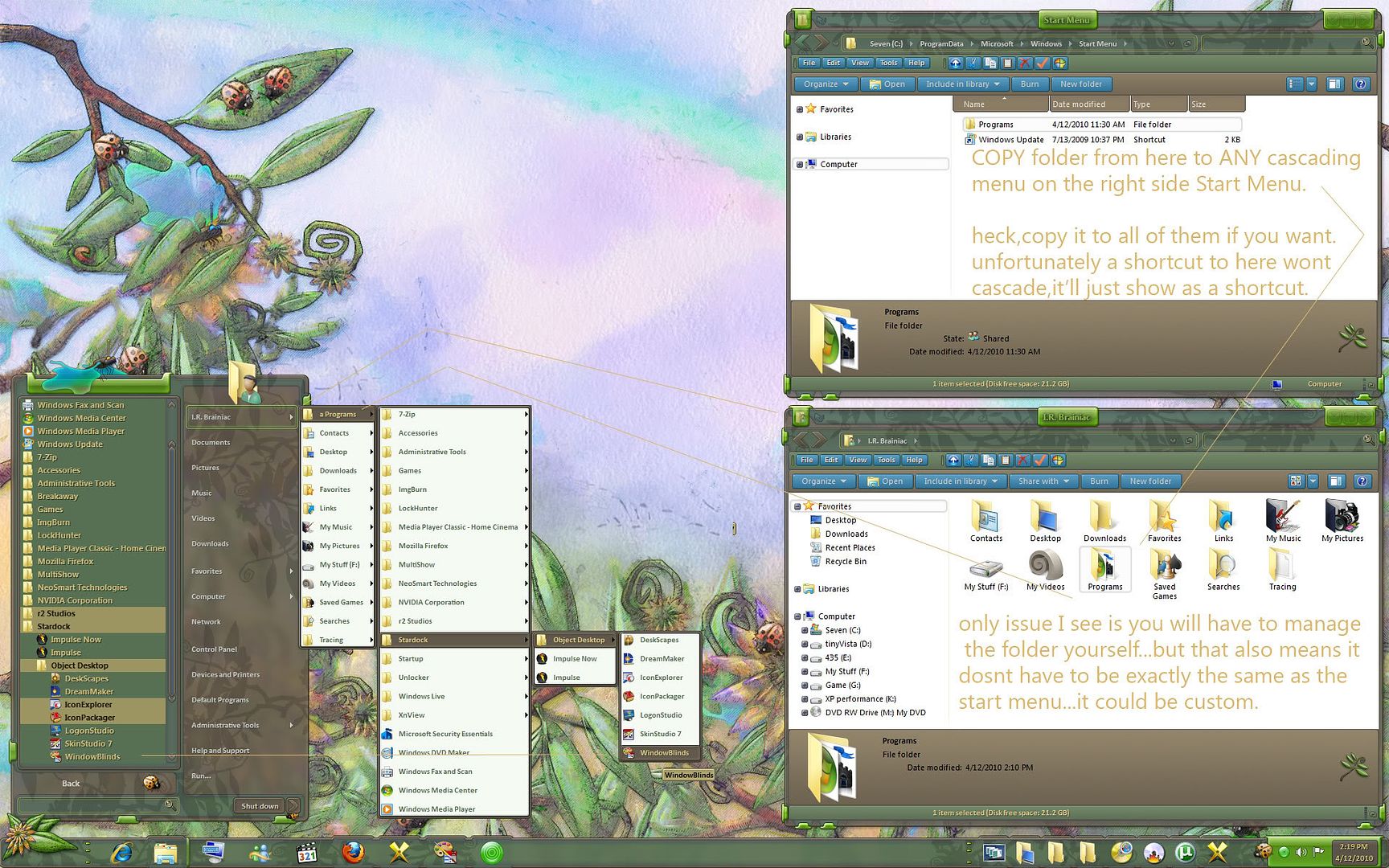
Of course some nimrod will come along to say how much better the new way is...but thats not the point is it?I aint telling you that you have to do it this way...I just wanted to show you it COULD be done. 
|
|
Page 2 of 2 | |
|
|---|
You can add "Move Folder To" to your context menu with:
Ultimate Windows Tweaker
http://www.thewindowsclub.com/ultimate-windows-tweaker-v2-a-tweak-ui-for-windows-7-vista
It will also remove shortcut overlays and much more.
Thanks to SPerry5531 for posting the link.
I hope this is what you meant,I never used XP. I thought that was the abbreviation for "obsolete".
I dont think thats the kind of move he meant but tweaks is tweaks.
I've used that tweak before,adding move and copy to into my right-click menus...but me and some others had some problem with it...slowed system or something I cant remember.
I ended up just putting those buttons on the toolbar.(plus in XP there are in the taskpane already)
Not saying dont try it,but be warned it might...cause an issue...that I cant remember...haha.
Dont let me stop you from posting more tricks Wizard...or would they be SPELLS? 
Lucky for me I have a SPELL checker.
Dunno if that was the "move" he meant, but here is one that I promise won't slow your system down or cause any problems. It too, like Wiz's suggestion, adds send to-to your context menu, but this one is programmable and you can add fixed destinations, you can copy to, or move to, and there are other tweaks, all relating to moving or copying files and folders. The other program has various unreated tweaks, and the version I used worked some, then didn't. And some of the tweaks didn't work at all. Like the one that allows 32 bit OS to use 4GB of ram...yeah, right...lol.
Anyway, I have used this on xp, vista and 7, and have used it for years with no ill effects.
It is called.....wait for it......
Send to 1.6. And it is the handiest free program I have ever used. It's like the default send to command on steroids! 
Note: all Links I give will open in a new window for me a new tab you too if you have it the same way..
I like the move to / Copy to reg hack I had in XP so I tried it when I got Vista and then 7 and it works
here it is if anyone is entreated in it.
Windows Registry Editor Version 5.00
[HKEY_CLASSES_ROOT\AllFilesystemObjects\shellex\ContextMenuHandlers]
[HKEY_CLASSES_ROOT\AllFilesystemObjects\shellex\ContextMenuHandlers\Copy To]
@="{C2FBB630-2971-11D1-A18C-00C04FD75D13}"
[HKEY_CLASSES_ROOT\AllFilesystemObjects\shellex\ContextMenuHandlers\Move To]
@="{C2FBB631-2971-11D1-A18C-00C04FD75D13}"
[HKEY_CLASSES_ROOT\AllFilesystemObjects\shellex\ContextMenuHandlers\Send To]
@="{7BA4C740-9E81-11CF-99D3-00AA004AE837}"
Note just open a text doc like note pad and copy all from bold to bold then save it as a .reg
then click on it to add to reg
I can also tell you how to do it Manually to
yes it dose MS says 7 is my way so I try too make it my way .. now if I could find a way to get the SEND button back in MSN Messenger
with out taking my hand off the mouse the hit ENTER
I tried to find some info on it but all I find is what I already know as to adding or removing items from it
I.R I did find this don't know if that is even close to what you want
http://www.microeye.com/resources/itemsCB.htm
I.R this might help with the Links or steer you in the direction you want
The Favorites bar, previously known as the Links toolbar,
thanks for the info But I.R is right .. thank for helping none the less
I'll probably give Send To a try...sounds good.

Please login to comment and/or vote for this skin.
Welcome Guest! Please take the time to register with us.
There are many great features available to you once you register, including:
|
|
Page 2 of 2 | |
|
|---|
web-wc01


Reply #21 Wednesday, April 14, 2010 1:01 PM
The fix I'm looking for most right now is getting the links toolbar back on the toolbar with file edit view,and the classic shell toolbar I showed in the first post.
as long as it is open...the extra room might as well be doing something.