






































ClearGem (WIP)
Saturday, March 27, 2010 by G3mpi3 | Discussion: Sneak Previews
I was working on my first windowblind, Azzurro and my computer crashed and I lost all of my work. I finally got around to starting a new one, and I'm very happy with it so far.
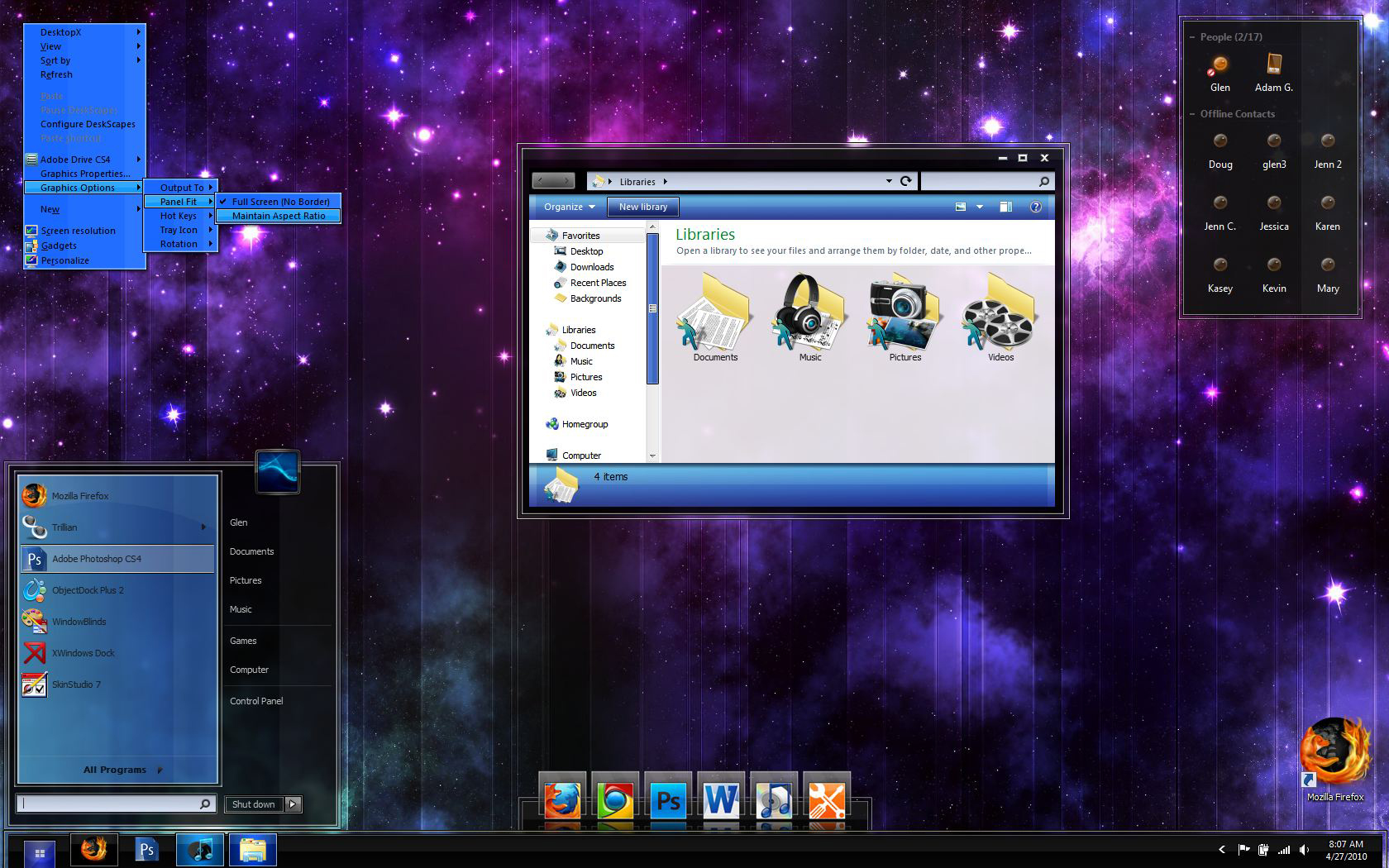
This is still technically my first windowblind, so be patient because I'm really going to take my time with it. Click on the screenshot and zoom in to see the details I've put into the taskbar, start button, taskbar buttons, and start menu. Let me know what you think.
I will also release the dock seen in the screenshot. I'll make a 2D zoomer as well as a tabbed dock too.
UPDATED to show new dock, minor changes, new trillian skin, and some icons (some of a pack of 60+)
G3
Here's the icon pack (so far) that I'm making to go along with my theme. I'll make any requested icons too.

 |
|
Page 3 of 4 | |
|
|---|

Reply #42 Thursday, April 22, 2010 10:48 AM
Ah thanks Tim. I'm grateful for all the help your giving me. 
Reply #43 Friday, April 23, 2010 8:24 AM
Here's a bit of an update........I'll upload a larger updated image next week. Anyway, I've cleaned up the objectdock skin, taskbar buttons, right click menus, added a new style for close, minimize, and maximize, and I've also finished the Trillian Astra skin to go along with my theme. 

Reply #44 Monday, April 26, 2010 10:48 AM
I've updated the OP screenshot to show more progress. I'm almost finished with 7, and ready to start vista. (by the way, I no longer need a vista tester, I reinstalled vista on my PC).

Reply #45 Tuesday, April 27, 2010 11:45 AM
99% of it looking great. Not loving the blue menus. That's only my opinion though. 
Reply #46 Tuesday, June 8, 2010 9:53 AM
Any ETA on the skin ? I really love how it looks, especially the dock icons, which i fell in love with, instantly:P
Reply #47 Tuesday, June 8, 2010 4:30 PM
I kind of lost motivation to do this halfway through this quarter. I have final exams this week, so maybe I'll try to finish it up in the next few weeks. After looking it over, I need to make a few changes too. I'll keep this thread updated.

Reply #48 Tuesday, June 8, 2010 10:25 PM
I know that the business of life in general can get in the way of skinning; and I also know that once you get down to the nitty-gritty in a blind, that it can be easy to lose motivation; but don't lose sight of the end product. Pick it back up when you have the time, and don't let anything keep you from finishing it. Things might slow you down, yes; but they should never stop you.



Reply #51 Wednesday, June 9, 2010 11:43 PM
Definitely. You're right about the nitty-gritty stuff, it's not as exciting to do. Also, I'm doing some more work on the dock and icons now. I'll get back to the blind next week. Thanks for all the support Brian 
Reply #53 Thursday, August 12, 2010 7:00 PM
Well, I finally started working on this thing again. Just one problem I need help with. I can't figure out how to make the start menu shorter........it seems like there is a gap between the all programs button and the icons above it. What should I adjust? Any help would be awesome!

Reply #54 Thursday, August 12, 2010 11:25 PM
Glen, did you right-click on your start menu and choose properties > customize? After this, change the "number of recent programs to display" values under "start menu size" AND uncheck some of the items in the list on top.
If you've already done this, then I dunno. 

Reply #55 Friday, August 13, 2010 1:04 AM
Also, make sure that the right side of the startmenu has a negative value for the bottom text margin in Sks (-35 or so). Sorry if that has been said before in this thread.....I just got up and need my coffee.
Reply #56 Friday, August 13, 2010 7:47 AM
If you've already done this, then I dunno.
Ah yeah, it's really weird because I can actually almost empty the start menu and it's still about the same height. Thanks for the quick response though, Brian.
I'll definitely look into that Tim, and I appreciate your help

Reply #57 Friday, August 13, 2010 9:09 AM
Quoting Mirsguy, reply 54Glen, did you right-click on your start menu and choose properties > customize? After this, change the "number of recent programs to display" values under "start menu size" AND uncheck some of the items in the list on top.
If you've already done this, then I dunno.
Ah yeah, it's really weird because I can actually almost empty the start menu and it's still about the same height. Thanks for the quick response though, Brian.
Quoting 2of3, reply 55Also, make sure that the right side of the startmenu has a negative value for the bottom text margin in Sks (-35 or so). Sorry if that has been said before in this thread.....I just got up and need my coffee.
I'll definitely look into that Tim, and I appreciate your help
I think (and I'm far from an expert here  ), but I think some of it might have to do with how large the original image was when it was created. I know I make my start menus around 300x400 so even when I have them practically empty, it's kept the same basic size as the parts that are sliced apart for the menu.
If that makes sense?
I don't know, I have the same problem.
Nice looking blind though, man. 

Reply #58 Friday, August 13, 2010 9:10 AM
And a good one too! 
Looking good Glen!
Reply #59 Friday, August 13, 2010 9:49 AM
Skillet: the size of the actual image should have no effect on the height of the start panel.....it's all in the settings 
Reply #60 Saturday, August 14, 2010 1:15 AM
Looking good Dude! I'm DX ready!, I can also test on all 3 OSes...hint, hint. 
Please login to comment and/or vote for this skin.
Welcome Guest! Please take the time to register with us.
There are many great features available to you once you register, including:
- Richer content, access to many features that are disabled for guests like commenting on the forums and downloading skins.
- Access to a great community, with a massive database of many, many areas of interest.
- Access to contests & subscription offers like exclusive emails.
- It's simple, and FREE!
|
|
Page 3 of 4 | |
|
|---|
Reply #41 Thursday, April 22, 2010 10:33 AM
You can change the background color to f.ex blue to match a bit better.
Startpanel/top part/ extras tab/ scroll down to all programs list background color