





































ClearGem (WIP)
Saturday, March 27, 2010 by G3mpi3 | Discussion: Sneak Previews
I was working on my first windowblind, Azzurro and my computer crashed and I lost all of my work. I finally got around to starting a new one, and I'm very happy with it so far.
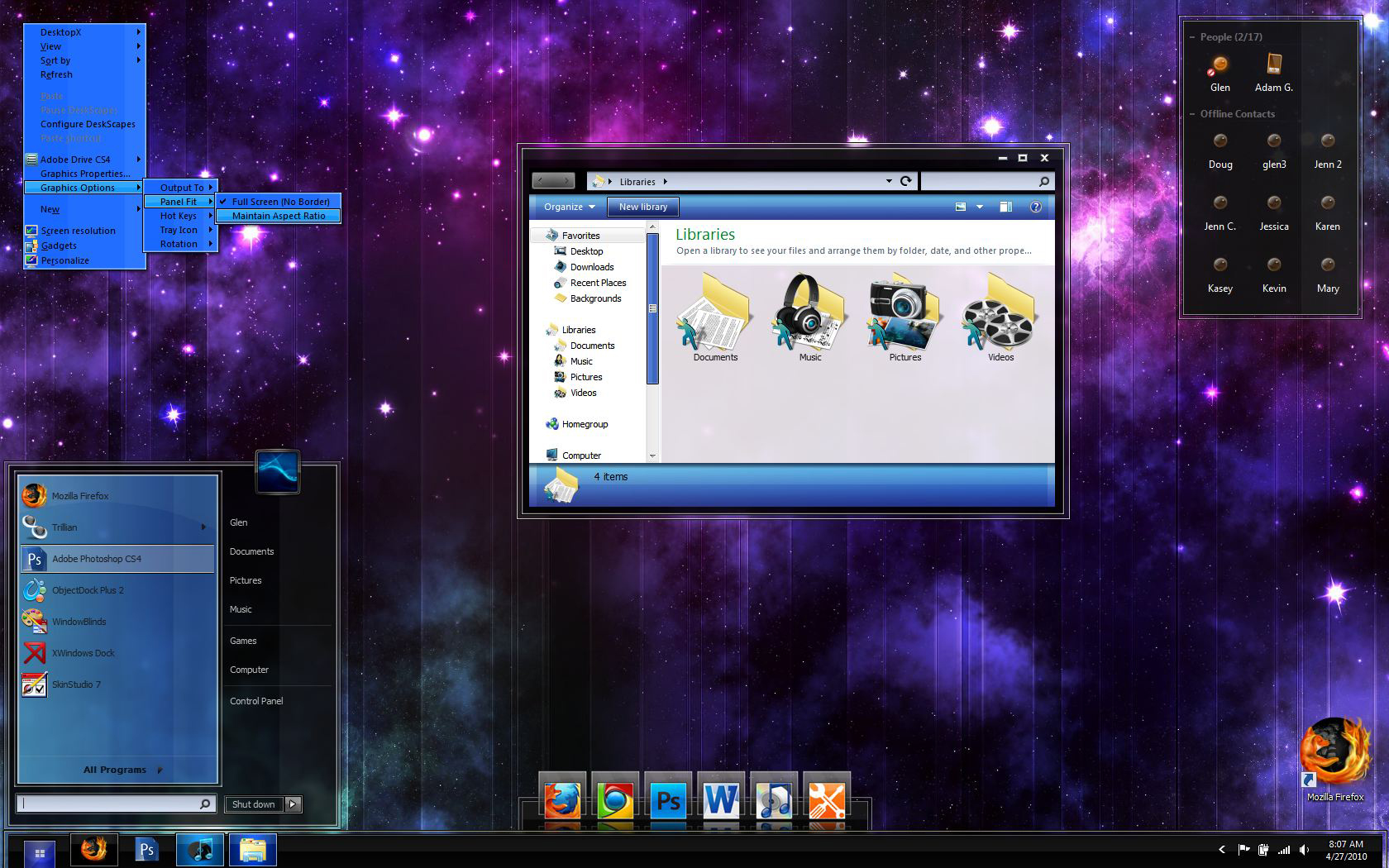
This is still technically my first windowblind, so be patient because I'm really going to take my time with it. Click on the screenshot and zoom in to see the details I've put into the taskbar, start button, taskbar buttons, and start menu. Let me know what you think.
I will also release the dock seen in the screenshot. I'll make a 2D zoomer as well as a tabbed dock too.
UPDATED to show new dock, minor changes, new trillian skin, and some icons (some of a pack of 60+)
G3
Here's the icon pack (so far) that I'm making to go along with my theme. I'll make any requested icons too.

 |
|
Page 2 of 4 | |
|
|---|

Reply #22 Wednesday, April 14, 2010 8:55 AM
I've updated both the screenshot for the blind and also the icon pack so far that I'm working on to compliment the theme. The screenshot also shows one of the docks I'm making to go along with the blind. If you'd like an icon that isn't pictured, just let me know and I'll add it. By the way...........I still need someone to test on vista..... 
Reply #23 Wednesday, April 14, 2010 9:26 AM
G3mpi3, nice work here!!!! 

I also like the wall paper at the top the very top one did you make it? if not can I get a link to it please?
or will it be in the WB
as to the
Reply #24 Wednesday, April 14, 2010 9:51 AM
Haha yeah sorry, I've been constantly replacing the screenshots in the OP to show changes. Each time I update, I seem to be using a different wallpaper. As for the graffiti wallpaper currently being used, I did not make it, so therefore it won't be included in the blind. However, here's the link for your convenience.
Reply #25 Wednesday, April 14, 2010 10:05 AM
thanks

Reply #26 Wednesday, April 14, 2010 11:22 AM
Those icons are awesome! I think OD2 is going to signal the return to poplularity of more 2D icons. Simply because they look a ton better with reflection. The reflection of the icons above is kick ass. 
Reply #27 Monday, April 19, 2010 12:06 AM
Need some help - the menus and right click menus are acting strange in firefox. They are normal in windows...........if I right click on the desktop, there aren't any bars like this. I must have accidentally changed something because I never saw these grey bars before in firefox. If anyone could help, I would really appreciate it. I'm not sure what I need to do or change.
Here's the screenshot:


Reply #28 Monday, April 19, 2010 2:43 AM
great,great skin...can´t wait to have it....can you tell me what gadget for recycle bin are you using in the third screenshot (with green background).....thx in advance

Reply #29 Monday, April 19, 2010 7:34 AM
Glen, Firefox uses the favorites menu. Skin that part and you'll be all good.
Reply #30 Monday, April 19, 2010 8:39 AM
Thanks for the quick response Brian, but here's the thing.........I did skin that part. But it's not showing up in Internet explorer and it's being glitchy in Firefox. 
I've even tried importing that part from another skin, and it was fine in IE, but still had those ugly boxes in Firefox.
I'm really confused about what might be causing this problem..........I may have accidentally changed something in "skin colors"..........could that be the problem?
Here's proof -

Reply #31 Monday, April 19, 2010 10:31 AM
It's part of a rainmeter skin called Razor, by minhtrimatrix. http://minhtrimatrix.deviantart.com/art/Razor-158568197

Reply #33 Monday, April 19, 2010 4:44 PM
If you'd like to send me the skin, I may be able to figure out what's going on with it. PM me with your email me by clicking on my name here in this post.
Reply #34 Monday, April 19, 2010 5:43 PM
Hey Tim! This skin is looking sharp! Lookin good, G3mpi3!!!

Reply #35 Monday, April 19, 2010 6:16 PM
G3mpi3....the icons look just great, as does the skin! You've improved so much I can scarcely believe it!  , man!
Reply #36 Monday, April 19, 2010 6:42 PM
Hi Glen
I got the skin and I'm not getting the issue with the menus. They look just fine.
From your screeny, I believe you have either another version of FF than me and/or you are using a custom firefox theme. Try disabling the theme and updating to the latest FF to see if it helps.
Nais skin by the way buddy. Showing real potential 
Reply #37 Monday, April 19, 2010 6:47 PM
Thanks Doc and RND! Tim, I'm using a firefox clone - Pale Moon (25% faster, you should try it) but anyway I tried disabling the theme and I'm still getting the issue. I never noticed it before, so I guess the next step is reinstalling my browser - firefox and pale moon.
But I guess it's good news that I'm the only one who's having problems haha

Reply #38 Monday, April 19, 2010 7:23 PM
Really looking good, can't wait till it comes out (I know, we have to be patient!)!
Love the icons too, could you make a RainMeter icon? Or, if you want more suggestions, what about making more Stardock product icons, cause we all use those.
Reply #39 Monday, April 19, 2010 9:22 PM
I found the problem for firefox displaying those ugly grey boxes on menus. It's actually Pale Moon's fault. (the firefox clone). If Pale Moon is open the same time as firefox, it works fine, if firefox is run alone, it works fine, BUT if pale moon is run alone, those grey boxes appear.
Well at least this is proof I'm not going crazy. 
Reply #40 Thursday, April 22, 2010 10:25 AM
Is it possible to skin this part? If so, can someone point me in the right direction? Thanks in advance 

Please login to comment and/or vote for this skin.
Welcome Guest! Please take the time to register with us.
There are many great features available to you once you register, including:
- Richer content, access to many features that are disabled for guests like commenting on the forums and downloading skins.
- Access to a great community, with a massive database of many, many areas of interest.
- Access to contests & subscription offers like exclusive emails.
- It's simple, and FREE!
|
|
Page 2 of 4 | |
|
|---|
Reply #21 Sunday, April 11, 2010 4:08 PM
I've decided to make a bundle of icons to go with this theme. Here's a preview of what some of them look like. I will be making a large set, if there are any special requests, just let me know.