































Xen
...beta testing
Sunday, January 3, 2010 by sViz | Discussion: Sneak Previews
Howdy all. 
I'm working on a suite of DesktopX objects designed to make using DX Builder mode a little easier for users. I call it Xen. I'm looking for dedicated beta-testers to let me know what's broken, what could be improved, and what other features could be added.
The first component that's ready for testing is the Xen Group Control.
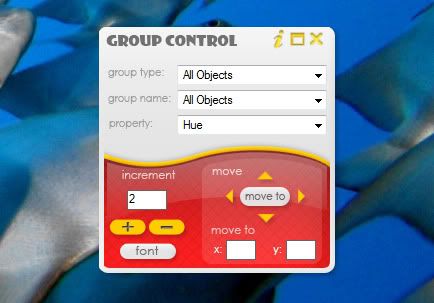
It is designed to make it easier to change the properties of a group of objects--be they an actual group, or just all text objects.
Features:
-Control All objects, children of an object, all text objects, or a group of objects.
-Control: font properties, hue, brightness, contrast, opacity, visibility, or move several objects at once.
-Includes a help document with instructions
With early feedback I've also added the ability to change text border.
To Use:
Just import the object into your DX Builder project, or load your project then run Xen Group Control. See the help document for details.
Download the Xen Group Control beta 2 - HERE
See it in action - HERE
 |
|
Page 1 of 2 | |
|
|---|
Reply #2 Sunday, January 3, 2010 10:01 PM
eve, that seriously looks awsome, and alot more easier than the current dx system way of doing things...!!! i would like to volunteer if thats okay,even though im still a newbie with dx and jim has to hold my hand 90% of the time lol

Reply #3 Sunday, January 3, 2010 10:17 PM
Thanks. I'd love to hear from all skill levels. Let me know how it works for you or ways it can be improved.

Reply #4 Sunday, January 3, 2010 10:29 PM
Cool, I've been wondering when We would start to see some of this stuff. 

Reply #5 Monday, January 4, 2010 12:31 AM
Xen...I love that name. It makes it sound like you are bringing serenity to the DX folks (I believe you are).  You, my dear, are brilliant!

Reply #7 Monday, January 4, 2010 2:25 AM
404 not found for "Download the Xen Group Control beta 2 - HERE" Please correct it. Thanks.
Worked fine for me. 
Reply #8 Monday, January 4, 2010 2:52 AM
My browser might be the problem. Actually I run backup only 2 days ago. So I only have Firefox 3.0.8 and IE 6.0.
The link for me when I click is http://www.box.net/shared/b8q7ks5of2 Whats urs. Thanks
Reply #9 Monday, January 4, 2010 3:14 AM
The link for me when I click is http://www.box.net/shared/b8q7ks5of2 Whats urs. Thanks
Same here...IE8.

Reply #10 Monday, January 4, 2010 9:12 AM
Reply #11 Monday, January 4, 2010 5:37 PM
Thanks everyone. Looking forward to hearing your suggestions and bug reports.
superman, I don't think your security likes box.net website. Send me an email (check your PMs) so I can send you the Group Control.
Reply #12 Monday, January 4, 2010 11:39 PM
So, are we able to put in a specific color number code, or just bump the hue in increments? The latter won't alter the color of black or white text.
Reply #13 Tuesday, January 5, 2010 1:04 PM
Click on font you will see there is a place to pick the color you want for the text
Reply #14 Tuesday, January 5, 2010 1:31 PM
Thanks! I missed that...



Reply #17 Tuesday, January 5, 2010 10:22 PM
I tried my hand at the ability to do states separately [for text objects only at the moment], but hit a stumbling block. Oh, you can change the states separately all right, assuming that's what you want to do, but if there are any properties you don't want to change (i.e. the <No Change> option) that's when things get sticky and your alternate states will revert to the default state settings.
There are two ways around this, though some expediency is lost.
1) You have to set every property every time. Meaning if your text object's Mouse Over state has bold on and you don't want that to change, you'd have to set bold to on every time instead of just leaving it at <No Change>.
2) You could have a prompt (before you even get to the settings) asking which state you want to change (all or a specific one) every time.
Personally, I think option 2 is more sensible. But, what do you guys think? And is the added benefit of changing states separately worth this extra step on your end?
Reply #18 Tuesday, January 5, 2010 10:47 PM
Number 2, and it's worth it to me! Wiz is right....you do rock!! Thank you so much for all you do to advance DX!!!!

Reply #19 Wednesday, January 6, 2010 1:32 AM
Ditto
Please login to comment and/or vote for this skin.
Welcome Guest! Please take the time to register with us.
There are many great features available to you once you register, including:
- Richer content, access to many features that are disabled for guests like commenting on the forums and downloading skins.
- Access to a great community, with a massive database of many, many areas of interest.
- Access to contests & subscription offers like exclusive emails.
- It's simple, and FREE!
|
|
Page 1 of 2 | |
|
|---|
Reply #1 Sunday, January 3, 2010 9:39 PM