






































Getting rid of the Windows 7 included wallpapers
...a how to.
Wednesday, October 28, 2009 by Jafo | Discussion: Personal Computing
Skinners like to mess with defaults....we screw up our systems quite well doing it, too.
This one had me stumped. I just could not get 'control' of the included folders in windows/web/wallpaper/ no matter what I poked and prodded.
The solution is a reg 'hack' to merge...and you can regain ownership of what are otherwise locked folders/images/etc.
http://www.herbystweaks.net/files/TakeOwn.zip
The only warning is that you are merging and thus altering registry entries...so if you are nervous about that....simply do not do it.
Included within the zip is a reversal option to restore your system to 'normal'.
Read the included text doc for details...
 |
|
Page 1 of 2 | |
|
|---|

Reply #2 Wednesday, October 28, 2009 8:37 AM
Yeah, I didn't reg hack anything. Seems like you made something easy into something hard.

Reply #3 Wednesday, October 28, 2009 8:48 AM
"You need permission from TrustedInstaller to make changes to this folder."
"Try Again"
No modding of permissions appeared to be able to access them for deletion.

Reply #4 Wednesday, October 28, 2009 12:29 PM
You could delete anything you want in safe mode.

Reply #5 Wednesday, October 28, 2009 12:43 PM
Okay, but please excuse me for asking. Why would you want to get rid the Windows 7 included wallpapgers? 

Reply #6 Wednesday, October 28, 2009 1:13 PM
Sorry Jafo But I tried and I can access the files, architecture, characters, all of them
I don't understand why you cannot. Stupid question? Did yo log on as admin?
Reply #7 Wednesday, October 28, 2009 1:17 PM
I forgot to mention that I am running an upgrade of Win 7 HP from Vista HP and not the full install.

Reply #8 Wednesday, October 28, 2009 1:37 PM
no problems here , and did, useless low quality images.
Reply #9 Wednesday, October 28, 2009 5:21 PM
Actually, you do not need to do any of this. Follow these instructions.
Browse to c:\windows\windows\web\wallpaper
Right click on wallpaper and click properties. Select the Security tab and then click the Advanced button.
Click the owner tab. Current owner is probably listed as System. Change Owner to field should have your currently logged on user listed. This account must have local admin rights to the system to make the next changes.
Click the Edit button. Now click your currently logged on user account under the Change owner to field. Check the box of Replace owner on subcontainers and objects. Now click Ok and confirm you want to do this. Once you have taken Ownership of the folder and subfolders then continue below.
Go back to the wallpaper properties and select the Security tab. Click the Edit button and add your currently logged on user account to this list. Give yourself Full Control permissions and click Ok. Now click the Advanced button and then the Change permissions button. Check the box Replace all child object permissions with inheritable permissions from this object. Click Ok and confirm this. Now all the folders and files under the Wallpaper folder should be under your control and you should have Full access permissions to them. Now choose what you want to delete.
Yes, this is alot of steps, but it is the correct way of doing this. And there is no need to "hack" anything.
I hope this helps!
Reply #10 Wednesday, October 28, 2009 5:23 PM
They aren't every good.

Reply #11 Wednesday, October 28, 2009 6:06 PM
Yeah, and they aren't very good, either. 

Reply #12 Wednesday, October 28, 2009 6:19 PM
Geesh... I'm glad John's skinning is better than his grammar... 
Reply #13 Wednesday, October 28, 2009 6:27 PM
Browse to c:\windows\windows\web\wallpaper
Right click on wallpaper and click properties. Select the Security tab and then click the Advanced button.
Click the owner tab. Current owner is probably listed as System. Change Owner to field should have your currently logged on user listed. This account must have local admin rights to the system to make the next changes.
Click the Edit button. Now click your currently logged on user account under the Change owner to field. Check the box of Replace owner on subcontainers and objects. Now click Ok and confirm you want to do this. Once you have taken Ownership of the folder and subfolders then continue below.
Go back to the wallpaper properties and select the Security tab. Click the Edit button and add your currently logged on user account to this list. Give yourself Full Control permissions and click Ok. Now click the Advanced button and then the Change permissions button. Check the box Replace all child object permissions with inheritable permissions from this object. Click Ok and confirm this. Now all the folders and files under the Wallpaper folder should be under your control and you should have Full access permissions to them. Now choose what you want to delete.
Yes, this is alot of steps, but it is the correct way of doing this. And there is no need to "hack" anything.
I hope this helps!
Ah...you see...I tried all of that originally...and at one time or another I'd encounter Catch22.
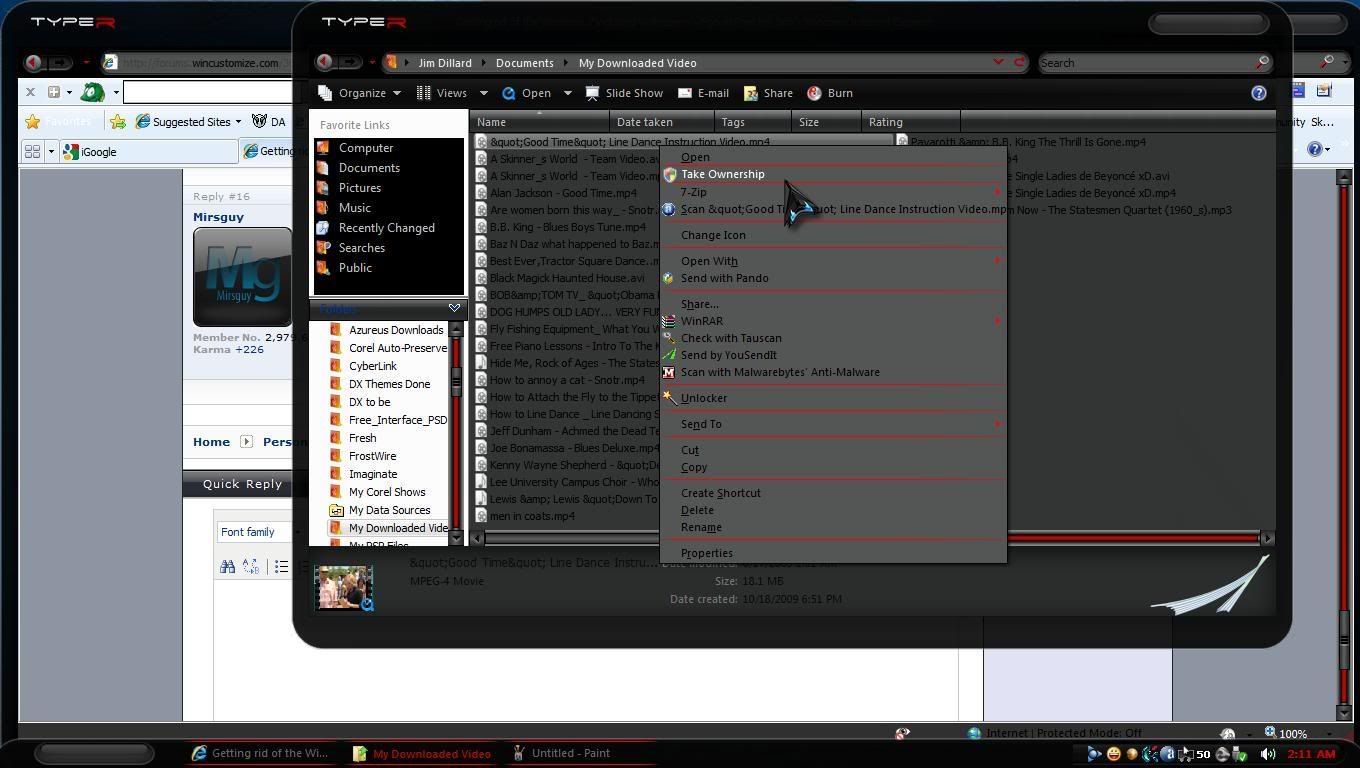
The 'hack' is a simple registry merge that is actually a lot easier....and gives you a context menu item accessible by right-click that you can then use on any file or folder you wish.
....and yes, I was logged in as Admin....


Reply #15 Wednesday, October 28, 2009 6:54 PM
You should try my cooking 
Reply #16 Thursday, October 29, 2009 1:03 AM

Just stick to skinning, my friend!
My wife won't even let me in the kitchen!

Reply #18 Thursday, October 29, 2009 5:42 AM
I normally use a wall of my own choice/something to fit the theme I'm using, but this thread aroused my curiosity so I took a gander at the included walls... piss poor, to say the least, is about all I can manage. Most of 'em look like those 'less than perfect' models (fashion or nude) who've been photo-shopped to all buggery to hide all the blemishes.
Oh well.... back to walls I like.

Reply #19 Thursday, October 29, 2009 8:11 AM
Jim...line dance instructional video...please, say it aint so. 

Reply #20 Thursday, October 29, 2009 8:21 AM
He is a redneck!
Please login to comment and/or vote for this skin.
Welcome Guest! Please take the time to register with us.
There are many great features available to you once you register, including:
- Richer content, access to many features that are disabled for guests like commenting on the forums and downloading skins.
- Access to a great community, with a massive database of many, many areas of interest.
- Access to contests & subscription offers like exclusive emails.
- It's simple, and FREE!
|
|
Page 1 of 2 | |
|
|---|
Reply #1 Wednesday, October 28, 2009 7:57 AM
it's actually quite painless, even an idiot like me could do it. for those that don't know, the location of the files is C:\Windows\Web\Wallpaper