





































WindowBlinds 7 Beta 2 bug reports
Wednesday, August 5, 2009 by ZubaZ | Discussion: WindowBlinds
Beta 2 of WindowBlinds has been released. This build focuses on UI enhancements.
The previous UI is still the default from Impulse. You can access the new (amazing!) UI from your start menu, or from the button in the old UI (screenshot)
Post anything that looks odd. Make sure to give us your WB system information from the WB app, your OS (including 32 or 64 bit), and if it's hard to explain (or even if it isn't) a screenshot.
 |
|
Page 9 of 10 | |
|
|---|

Reply #162 Tuesday, November 3, 2009 9:21 AM
The entire tray area is disappearing on some skins, perhaps only ones using trans. TGA, as opposed to bmp, not sure, haven't inverstigated to any great extent. Typically a re-apply or explorer kill fixes it, but a bug nonetheless.

Reply #163 Tuesday, November 3, 2009 2:19 PM
Ok Neil. If there's anymore information I can provide to help let me know.
Here's my current info again...if it will help.
WindowBlinds version : WindowBlinds 7.0 (build 79 x86) (In this version toolbaricons & animations are working)
WindowBlinds is installed correctly on this PC
WindowBlinds appears to be activated on this PC
Your machine supports per pixel borders on WindowBlinds skins.
(Dell 2007WFP (Digital)) 1 is attached to NVIDIA GeForce 7600 GS
Wblind.dll 2009/09/25 08:42:20
Wbsrv.dll 2009/09/25 08:42:18
Wbconfig.exe 2008/09/22 16:59:32
Wbload.exe 2008/03/30 10:27:14
Wbhelp.dll 2009/03/24 16:04:07
Wbui.dll 2009/03/24 16:04:05
Tray.dll 2007/09/12 16:58:21
Screen.exe 2008/07/22 10:10:09

Reply #164 Tuesday, November 3, 2009 7:37 PM
are there different builds out there that are depending on...?
all of my files are more recent with the exception of the help dll which is older?
Your computer has a Windows Experience Index base score of 5.9
Your Windows Graphics Experience score is 5.9
WindowBlinds version : WindowBlinds 7.0 (build 228 x86 - Vista Edition) - 64 bit OS
WindowBlinds is installed correctly on this PC
WindowBlinds appears to be activated on this PC
(ViewSonic VX2433wm) 1 is attached to NVIDIA GeForce GTX 285
Wblind.dll 2009/10/29 13:32:20
Wblind64.dll 2009/10/29 13:32:19
Wbsrv.dll 2009/10/22 13:49:56
SevenConfig.exe 2009/10/26 10:41:17
Wbload.exe 2009/10/22 07:40:12
Wbhelp.dll 2008/04/26 14:14:07
Tray.dll 2009/10/21 09:13:19
Wbload.dll 2009/09/25 08:41:28
Screen.exe 2009/10/22 07:40:01

Reply #165 Thursday, November 5, 2009 2:40 PM
What's going on again with that silly Impulse program done mainly for plyers ???
Just wanted to update WB7 from V6.90 beta.097 to V6.90 beta .099 and Impulse is telling me "your registration number is not valid ..."
Till when those troubles will continue ? 

Reply #166 Thursday, November 5, 2009 4:06 PM
Just wanted to update WB7 from V6.90 beta.097 to V6.90 beta .099 and Impulse is telling me "your registration number is not valid ..."
I had the same problem, if you use the "Install all updates" button under the help icon it should install for you.
Reply #167 Thursday, November 5, 2009 5:13 PM
What's going on again with that silly Impulse program done mainly for players ???
Just wanted to update WB7 from V6.90 beta.097 to V6.90 beta .099 and Impulse is telling me "your registration number is not valid ..."
I had the same problem, if you use the "Install all updates" button under the help icon it should install for you.
Before seeing your post, i did a full uninstall of Impulse, then reboot, then re-install it with the full installer, then reboot, then uninstall WB7, then reboot, then it installed correctly WB6, then reboot, then trying to get the WB7 update and ... back to the silly message ...
BTW, thanks very much for your tip, it worked also for me 
 (i hate that Impulse crazy kinda program
  ), but now i get troubles when verifying other programs installation such as "MyColors" for instance ... (detected as not correctly installed and asking for update to correct the problem, update which doesn't solve anything ... )
AAAarrrggggggggggggg i hate it i hate it

Reply #168 Friday, November 6, 2009 7:27 AM
Hi Neil,
I am still having a minor issue with taskbar transparency as well - at least with Diamond. It works under the default setting and on full transparency. Any other setting results in a completely transparent notification area even though the rest of the taskbar is set for less transparency. I did notice that I have to run Skin Studio 7 separately but I can work around that. Can't seem to get around the transparency issue though and I've tried it with a couple of other themes as well. Otherwise, things are working well and and changes are much faster than with WB 6.

Reply #169 Friday, November 6, 2009 8:40 AM
Reply #170 Friday, November 6, 2009 3:50 PM
Still waiting on a fix for the toolbaricons and animations in XP. Any word on this yet?
Reply #171 Friday, November 6, 2009 7:20 PM
I am also having trouble updating Windowblinds using Impulse, getting the Registration Not Valid message. Running Vista Home Premium. My ObjectDesktop Ultimate subscription expires sometime in 2016. My desktop updates fine, but my laptop gives me the Registration Not Valid message.
Reply #172 Tuesday, November 10, 2009 4:21 PM
Are we getting any closer on this? Would really love to use the new interface. 

Reply #173 Tuesday, November 10, 2009 9:54 PM
I have problems with PowerDVD Ultra 9, it wont show the fonts in white color when a WindowsBlinds skin is applied. I have tried by setting an exclusion for this application but it is even worse since no fonts are shown when configured like that.
Disabling any custom skin (by selecting Aero) fixes the problem with PowerDVD. Thus, it might be some problem with WB 7.
Reply #174 Wednesday, November 11, 2009 5:45 AM
Disabling any custom skin (by selecting Aero) fixes the problem with PowerDVD. Thus, it might be some problem with WB 7.
Any WB skin?
It sounds like a system colour issue which is why exclusion does not help.

Reply #175 Wednesday, November 11, 2009 2:39 PM
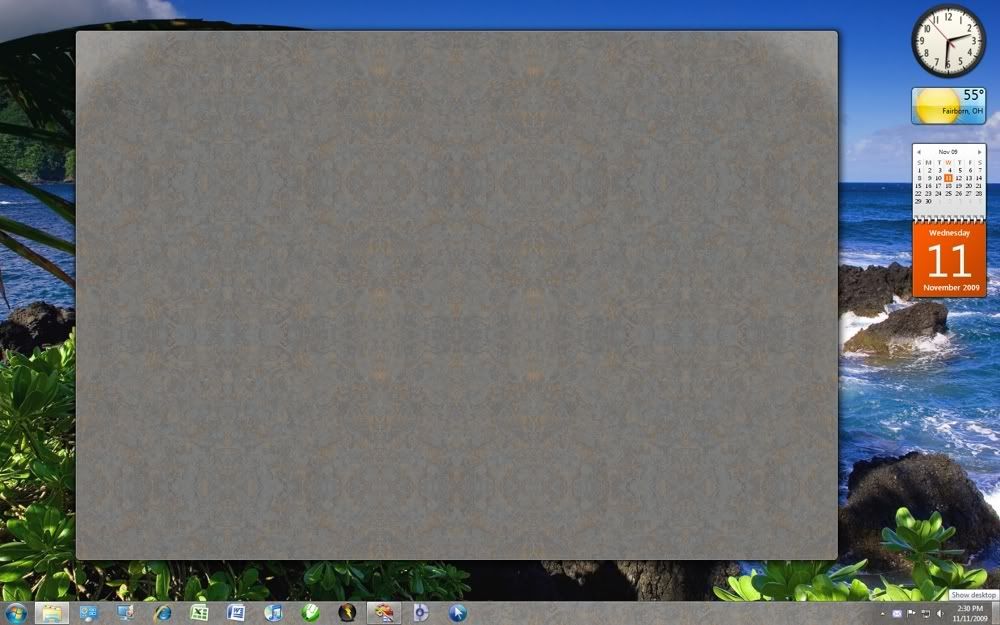
ok, not sure if this has been posted or not... so much to sift through. Anyway, When I have one of the Aero textured skins applied (Aero metals in the screenshot) the Aero Peek feature of Windows 7 doesn't make the window transparent, instead it makes it a box of the texture used... like so...
http://i252.photobucket.com/albums/hh28/richieguere/AeroPeekBug.jpg
Reply #176 Wednesday, November 11, 2009 4:26 PM
http://i252.photobucket.com/albums/hh28/richieguere/AeroPeekBug.jpg
This is perfectly normal.
To make things more transparent use the transparency tab.
Reply #177 Wednesday, November 11, 2009 7:27 PM
To make things more transparent use the transparency tab.
But what if I don't want the skin transparent? Then the Aero Peek feature doesn't work?
Reply #178 Wednesday, November 11, 2009 9:33 PM
Don't mean to be a pain in the ass here...but should I bother installing the latest version of this...as far as hoping my problem is fixed? My inquiry seems to be getting looked over here. And I don't see anything in the "history" in Impulse that would suggest it has been fixed...but then again these things don't seem to get updated as they once did.

Reply #179 Thursday, November 12, 2009 12:02 AM
Win 7 has stopped skinning the window widgets. I no longer have borders, menu bars, or close/open icons surrounding program windows. Program Titles and icons still remain visible and all functions including close/open commands and resize arrow are still working. Impulse maintains its windowing. This happened on my desktop just recently (would installing the beta of Spiriform's Specce make any difference?). No change in skin or unloading/reloading/rebooting will alleviate the effect. Have to revert to Aero to use the operating system.
Your computer has a Windows Experience Index base score of 5.6
Your Windows Graphics Experience score is 6.7
WindowBlinds version : WindowBlinds 7.0 (build 228 - Windows 7 Edition) - 64 bit OS
WindowBlinds is installed correctly on this PC
WindowBlinds appears to be activated on this PC
(Generic PnP Monitor) 1 is attached to NVIDIA GeForce 8800 GTS
Wblind.dll 2009/10/29 12:32:20
Wblind64.dll 2009/10/29 12:32:19
Wbsrv.dll 2009/11/04 09:22:58
SevenConfig.exe 2009/11/04 15:15:08
Wbload.exe 2009/10/22 06:40:12
Wbhelp.dll 2009/10/07 14:35:07
Tray.dll 2009/10/21 08:13:19
Wbload.dll 2009/09/29 10:20:26
Screen.exe 2009/11/04 09:22:01


Please login to comment and/or vote for this skin.
Welcome Guest! Please take the time to register with us.
There are many great features available to you once you register, including:
- Richer content, access to many features that are disabled for guests like commenting on the forums and downloading skins.
- Access to a great community, with a massive database of many, many areas of interest.
- Access to contests & subscription offers like exclusive emails.
- It's simple, and FREE!
|
|
Page 9 of 10 | |
|
|---|
Reply #161 Tuesday, November 3, 2009 9:20 AM
Not yet. We need to see why it is not working for you as the reg keys should be being written ok.