





































Question about Startmenu Logoff buttons in XP
Monday, August 3, 2009 by k10w3 | Discussion: Skinning
I'm trying to push my limit of skills in SkinStudio 6 with my next blind, and I know that when it comes to skinning the Startmenu Logoff buttons, I'm clueless. I've taken apart other blinds and I still can't figure out how to do this. In XP, how do I put 3 different icon states in the button icons when the default is 3 (which would mean there would need to be 9 images)

Also, are there tricks so I can hide the text that says "Log Off" and "Turn Off Computer"? Is it possible to move the buttons and icons to the left side of the panel, rather than the right? I can't find anything in SKS6 on altering these things and I've never skinned using SKS5 -- THAT program is a total mystery to me.
Is there a tutorial some place that goes into detail on the startmenu logoff buttons I can study?

Reply #2 Monday, August 3, 2009 4:47 PM
If the area where the text would go is NOT transparent, you can use the color of the area for your text...then it wouldn't show...at least, this used to work for me. But if it is transparent or has multiple colors, then you are out of luck.



Reply #4 Monday, August 3, 2009 6:40 PM
That's the text margins on the bottom part of the start panel itself not in the log off buttons section, in case it wasn't clear. Move your right margin to the left and the whole button section will move. The same for moving them up (in that case it's the bottom margin)
Reply #6 Monday, August 3, 2009 7:38 PM
Take a look at IR Brainiacs "tore up xp" blind, i think that has the function your after,not only is there no text there's no buttons either,once you mouse over em the rectangular button he made appears but there is no text,dam blind freaked me out the first time i used it since i could'nt see the off button i did'nt thik it had one..lmao..
Reply #7 Monday, August 3, 2009 7:48 PM
in xp the log off glyphes dont show states, but the button BEHIND it does.. and thats the logg off button, so you make the logg off button with only 3 images , but they must show the 3 states, normal, pressed mouseover,
the glyphes just sit on top as a set of 9(but do not show states) hence why the button does it for you.
and 20f3 is right, to move them, its the loggoffpanel text margins that moves them left,right,up or down. hope this helps.
Reply #8 Monday, August 3, 2009 8:20 PM
Thanks everybody! (consuming large quantities of caffeinated beverages right now so I can burn somemore midnight oil and bump up my SKS6 skills).
It's a good thing I'm not this excited about my job, because rumor has it in the next 4 years, what with the push for EMR (electronic medical record), there will be no more need for medical transcriptionists, and if I were as excited about my job as I am about skinning, I'd be really bummed right now. The way it is, I'm just figuring...oh well...I'll figure something else to do for money and keep skinning until I'm dead.
I hope the geezer home has WiFi.

Reply #9 Thursday, August 6, 2009 11:29 PM
You can...
make the icon states 1 pixel wide and translucent=nothing but text.(and button if you do them)
make button trans in first state and blend text into logoff graphic...only showing text on mouseover
content margin the logoff area to the point it just says logoff and turnoff...or even completely off the bottom so they have to logoff with the taskmanager...heheh
content margin the logoff so titghtly vertically that only a sliver of color shows on mouseover...no text ,but trust me...people wont read your description or find them easily.(thanks for the tore up XP mention  )
)
With the right icons and button graphic,combined with the right text color you could put a button just behind the icon and the text would sit on the logoff graphic...blending in...but there would be a gap between the buttons where the text actually was.
Like...draw your button square but add some trans to the right(blank space)and use your sizing margins to keep the button off the text.(so it only draws to the left side,over the icon)(expands trans to the right)
confused yet? 
Reply #10 Thursday, August 6, 2009 11:44 PM
messed up my own skin temporarily to show you...it can be done  thats the logoff button I have moused into(mouse dont screencap for some reason)
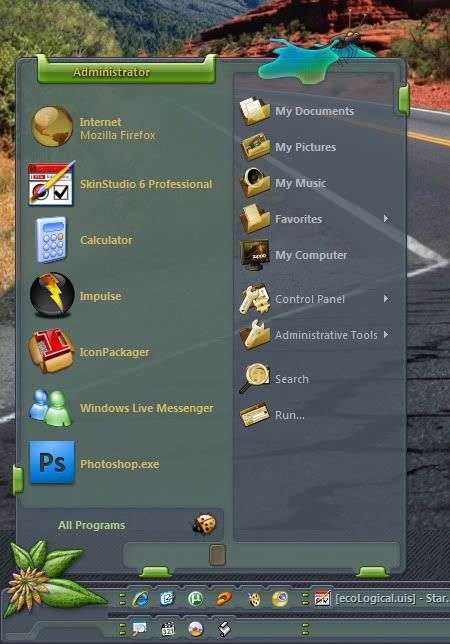
there are variations of this...one with icons etc... blah blah blah 

Reply #11 Thursday, August 6, 2009 11:47 PM
heck I might go ahead and change those buttons to logoff bugs on 1 of the subs...ehhehehehee. 
what skinners forget sometimes is a button graphic dosnt HAVE to surround the entire text...it can just be an image that sits to the right or left of the text.(with working content margins) 
Reply #12 Thursday, August 6, 2009 11:54 PM
like these toolbarlike buttons...they look like raised parts of the toolbar pointing down but its a button that doesnt encompass the text

Reply #13 Thursday, August 6, 2009 11:57 PM
shucks darn...now I have to put my skin back the way it was...
Reply #14 Friday, August 7, 2009 12:22 AM
Thanks I.R. Brainiac -- I'm going to have to spend some time playing around with these ideas. What is that skin you used as an example in reply #12?
Reply #15 Friday, August 7, 2009 12:53 AM
Thats No Load Limit...I think I did it in Slider too.
Please login to comment and/or vote for this skin.
Welcome Guest! Please take the time to register with us.
There are many great features available to you once you register, including:
- Richer content, access to many features that are disabled for guests like commenting on the forums and downloading skins.
- Access to a great community, with a massive database of many, many areas of interest.
- Access to contests & subscription offers like exclusive emails.
- It's simple, and FREE!
Reply #1 Monday, August 3, 2009 4:42 PM
If you click the Help tab in SkinStudio when you are editing the logoff buttons, you will get an explanation of what each of the nine images do k10w3. It is pretty self-explanatory.
Oh, and if you increase the size of your right text margin, it pushes all the logoff buttons to the left. Not too sure about removing the text though, anyone?