





































Jagged preview when going from Bryce to my Image editor?
Ugh!
Thursday, May 14, 2009 by Skinhit | Discussion: WinCustomize Talk
I need help please....I'm trying to create an IP using Bryce6 and the icons have a great quality, however when I create a preview from bryce to my image editor all I get is a very jagged preview and I cant figure out why? I do walls in Bryce all the time and create previews for them the same way with no jagged edges... It's driving me crazy, can someone offer any advice as I want my previews to reflect the same quality the Icon has....Please,please,please, thanks, Skinny
 |
|
Page 1 of 2 | |
|
|---|

Reply #2 Thursday, May 14, 2009 1:11 PM
Im using bryce5.5 but may be this would help you out.
Under document setup, Antialiasing, check the box next to superfine instead of normal and render.
Make sure you are trying to export the image in the same resolution you want for the preview in your image editor.

Reply #3 Thursday, May 14, 2009 1:16 PM
Have done that...didnt help.
still no...
thank you for your time Amitsaran


Reply #4 Thursday, May 14, 2009 1:38 PM
Hey Skinhit, I have a couple thoughts but hands on would be easier for me, could ya fire me one of the Bryce files for me to play with. sjmcavan at hotmail dot com
And the steps you are taking to try to make the preview.
Reply #6 Thursday, May 14, 2009 2:01 PM
Got it, just doing a quick render then will see the results I get with a couple methods.
Reply #7 Thursday, May 14, 2009 2:27 PM
Hey Skinhit, ya are not going to like hearing this, I think maybe something is borked with your image editor saving as a jpg. After rendering I saved image, as a bitmap, from Bryce to folder and exported to folder also, then opened both in Paint Shop Pro X2 to save as a jpg, even at default compression of 20 I am getting a good quality jpg. With compression at the lowest/best quality setting of 1, when viewed in windows pic viewer I can not tell the difference between the bmp and jpg.
Unless there is something different you are doing that I could give a try.

Reply #8 Thursday, May 14, 2009 8:50 PM
Do you have a screenshot of the jagged image?
Waht resolution are they and wahts your image editor?
I converted the icon to a png and got a decent png file up to 256x256. I did get some kinda goofy error in ID when I tried to open it about the resolution bening '200' and it was supposed to be lower or higher. I haven't been able to duplicate that yet. I was able to comvert the png back to an icon with no problem. Here's a shot...

I hope I am following what you are saying. Let me know. 
Oh..and I hate you and hope this was no help at all. And all that stuff there.
Reply #9 Thursday, May 14, 2009 10:23 PM
Unless there is something different you are doing that I could give a try.
Damn Cavan...Can you recommend a good free image editor?
Reply #10 Thursday, May 14, 2009 10:28 PM
yes the preview on the icon in the gallery....
256x256 for the icon and 1050x1050 on the screenie and my image editor is art explosion publisher pro...
so can you recommend a free image editor?
and thanks for the help! I hate you too!
Reply #11 Thursday, May 14, 2009 11:25 PM
If iI had to take a guess, it's the 'resolution'. It's high. What you listed (256x256) is your pixel dimensions. In PS, the pixel dimensions and the resolution are two seperate things.When ever I do something in a 300 resolution, I get almost the same effect. I go over the jagged edges with my blur tool at a soft setting. Does it do the same if you make the preview , say 750x750 or smaller?
PAINT.net - is the hot one right now. They call it the PS killer. As of last month, you can open photoshop files in it. The set-up and tools is very similar to PS. Check out these articles on it at Lifehacker.
http://lifehacker.com/search/PAINT.net
GIMP
Someone over at DA had the same issue with her renders. I will try to look and see if I can find it. She found a solution for it after a while.
Reply #13 Friday, May 15, 2009 12:42 AM
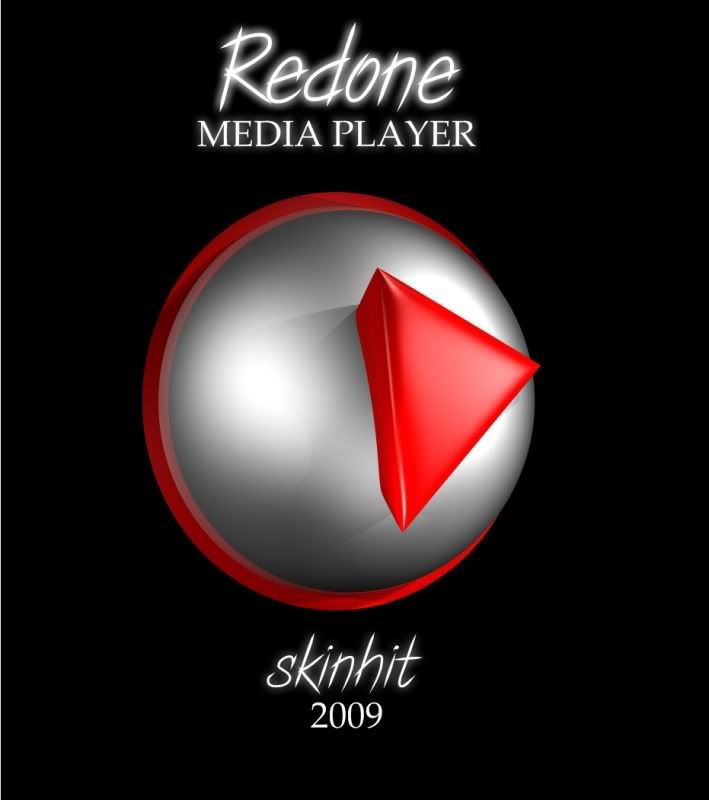
It's like night and day...this was done in paint.net


Reply #16 Friday, May 15, 2009 12:37 PM
I don't need your fucking insults. I hate you.

Reply #18 Friday, May 15, 2009 2:17 PM
I second this. I use GIMP constantly at work and at home. From what I can see, it packs all of the features (or at the very least all of the most commonly used features) of the PhotoShop family into one nice, stable open-source program.
Reply #19 Friday, May 15, 2009 4:04 PM
That is a much better looking preview pic. Glad to see ya got it fixed up.
Now will you and Po just get a room and do what ya need to do
Reply #20 Friday, May 15, 2009 9:03 PM
It's always the ones who don't post pics of themsleves on their sites that get bold and think they're funny. Oh, wait...I think I found one.

Please login to comment and/or vote for this skin.
Welcome Guest! Please take the time to register with us.
There are many great features available to you once you register, including:
- Richer content, access to many features that are disabled for guests like commenting on the forums and downloading skins.
- Access to a great community, with a massive database of many, many areas of interest.
- Access to contests & subscription offers like exclusive emails.
- It's simple, and FREE!
|
|
Page 1 of 2 | |
|
|---|
Reply #1 Thursday, May 14, 2009 12:55 PM
here's the image https://www.wincustomize.com/skins.aspx?skinid=4093&libid=39