





































DesktopX Step-By-Step Tutorials #12
Stepping Thru States
Tuesday, January 13, 2009 by RomanDA | Discussion: DesktopX Tutorials
  |
|||
| Step-by-Step Tutorials |
#12 - Stepping Thru States |
||
|
A series by RomanDA |
|||
|
Listing of other DX Tutorials: Click here Today's Lesson: "Stepping Thru States" is a very simple way to setup multiple states with a button to change between them. In this lesson we will cover how to create a simple object, then add multiple states to it, and add a simple button to "step" thru the states. For this and all the Step-By-Step DX Tutorials you will need to purchase DesktopX for $14.95 from Stardock. See previous tutorials for how to load DX & create a new object. Lets get started. |
|||
| STEP 1 - Create the first object "state" | |||
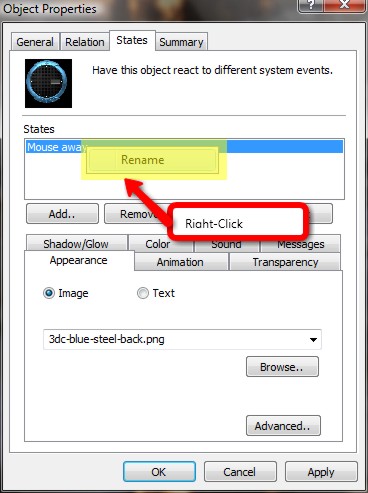
| With DX loaded and running, add a new object, goto the "STATES" tab and here we will assign the object a new image and then rename the state to "1" Browse to the 1st background image you want to use, and select it. Then use the steps below to rename the state to 1.
|
|||
| STEP 2 - Create More States | |||
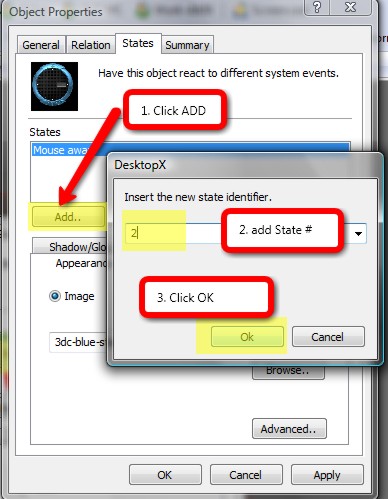 |
Add a new STATE naming it "2" and assigning it to the next background image. You would continue this for ALL the states you want to add. In our case we will make the TOTAL 8 states. Repeat - till you have all 8 states added. "OK" it all when its done. |
||
| STEP 3 - Adding the code to step thru the states. | |||
|
Edit the above object and click on "NEW SCRIPT". We will be adding the following script. Code: vbscript
|
|||
| You could also add multiple "state" changes to other objects as well (things like Clock hands, or color changes to text objects, etc. | |||
| CONCLUSION | |||
| There is a lot more you can do with this, but these are the basic steps to setting up the Stepping Object State Changer. This works great for clocks, and lots of other items where you want to have multiple looks/colors/layouts.
|
|||
 |
|
Page 1 of 2 | |
|
|---|

Reply #2 Tuesday, January 13, 2009 8:15 PM
yep.. the whole object is the button.
if you want to make a seperate button somewhere, just look at the code:
- Sub Object_OnLButtonDown(x, y)
- CurrentState = CurrentState + 1
- If CurrentState > MaxStates Then CurrentState = 1
- Call SetState()
- Widget.Preference(" CurrentState ").value = CurrentState
- End Sub
You would have to make some changes to this to make it work, but its not that hard. If you download and look at my "Kewl-Klock" it had all of this code in it.

Reply #3 Tuesday, January 13, 2009 8:26 PM
I've done it dear! just exporting it now, I'm still half asleep, that's my excuse , thanks again for this script, and for suggesting it to me hon, you rock
Reply #5 Wednesday, January 14, 2009 9:06 PM
RomanDA must be related to HG, he also speaks in the third person


Reply #6 Wednesday, January 14, 2009 9:42 PM
Thanx David. BTW, How's that gadget coming? Or did I miss it's finish?

Reply #7 Thursday, January 15, 2009 3:23 AM
HG_Eliminator thinks it must be a Dave thing.


Reply #10 Thursday, January 15, 2009 6:53 AM
RomanDA wonders What gadget?
RomanDA thinks others should think like he does.
RomanDA likes to use '/ me'
Reply #11 Thursday, January 15, 2009 7:01 AM
Tailsgirl is going to test /me out
Hey it works!! coolies 
Reply #12 Thursday, January 15, 2009 11:15 AM
Wincustomize Community Wall Gadget, of course!
Reply #13 Thursday, January 15, 2009 12:30 PM
oh, Sorry.. no, it had a lot of issues with screen resolutions, and i just gave up at one point, it was just too time consuming to get working the way i wanted it to. sorry.. I can send you whats done if you want.
The main issues were with the "desktop" icons not showing with it setup, and that sorta defets the purpose of a "wallpaper"
Reply #14 Thursday, January 15, 2009 4:41 PM
Roman couldit be set it up with layered pages like Lcars? one full of the Links as proposed and a second with Desktop Icons available, alternatively switched back and forth with a control button.
Reply #15 Thursday, January 15, 2009 5:05 PM
Reply #16 Thursday, January 15, 2009 5:06 PM
Anything I could do would , of course, require that desktop icons be hidden.
Reply #17 Thursday, January 15, 2009 5:08 PM
What I am proposing will not be a wallpaper, it will be a full screen gadget.

Reply #18 Thursday, January 15, 2009 5:46 PM
https://www.wincustomize.com/skins.aspx?skinid=3223&libid=31
Reply #19 Thursday, January 15, 2009 5:53 PM
What I am proposing will not be a wallpaper, it will be a full screen gadget.
Crikey Jim, you're gonna need some horsepower to push something like that
 ..... or in my case, I'll need a LOT of extra mice to run in that wheel, that powers my CPU
Reply #20 Thursday, January 15, 2009 6:13 PM
I uploaded it here: https://www.wincustomize.com/skins.aspx?skinid=1503&libid=34
its a DXPACK (in a zip file), its also HUGE (size). Its very complicated in the script, but if you want to take it apart, and try and make it work, its all yours. I just have not had the time (desire) to make it work. Maybe VAD could make it work, but i dont know its really a complext thing.
Sorry i never managed to get it 100%.
Please login to comment and/or vote for this skin.
Welcome Guest! Please take the time to register with us.
There are many great features available to you once you register, including:
- Richer content, access to many features that are disabled for guests like commenting on the forums and downloading skins.
- Access to a great community, with a massive database of many, many areas of interest.
- Access to contests & subscription offers like exclusive emails.
- It's simple, and FREE!
|
|
Page 1 of 2 | |
|
|---|
Reply #1 Tuesday, January 13, 2009 7:47 PM
Thanks for this Roman, just one question, how do you toggle through the states? is there an option to toggle?
Edit.. I'm an idiot Roman, that WAS for the button doh! <---
