





































Paint.COM released
better then Paint.NET?
Friday, December 26, 2008 by vlastimilmiler | Discussion: New Releases
Hello everyone,
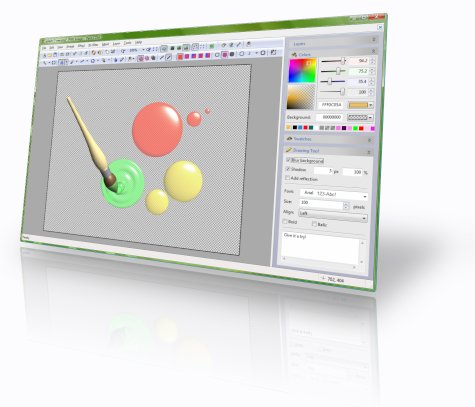
Paint.COM, a new freeware image editor was just released. It supports image masks and layers with effects, can modify pictures using drawing tools like Rectangle, Ellipse, Line, Curve, Polygon, Text, Retouch, Magic wand, Transformation, etc. Drawn shapes can be filled with solid colors, patterns or custom gradients.
Images can be processed with built-in filters (Drop shadow, Bevel, Blur, Displace, Color adjustments, Perspective projection, etc.), with custom JavaScript filters, or with image filters compatible with Adobe Photoshop.
User interface of the application can be customized by modifying toolbars, changing keyboard accelerators, or assigning actions to mouse gestures. Advanced users can reposition individual windows to completely change the look and feel of the application or develop their own plug-ins and add new drawing tools, fill styles, windows, filters, or codecs.
Download from homepage: http://www.rw-designer.com/image-editor
 |
|
Page 2 of 2 | |
|
|---|

Reply #22 Sunday, February 15, 2009 3:50 AM
I've only used one program by RealWorld, and it's the RealWorld Cursor Editor 2007.1, and that program is really nice, and makes 3D designing easy (for me anyway). So I'm gonna try this program out, and say what I think.
Reply #23 Sunday, February 15, 2009 4:23 AM
Well I've tried the program out, and the interface is really nice, and easy to navigate threw, but couldn't really do what I wanted to like a sketch for example, but it's pretty good if your just getting started, and as for a free program at that, but I prefer GIMP, and Paint.NET over it.
However that's my intake on it, and don't forget that everyone has different opinions, and that's just mine.
I tried to make a fog effect for one of my images of me doing some parkour, anyway the result is below.
Reply #24 Wednesday, March 4, 2009 8:14 AM
I made another edit with the program on colored eyes, and even did a tutorial on it as well.
Image Before:
Image After:
NOTE: That is me in that picture, and my eyes are naturally brown, but I don't know why they look blue in the picture. Which is pretty odd, in my opinion.
Please login to comment and/or vote for this skin.
Welcome Guest! Please take the time to register with us.
There are many great features available to you once you register, including:
- Richer content, access to many features that are disabled for guests like commenting on the forums and downloading skins.
- Access to a great community, with a massive database of many, many areas of interest.
- Access to contests & subscription offers like exclusive emails.
- It's simple, and FREE!
|
|
Page 2 of 2 | |
|
|---|
Reply #21 Tuesday, February 3, 2009 1:22 AM
pretty cool, messed around with it and was a little confused with it... UI is different from PS but nice to have for free...