





































Paint.COM released
better then Paint.NET?
Friday, December 26, 2008 by vlastimilmiler | Discussion: New Releases
Hello everyone,
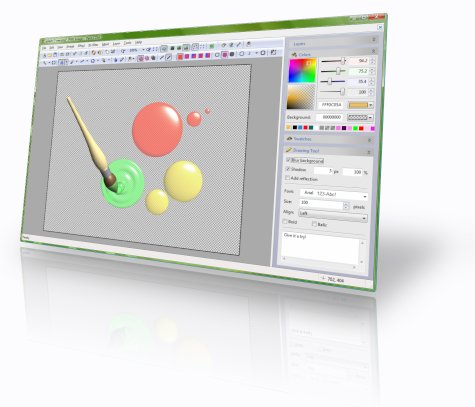
Paint.COM, a new freeware image editor was just released. It supports image masks and layers with effects, can modify pictures using drawing tools like Rectangle, Ellipse, Line, Curve, Polygon, Text, Retouch, Magic wand, Transformation, etc. Drawn shapes can be filled with solid colors, patterns or custom gradients.
Images can be processed with built-in filters (Drop shadow, Bevel, Blur, Displace, Color adjustments, Perspective projection, etc.), with custom JavaScript filters, or with image filters compatible with Adobe Photoshop.
User interface of the application can be customized by modifying toolbars, changing keyboard accelerators, or assigning actions to mouse gestures. Advanced users can reposition individual windows to completely change the look and feel of the application or develop their own plug-ins and add new drawing tools, fill styles, windows, filters, or codecs.
Download from homepage: http://www.rw-designer.com/image-editor
 |
|
Page 1 of 2 | |
|
|---|

Reply #2 Friday, December 26, 2008 4:42 PM
Ha! that look better than photoshop hehe, well easier to navigate anyway, thanks for the link!!!!!!
Going to get it right now

Reply #3 Friday, December 26, 2008 4:42 PM
Hmm, People just might get this confused with Paint and Paint.Net.


Reply #6 Friday, December 26, 2008 7:33 PM
That is very hard to say in one sentence. GIMP does not try to be innovative, its goal is to duplicates functionality of commercial software and provide an open source alternative. It has accumulated a lot of functions over the years, but some people consider it hard to use. Paint.COM tries to be innovative (supports mouse gestures, gamma-aware blending, JavaScripted filters, the Vista-glass-like tool modifier, etc.), but keeping things simple is a priority. So, I'd say it is better for newbies and who knows, maybe even experienced users may find it sufficient. Users rarely use more than 20% of application features, maybe it has the right 20%.
That's intentional  .
.
The mouse gestures? The control handles?
Reply #7 Friday, December 26, 2008 7:41 PM
The interface, controls, kinda doesn't do what it's meant to, for instance, the gradient tools, did nothing at all to the image I was messing with, and a few other tools, or maybe I'm too use to photoshop, but others might like it 

Reply #8 Friday, December 26, 2008 10:07 PM
i, myself have both paint.net and GIMP for vista..dont think i need another one, but ill pass this info along to other people. thx for info mate 
Reply #9 Saturday, December 27, 2008 3:54 AM
Yes, gradient works differently. It is not a tool, but rather a fill style. If you activate it, and then draw for example a rectangle, it will fill the rectangle with a gradient or pattern.
It is different - I am trying to make things simpler. Not sure if I am sucessfull in that, but I am trying.


Reply #11 Saturday, December 27, 2008 6:11 AM
Looks really nice... Will it support all photoshop plugins? 
Reply #12 Saturday, December 27, 2008 7:43 AM
I wouldn't say all, but there's quite a few filter factory compatible ones available 
Reply #13 Saturday, December 27, 2008 12:27 PM

Reply #14 Saturday, December 27, 2008 12:40 PM
I decided to give it a run, but it seems that no matter what I do, after installation, the program crashes.
Seems like all I can do is launch it....
Getting this error:

Happend first time when trying to open a .png image.
System:
Vista Ultimate (32 bit)
AMD 64 Dual Core 3800+ processor
2 GB ram
Reply #15 Saturday, December 27, 2008 1:37 PM
Happend first time when trying to open a .png image.
That's bad news for me. Is is just one .png image or does it crash every time you try to open anything or create new image? Do you have a tablet? Are you running a lot of applications that modify behavior of Windows (I can see that you are using CursorFX)?
Thanks.
Reply #16 Saturday, December 27, 2008 2:06 PM
When I open the png image first time Paint didn't display the image in the main 'viewer', sp I tried re-opening it - boom bang crash.
Well, it does now 
I'll try re-installing and start over from scratch.
Nope, but I'd like one! (hint for an Xmas gift, anyone.)
I'm using plenty of GUI modifying applications - WindowBlinds, IconPackager, CursorFX, RightClick, the kitchen sink.....
Reply #17 Saturday, December 27, 2008 2:11 PM
Err... reg. re-installing it...
Are there no un-installer, or shall I just nuke the installation folder?!
(Doesn't show in 'add-remove programs' in the Control Panel)
Reply #18 Saturday, December 27, 2008 2:35 PM
It shows in add-remove CP under its full name "RealWorld Paint.COM".
Maybe the configuration was somehow corrupted. Though it seems unlikely. If you run the main executable with /manage switch (C:\.....\RWPaint.exe /manage), a different dialog pops up. Hit the Reset Config button and close it.
I'll try installing a WindowBlinds, CursoFX and RightClick to see if it crashes...
Reply #19 Saturday, December 27, 2008 3:03 PM
Darn... so it did... 
Anyway, after re-installing I opened Paint, opened a regular jpg image, clicked tools -> application settings - and boom... crashed again.
Re-opened Paint, clicked tools -> application settings, settings window came up just fine this time.
Flipped down the language drop-down menu.
Selected English
Clicked OK
And... boom.
Crashed once again.
I think a lill more work is needed
Then again, no application works the same on all/any PC systems.
Reply #20 Saturday, December 27, 2008 3:29 PM
OK, thanks for the info. With so many different crashes, I am guessing something fundamental is going on, maybe it interferes with some software on your PC. I tried installing WindowBlinds in VMWare, but it froze the screen of the VM. I do not want to risk my main PC (I am a bit paranoid about software that does such a big changes to OS), but I'll try it on some older piece of hardware. Anyway, thanks again for the feedback, it is very important when releasing a new app.
Please login to comment and/or vote for this skin.
Welcome Guest! Please take the time to register with us.
There are many great features available to you once you register, including:
- Richer content, access to many features that are disabled for guests like commenting on the forums and downloading skins.
- Access to a great community, with a massive database of many, many areas of interest.
- Access to contests & subscription offers like exclusive emails.
- It's simple, and FREE!
|
|
Page 1 of 2 | |
|
|---|
Reply #1 Friday, December 26, 2008 4:38 PM
Thanks, vlastimilermiler. Looks interesting. How does it compare to say, Gimp?