






































Need Graphic Help??!!
Friday, September 12, 2008 by RobJK | Discussion: WinCustomize Talk
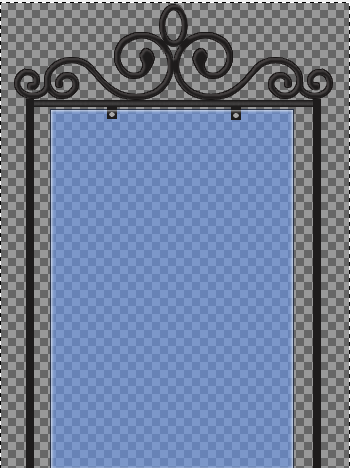
This is what i want to do for my start menu. Obviously this is a rough draft? But the top swirly part is jagged? I need help? I dont know how to make it more smooth. I know i can go through and erase unitll i get it right.....but I am not very good at that. Is there anyone who can offer me advice on how to make the image more smooth aroung the edges?

Reply #2 Friday, September 12, 2008 6:06 PM
I saved it as a png image. I am using the gimp and cant afford to buy anything right now. But ....I think i am just going to have to erase abit more and deal with the jaggedness? It isnt that bad. Plus i can shrik it a bit so..
Reply #3 Friday, September 12, 2008 6:07 PM
that is unless someone has any sugesstions? No one really had anything to say so far, but... 

Reply #4 Friday, September 12, 2008 6:58 PM
Can't help with the Gimp, but I can give the thread a bump. 
Doesn't matter if you're saving as png, if it's jaggie before you save it. If I was doing something like that, I would create it using the vector tools in PSPX......don't know if that's any help to you.

Reply #5 Friday, September 12, 2008 7:55 PM
Reply #6 Friday, September 12, 2008 8:27 PM

Reply #7 Friday, September 12, 2008 8:38 PM
I don't know anything about GIMP. Sorry. If you want to email me the png, I would be willing to see if I can clean it up in photoshop for you. 
Maybe it's just me, I haven't seen anyone else comment, but I'm not seeing anything wrong with it. I tried something similar a while ago and your edges look pretty clean. How does it look when you apply it? (If you've gotten that far yet)
Reply #8 Friday, September 12, 2008 8:48 PM

Reply #9 Friday, September 12, 2008 8:48 PM
oops, sorry! PSPX is Paint Shop Pro X.
Reply #10 Friday, September 12, 2008 9:00 PM
Rob, have you tried Paint.NET ? It's free. You can do alot wiht it, like Photoshop and it supports layers. Here's an example.
Reply #11 Friday, September 12, 2008 10:11 PM
gimp is really good. It supports layers. I know my way around gimp really good. And i do have paint. net i dont use it cuz i dont know how and i feel like it is no different than gimp...i just dont know how to use paint.net and i know how to use gimp.
Reply #12 Friday, September 12, 2008 10:43 PM
Okay. I haven't used PAINT.NET, so I'm asking...if it's similar to photoshop..
- When making custom shapes..in PSP you can customize the size and there is a 'snap to pixel' box that helps with 'smoothing'. PAINT may have something similar.
- Does pint have a 'feather' or 'smoothing' tool? This page for PAINT.NET indicates you can smooth fonts and edges.
- Also this shows something about smoothing in BMPS
Without knowing too much about GIMP, IMO, you should be able to do soemthing in PAINT to smooth it. Maybe someoen else can clarify this, but I have seen folks on DA go through this and I think it has a little to do with the high resolution that GIMP outputs in.
I'm outta ideas, so I'll stop bugging ya. lol. I'm still willing to try and smooth it for ya if ya want or you get stuck. Good luck.
Reply #13 Friday, September 12, 2008 11:21 PM
I have paint.net on my PC but rarely use it. It's more like a super improved MS Paint program. In my opinion, GIMP is more like Photoshop than Paint.net.
GIMP can do almost everything Photoshop can. Most of the PS tutorials can be translated to GIMP. The only limitation to GIMP that I have found is it does not have the ability to use layer sets (which stinks if you want to animate a Xion player).
Reply #14 Friday, September 12, 2008 11:25 PM
Reply #15 Saturday, September 13, 2008 12:51 PM
Well i sent the image to Messiah1 and he feathered it and sent it back but it took so much off of the image, the lines where to skinney...So i just dont know.
Reply #16 Saturday, September 13, 2008 4:09 PM
Ctrl>eft click the layer to selsct it
Go to menu bar
Click on Select>Modify>Smooth
Window opens. Set your pixels for how much 'smoothing you want to do' and click okay
Reply #17 Saturday, September 13, 2008 4:11 PM
dang edit won't work to fix typos..
Ctrl>left click the layer to select it
Go to menu bar
Click on Select>Modify>Smooth
Window opens.
Set your pixels for how much 'smoothing you want to do' and click okay

Reply #18 Saturday, September 13, 2008 6:08 PM
Well...
Reply #19 Saturday, September 13, 2008 6:55 PM
SOOO...you chose the monkey over the red headed step-child....NOBODY LOVES ME!
Reply #20 Thursday, September 18, 2008 1:14 AM
Yeah so it is pretty much solved now...But all the sugestions are something that i can keep in mind guys...So thanks much.
Please login to comment and/or vote for this skin.
Welcome Guest! Please take the time to register with us.
There are many great features available to you once you register, including:
- Richer content, access to many features that are disabled for guests like commenting on the forums and downloading skins.
- Access to a great community, with a massive database of many, many areas of interest.
- Access to contests & subscription offers like exclusive emails.
- It's simple, and FREE!
Reply #1 Friday, September 12, 2008 10:37 AM
What image format is it in or is it in pspimage or psp?
If you have spent a lot of time on it and want to salvage try http://vectormagic.com/ to get rid of the jpg jaggies and save it in smooth png form, you have to pay for photoshop format.