







































Moving the Data bar
Sunday, June 8, 2008 by Ryan Cross | Discussion: Skinning
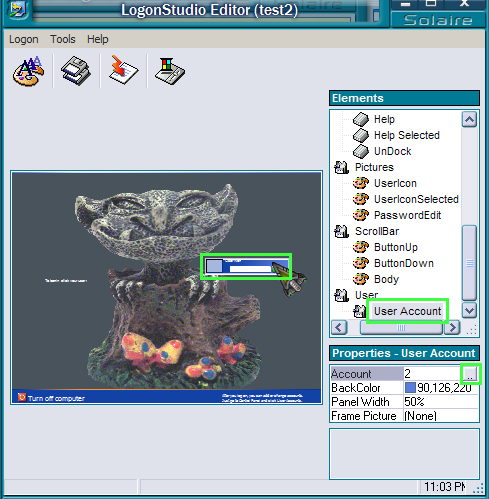
When creating Logon skins, how do you move the data bar so that it doesn't have to be in the middle of the screen?

2of3
Reply #3 Sunday, June 8, 2008 9:05 PM

Reply #3 Sunday, June 8, 2008 9:05 PM
Here's another little tip:
If you set the panel width to 30%, the account banner will be flush with the edge of the screen when in positions 1, 2, 5, 6, 7 and 8
If you set the panel width to 30%, the account banner will be flush with the edge of the screen when in positions 1, 2, 5, 6, 7 and 8
Please login to comment and/or vote for this skin.
Welcome Guest! Please take the time to register with us.
There are many great features available to you once you register, including:
- Richer content, access to many features that are disabled for guests like commenting on the forums and downloading skins.
- Access to a great community, with a massive database of many, many areas of interest.
- Access to contests & subscription offers like exclusive emails.
- It's simple, and FREE!
Reply #1 Sunday, June 8, 2008 3:13 PM
Account 0 little light grey square click it opens up menu
gives 9 positions that you can set to move it around screen.