







































Taskbar Error
Tuesday, May 6, 2008 by GhoS | Discussion: WindowBlinds
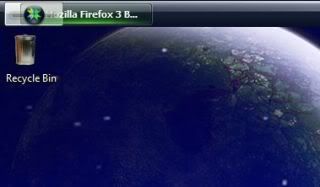
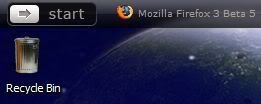
I have actually had this error for awhile but didn't ask about it since it didn't do this with all skins. Now though I noticed it with the new release from Stardock called Stardust so I'm wondering if its something on my desktop doing it or if anyone knows what might fix it.
I'm on Vista Home Premium. I have provided screenshots. One using Stardust after its been applied and I re-booted the computer, and then another shot with a WB that works fine, iPhonix (which was applied after screenshot taken of Stardust showing poorly). You see on the Stardust the button is hiding behind the start menu.
Also here is the text from WB system Info.
Thanks
Your computer has a Windows Experience Index base score of 3.6
Your Windows Graphics Experience score is 3.6
WindowBlinds version : WindowBlinds 6.03 (build 75a x86 - Vista Edition)
WindowBlinds is installed correctly on this PC
WindowBlinds appears to be activated on this PC
(Dell SE198WFP(Digital)) 1 is attached to NVIDIA GeForce 8400 GS
(Generic PnP Monitor) 2 is attached to NVIDIA GeForce 8400 GS
Wblind.dll 2008/03/30 11:29:20
Wbsrv.dll 2008/03/31 16:21:03
Wbconfig.exe 2008/03/30 11:29:34
Wbload.exe 2008/03/30 11:27:14
Wbhelp.dll 2007/08/27 12:54:07
Tray.dll 2007/09/12 18:58:21
Wbload.dll 2007/09/12 18:58:28
Screen.exe 2008/03/29 15:09:18
I'm on Vista Home Premium. I have provided screenshots. One using Stardust after its been applied and I re-booted the computer, and then another shot with a WB that works fine, iPhonix (which was applied after screenshot taken of Stardust showing poorly). You see on the Stardust the button is hiding behind the start menu.
Also here is the text from WB system Info.
Thanks
Your computer has a Windows Experience Index base score of 3.6
Your Windows Graphics Experience score is 3.6
WindowBlinds version : WindowBlinds 6.03 (build 75a x86 - Vista Edition)
WindowBlinds is installed correctly on this PC
WindowBlinds appears to be activated on this PC
(Dell SE198WFP(Digital)) 1 is attached to NVIDIA GeForce 8400 GS
(Generic PnP Monitor) 2 is attached to NVIDIA GeForce 8400 GS
Wblind.dll 2008/03/30 11:29:20
Wbsrv.dll 2008/03/31 16:21:03
Wbconfig.exe 2008/03/30 11:29:34
Wbload.exe 2008/03/30 11:27:14
Wbhelp.dll 2007/08/27 12:54:07
Tray.dll 2007/09/12 18:58:21
Wbload.dll 2007/09/12 18:58:28
Screen.exe 2008/03/29 15:09:18
Please login to comment and/or vote for this skin.
Welcome Guest! Please take the time to register with us.
There are many great features available to you once you register, including:
- Richer content, access to many features that are disabled for guests like commenting on the forums and downloading skins.
- Access to a great community, with a massive database of many, many areas of interest.
- Access to contests & subscription offers like exclusive emails.
- It's simple, and FREE!