






































Skinstudio 6
Should I get it?
Sunday, March 2, 2008 by Imzadi | Discussion: Customization Software
 |
|
Page 1 of 3 | |
|
|---|

Reply #2 Monday, March 3, 2008 12:42 AM
I do miss the feature for building WinMedia skins in SkinStudio 6 so I have SkinStuid 5 installed as well to create WinMedia skins.

Reply #3 Monday, March 3, 2008 1:04 AM
It only lacks Vista elements...hint hint Stadock.
SKS 6 is a blunt instument in comparison.


Reply #4 Monday, March 3, 2008 3:50 AM
Reply #5 Monday, March 3, 2008 4:20 AM
Fuzzy Logic: Why are you manually editing the UIS?
Reply #6 Monday, March 3, 2008 4:35 AM
To change the colours. SK5 had a section for this, SK6 doesn't. Also the font angle. The uis takes just a few seconds to set up.
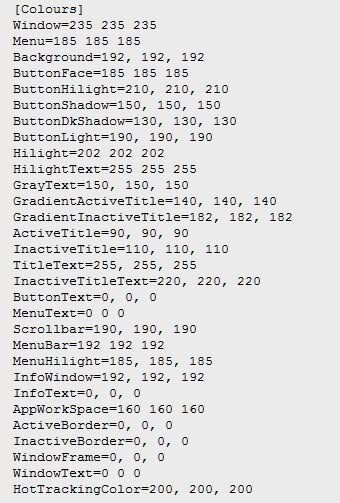
I still haven't found some colours though, like the blue text in explorer under 'favourite links'
Reply #7 Monday, March 3, 2008 4:39 AM
The colours can be changed from change skin colours top level item. Open that up and then change the drop down box from "Show me the skin colour presets" to "Show me the skin defined system colours"
Support for the blue text under favorite links is coming soon.
Are you just setting the angle to 90 degrees?
Reply #8 Monday, March 3, 2008 4:52 AM
Reply #9 Monday, March 3, 2008 4:57 AM
I will be glad to see the back of that blue text, it drives me nuts to see the wrong colour in the wrong place. While we are on the subject of text, is there plans to change the colour of the text on IE tabs? Having this as plain black text is messing up my skin
Reply #10 Monday, March 3, 2008 5:48 AM
When 6 came out I jumped straight in hoping I could finally make a per pixel skin, but I found it twice as hard as SKS5 to use.
As a side note to the general skinning of WindowBlinds, the biggest step forward for me would be some kind of documentation that tells you the optimum size for EVERY image that you have to make, especially when it comes to the actual window frames and button sizes.
For instance, how wide should the titlebar image be to make sure that it stays useable at any size? and should the start button, taskbar buttons and the systray images all be the same size for the best results?
I accept that I'm not the most technical person in the world, but I'm sure many others who would like to make a WB aren't either. I guess it comes down to a lack of good, in-depth tutorials and walk throughs for Skinstudio.
This isn't a blast at Stardock or the developers, those guys know that I love them and couldn't live without the software they produce, it's just the honest opinion of a hobbyist skinner who likes to make pretty pictures yet struggles with the technical stuff.
Have Fun!!

Reply #11 Monday, March 3, 2008 5:56 AM

yes, i am not very happy with sk6, i dont want to sound ungreatful, but it is very hard to navigate around....and like i said before, if it didnt have a tree node, id really be lost in the dark and wouldnt know what to do.........
Reply #12 Monday, March 3, 2008 5:58 AM
Reply #13 Monday, March 3, 2008 6:14 AM
You see? it's not my understanding of how things work, it's things that the program does for no reason that I don't understand, and it all becomes very tedious after a while.
Thanks again for the offer though.

Reply #14 Monday, March 3, 2008 8:02 AM
Reply #16 Monday, March 3, 2008 8:16 AM
Start Menu shadow and Fonts for Classic Widgets.

Reply #17 Monday, March 3, 2008 8:41 AM
Also on import the checkbox for "re import if disk copy changes" is by default checked, so one has to remember to uncheck that every time

Feel free to correct me if I'm wrong about these things

Reply #18 Monday, March 3, 2008 9:12 AM
Still using 6 just have to find somethings in 5 and edit uis.

Reply #19 Monday, March 3, 2008 9:53 AM

Reply #20 Monday, March 3, 2008 12:00 PM
Please login to comment and/or vote for this skin.
Welcome Guest! Please take the time to register with us.
There are many great features available to you once you register, including:
- Richer content, access to many features that are disabled for guests like commenting on the forums and downloading skins.
- Access to a great community, with a massive database of many, many areas of interest.
- Access to contests & subscription offers like exclusive emails.
- It's simple, and FREE!
|
|
Page 1 of 3 | |
|
|---|
Reply #1 Monday, March 3, 2008 12:26 AM
it is a dive in the deep end.......but after doggy paddling for a bit, the water warms up and you get used to it............