







































How Do I pin "User" folder to Objectdock?
Friday, January 25, 2008 by Ton62 | Discussion: ObjectDock
How do I pin "User" folder to Objectdock? Not just pinning "My Documents" folder but my "User" folder. I noticed there is an "Argument" and "Link" area where you enter the information to link/pin the folder to Objectdock.
AmberView
Reply #2 Wednesday, February 6, 2008 2:35 PM

Reply #2 Wednesday, February 6, 2008 2:35 PM
That worked for the "My Docs" folder, but how do you make the other folders work?
I have various photo folders that I use constantly at work, and it would be nice to be able to open the exact folder I need, rather than digging for it through My Docs..
I have various photo folders that I use constantly at work, and it would be nice to be able to open the exact folder I need, rather than digging for it through My Docs..
ZubaZ
Reply #3 Wednesday, February 6, 2008 2:39 PM

Reply #3 Wednesday, February 6, 2008 2:39 PM
Any folder you drag to the dock should drop there and open when clicked.
For real fun you can create flyout folders by right-clicking, choose Add Entry, New Custom Flyout menu and then browse to your folder.
For super-duper coolness, check out the Stacks docklet. (http://www.osx-e.com/downloads/docks/stacks_docklet.html)
For real fun you can create flyout folders by right-clicking, choose Add Entry, New Custom Flyout menu and then browse to your folder.
For super-duper coolness, check out the Stacks docklet. (http://www.osx-e.com/downloads/docks/stacks_docklet.html)
AmberView
Reply #4 Wednesday, February 6, 2008 2:58 PM
Reply #4 Wednesday, February 6, 2008 2:58 PM
Thanks Zubaz,
I understand that they should, but for me, they're not. I can open the folder after dropping it onto the dock by holding a left click on the icon for a few seconds, then by getting a drop down of the folder contents, and choosing the folder. I cannot, however, just open it by clickiing on the icon that was dragged and dropped there.
I understand that they should, but for me, they're not. I can open the folder after dropping it onto the dock by holding a left click on the icon for a few seconds, then by getting a drop down of the folder contents, and choosing the folder. I cannot, however, just open it by clickiing on the icon that was dragged and dropped there.
ZubaZ
Reply #5 Wednesday, February 6, 2008 3:07 PM
Reply #5 Wednesday, February 6, 2008 3:07 PM
Right click on the folder adn choose properties. Take a screenshot and post it to imageshack or somewhere and then post it here please.
Free or Plus? What version?
Free or Plus? What version?
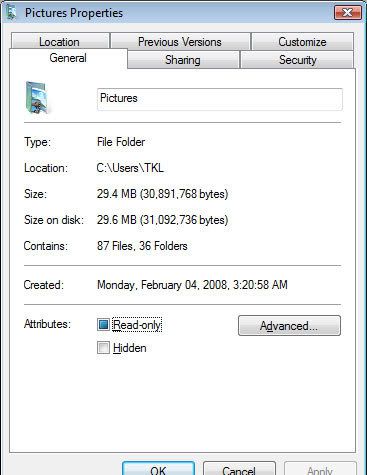
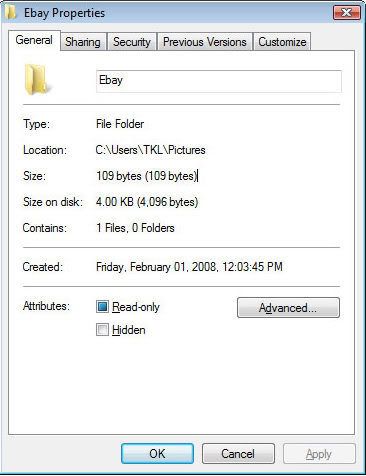

AmberView
Reply #8 Wednesday, February 6, 2008 6:00 PM
Reply #8 Wednesday, February 6, 2008 6:00 PM
I'm new to this, so please bear with me.
Ok, here's the correct property files for a couple folders that I'm trying to use.
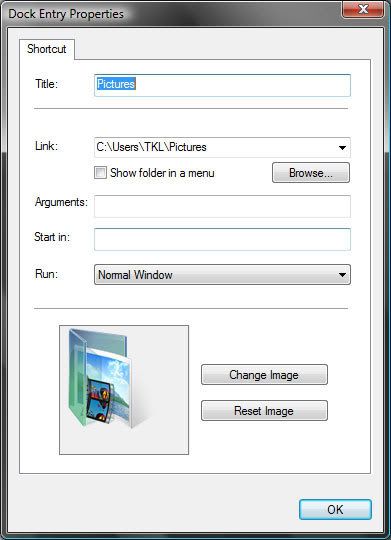
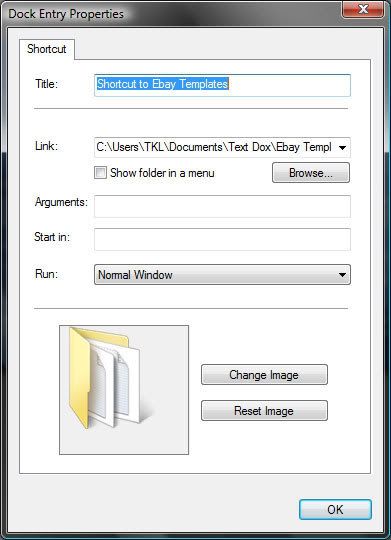
Ok, here's the correct property files for a couple folders that I'm trying to use.
ZubaZ
Reply #9 Wednesday, February 6, 2008 6:10 PM
Reply #9 Wednesday, February 6, 2008 6:10 PM
Perfect.
Unfortunately . . they are perfect too.
Do me a favor and select the show as menu and try to open them again.
Unfortunately . . they are perfect too.
Do me a favor and select the show as menu and try to open them again.
AmberView
Reply #10 Wednesday, February 6, 2008 6:16 PM
Reply #10 Wednesday, February 6, 2008 6:16 PM
Ok.. Tried that, and the menu pops just as it's supposed to. I then un-selected the show menu, and still no dice.
ZubaZ
Reply #11 Wednesday, February 6, 2008 6:18 PM
Reply #11 Wednesday, February 6, 2008 6:18 PM
Very, very funky
Are you runnign any vurus/spyware/etc? Can you disable it whilst we test?
Are you runnign any vurus/spyware/etc? Can you disable it whilst we test?
AmberView
Reply #13 Wednesday, February 6, 2008 6:31 PM
Reply #13 Wednesday, February 6, 2008 6:31 PM
side note...
Before I found OD, I was playing around with replacing my folder icons. All the folders have been reset to default within windows, and work fine outside of OD.. Potential source of the problem there?
Before I found OD, I was playing around with replacing my folder icons. All the folders have been reset to default within windows, and work fine outside of OD.. Potential source of the problem there?
Please login to comment and/or vote for this skin.
Welcome Guest! Please take the time to register with us.
There are many great features available to you once you register, including:
- Richer content, access to many features that are disabled for guests like commenting on the forums and downloading skins.
- Access to a great community, with a massive database of many, many areas of interest.
- Access to contests & subscription offers like exclusive emails.
- It's simple, and FREE!
Reply #1 Friday, January 25, 2008 2:53 PM
Worked a charm
In XP I went to Documents and Settings and then to dragged my user name to the dock.