










































Vista Explorer Parts
Wednesday, January 2, 2008 by vogliadicane | Discussion: SkinStudio
it´s me again, 
there are a few parts of Vista explorer for which I can´t find where to manage them in SkinStudio:
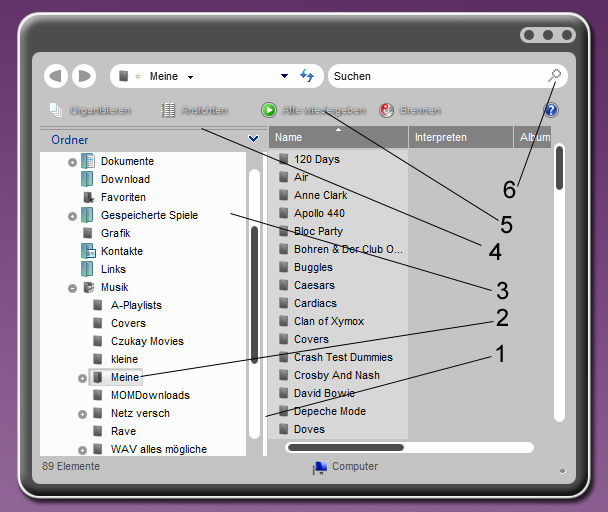
1: This resizing bar. In most (or all) skins it has the rgb color 252/252/252. Is this system defined or manageable by SkinStudio (no image in the WB folder fits)?
2: this item for over appeared after I upgraded Skinstudio and WB yesterday. Don´t find the corresponding thing in skinstudio to change it
3: the bitmap or color that defines this background
4: This ugly double line looks definitely like ugly Vista defined, right?
5: where is this font defined (in my skin I changed every font to no-shadow, so I guess it is some system font). Btw it was unchainched, after I changed the system fonts within the .uis, maybe someone knows the correct name for it...
6: the correct sizing of this icon. I made a 16x16 and a 32x32 but it is somehow resized and looks ugly (as you can see)
thanks for help in advance!

there are a few parts of Vista explorer for which I can´t find where to manage them in SkinStudio:
1: This resizing bar. In most (or all) skins it has the rgb color 252/252/252. Is this system defined or manageable by SkinStudio (no image in the WB folder fits)?
2: this item for over appeared after I upgraded Skinstudio and WB yesterday. Don´t find the corresponding thing in skinstudio to change it
3: the bitmap or color that defines this background
4: This ugly double line looks definitely like ugly Vista defined, right?
5: where is this font defined (in my skin I changed every font to no-shadow, so I guess it is some system font). Btw it was unchainched, after I changed the system fonts within the .uis, maybe someone knows the correct name for it...
6: the correct sizing of this icon. I made a 16x16 and a 32x32 but it is somehow resized and looks ugly (as you can see)
thanks for help in advance!
vogliadicane
Reply #2 Friday, January 11, 2008 8:35 AM

Reply #2 Friday, January 11, 2008 8:35 AM
depite the fact that I´m the only one who replies to my post in this thread I just for someone who reads it wanted to mention that I could fix problem 4 and 6.
so the other problems still remained- feel free to reply if you got an idea
so the other problems still remained- feel free to reply if you got an idea

AxHead
Reply #3 Tuesday, January 22, 2008 1:21 AM
Reply #3 Tuesday, January 22, 2008 1:21 AM
I too am interested in the answers very much. Glad to read you figured out 4 and 6.
DemonTekDigital
Reply #4 Tuesday, March 18, 2008 7:26 PM

Reply #4 Tuesday, March 18, 2008 7:26 PM
hmmmm, I can't seem to find the resizing bar either. as far as the hover (#2) it's in Edit Vista Explorer parts> List View> Selection Image. #3 is found in the same section and is labeled Favorite Links Backgrounds. The problem though, is the dialog for Folders will not be skinned using that. That would most likely be located in the colours section under MDI or Explorer Window colours. The double line you're indicating in #4 looks like a seperator between menubars. Either you might have something disabled, or it's for aesthetics in the skin? *shrugs*
That's about all I know...lol, prolly not much help, sorry
That's about all I know...lol, prolly not much help, sorry
vogliadicane
Reply #5 Thursday, March 20, 2008 1:33 PM
Reply #5 Thursday, March 20, 2008 1:33 PM
thanks for replying , I thought this thread is already dead, so I didn´t post what I found out myself meanwhile.
for #1 you´re right, it can´t be skinned as far as I saw
#2 yes it´s the selection image, the third frame is for left part of explorer. You sometimes have to restart WB or restart vista to get it working
#3 you´re right and the background for folders can´t be changed (at least not at the moment), and no color in SkS acts on color of that background
#4 this double line is controlled by color "Button Hilight". To my experience it´s better to edit it in the .uis file
#5 didn´t find how to control that shadow. Think it´s not possible. The color of the font is controlled by "Window Background Color" the shadow can´t be edited, maybe in the final version of SkS 6?
#6 was my fault it´s like any other icon
, I thought this thread is already dead, so I didn´t post what I found out myself meanwhile.for #1 you´re right, it can´t be skinned as far as I saw
#2 yes it´s the selection image, the third frame is for left part of explorer. You sometimes have to restart WB or restart vista to get it working
#3 you´re right and the background for folders can´t be changed (at least not at the moment), and no color in SkS acts on color of that background
#4 this double line is controlled by color "Button Hilight". To my experience it´s better to edit it in the .uis file
#5 didn´t find how to control that shadow. Think it´s not possible. The color of the font is controlled by "Window Background Color" the shadow can´t be edited, maybe in the final version of SkS 6?
#6 was my fault it´s like any other icon
DemonTekDigital
Reply #6 Saturday, March 22, 2008 11:37 PM
Reply #6 Saturday, March 22, 2008 11:37 PM
nice, well at least I figured it out...lol. #4 I didn't even think of checking out in the colors section though. Good find on that. Shadows tend to be rather tricky, especially if it's a windows placed shadow. Closest you can come to really editing it is to remove it completely usually. I haven't really seriously gotten into SKS 6 though either, mainly just adapted some of my personal skins, and a few author skins for Vista. Seems like there's a bit of a give and take between XP and Vista skinning too. I am, however, glad that the shutdown dialogs aren't in Vista. I'll figure it all out once I get some inspiration to actually skin something though...lol.
MKANET
Reply #8 Monday, May 26, 2008 6:08 AM

Reply #8 Monday, May 26, 2008 6:08 AM
3 is not possible. I just found that out a few weeks ago. There are some colors that simply cant be changed.
anybody an idea for number 3?
Vampothika
Reply #9 Monday, May 26, 2008 6:25 AM
Reply #9 Monday, May 26, 2008 6:25 AM
6. search icons use the LUNA default size and you cant go wrong.
5. default vista font....cant change it.
4. never seen that before....
3. cant be changed...that is the default LUNA skin colour.
2. most probably menu_item_2
1. is the same background as 3, yr scrollbar colour has just cut them off from each other
5. default vista font....cant change it.
4. never seen that before....
3. cant be changed...that is the default LUNA skin colour.
2. most probably menu_item_2
1. is the same background as 3, yr scrollbar colour has just cut them off from each other
SKoriginals
Reply #10 Monday, May 26, 2008 10:54 AM

Reply #10 Monday, May 26, 2008 10:54 AM
1. Default color, can not change that
2. In the 'Tree View*' it is Explorer and IE (#2) > List View > Selected Image
3. Default color, can not change that (as kitty said... just part of the same background)
4. Default, can not change that (its actually a space between the Folder Bar and Favorite links, playing with the 'top' of the folder bar image may change it - untested)
5. Font shares the color of the default Windows background color, go to Change Skin colours > Show me the skin defined system colours > Window Background. The Text Effect (that outter glow) is default and canot be changed.
6. In the 'Tree View*' it is Explorer and IE (#3) > Internet Explorer Icons > Small Icons & Large Icons (find a skin like 'Aero Executive (Vista)' that has these as an example)
*The 'Tree View' is an option in Tools > Preferences > Advanced > 'Show tree in Edit Window' checkbox
2. In the 'Tree View*' it is Explorer and IE (#2) > List View > Selected Image
3. Default color, can not change that (as kitty said... just part of the same background)
4. Default, can not change that (its actually a space between the Folder Bar and Favorite links, playing with the 'top' of the folder bar image may change it - untested)
5. Font shares the color of the default Windows background color, go to Change Skin colours > Show me the skin defined system colours > Window Background. The Text Effect (that outter glow) is default and canot be changed.
6. In the 'Tree View*' it is Explorer and IE (#3) > Internet Explorer Icons > Small Icons & Large Icons (find a skin like 'Aero Executive (Vista)' that has these as an example)
*The 'Tree View' is an option in Tools > Preferences > Advanced > 'Show tree in Edit Window' checkbox
vogliadicane
Reply #11 Wednesday, May 28, 2008 11:30 AM
Reply #11 Wednesday, May 28, 2008 11:30 AM
well 4. is actually the color "Button Hilight" (see above)
too bad, that #3/1 can´t be changed yet (
too bad, that #3/1 can´t be changed yet (

Please login to comment and/or vote for this skin.
Welcome Guest! Please take the time to register with us.
There are many great features available to you once you register, including:
- Richer content, access to many features that are disabled for guests like commenting on the forums and downloading skins.
- Access to a great community, with a massive database of many, many areas of interest.
- Access to contests & subscription offers like exclusive emails.
- It's simple, and FREE!
Reply #1 Friday, January 4, 2008 10:03 AM